Wine Staging 11.18 Ships Two New Patches for Service and Video Support
Wine Staging 11.18 went live on September 18, 2026, with two new experimental patches that quietly patch up two of the more fiddly corners of the Wine compatibility layer. If you've been running Windows games or apps on Linux, this release is the kind of thing you won't notice until it fixes something that was actually broken.
The release was tagged by Alistair Leslie-Hughes, the project's lead maintainer, and it's a modest bump in an otherwise busy month of upstream churn. No fanfare. Just a rebase against the latest Wine development branch plus two patches, one of which should matter to actual users and one of which won't.
What's new
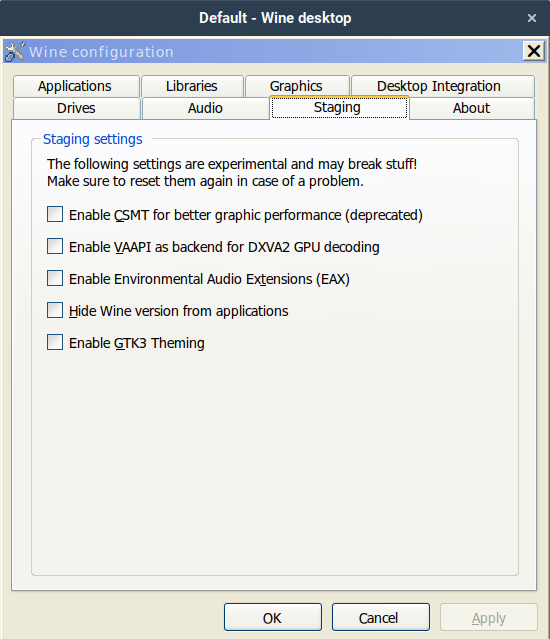
Wine Staging is the experimental testing area of Wine. It collects fixes and features that haven't made it into Wine's main development branch yet, giving them a faster path to your machine while letting maintainers wrangle patches before they're candidate for upstream. Everything here is volunteer-run.
This version adds exactly two new patchsets and bumps one existing one. Both new patches were written by Leslie-Hughes himself. He has been doing most of the recent staging work on his own, including the vkd3d and win32 patches, so it's no surprise he's the sole author of the new stuff.
The service architecture check
The first new patch, service_check_arch, deals with a bug where a 32-bit installer can accidentally create a 64-bit service. When that happens, Wine records the wrong WOW64 flag in the service's registry entry, and the service ends up launching with the wrong binary architecture. It frequently just fails to start.
Keep in mind that this bug is masked with a win32 prefix, since the flag simply isn't set and the 32-bit DLL gets used. So most people never even see it. It only bites when you're running 64-bit services on a 64-bit prefix.
The fix introduces a get_binary_type() helper that reads the PE header of a service's executable and maps the machine type to a code size. A 32-bit binary stays a 32-bit binary. A 64-bit AMD64 or ARM64 binary stops getting mislabeled. It's a straightforward correctness fix, and it touches just 83 lines in programs/services/rpc.c.
That said, it's an edge case worth fixing, but it's the kind of thing that affects maybe a handful of service-based apps. You probably have one.
The video playback fix
The second patch is the one you're more likely to actually care about. quartz-vy12_to_rgb makes the DirectShow Video Mixing Renderer 9 filter handle YV12 video frames correctly.
Here's the setup: the VMR-9 filter in quartz.dll was mishandling video frames stored in the planar YV12 YUV 4:2:0 format when the render target wanted raw RGB. That path is used by a fair number of media players and some games under Wine. Broken or degraded playback is the likely symptom, which is meaningfully more visible than the service bug.
The patch adds a convert_yv12_to_rgb() routine that does the YUV to RGB conversion in software, applying the standard ITU-R 4:2:0 coefficients and clamping to the normal byte range. RGB destinations now trigger the conversion, planar YV12 copies still work as before, and anything else logs an unsupported error. It fixes WineHQ bug report #59846.
One amusing detail worth flagging. The patch is titled "VY12," but the implementation operates on the YV12 fourcc. Just a transposition that's surprisingly common in the Windows media world, so don't let it trip you up.
The bigger picture
There's also an update to the vkd3d-latest patchset. VKD3D implements Direct3D 11 on top of Vulkan, which makes it essential for running a large chunk of DirectX 11 games on Linux and macOS. Keeping it current is what maintains GPU compatibility and performance, so that update is doing real work under the hood even though you won't see it directly.
Beyond those three changes, 11.18 ships the usual suite of roughly 90 experimental patchsets. We're talking graphics (wined3d variants, d2d1 geometry), audio (dsound-EAX), media (windowscodecs TIFF support and a GIF encoder), networking, and the usual Win32 subsystem improvements. The 11.18 release is primarily a maintenance rebase that refreshes the base against recent Wine development snapshots on top of that existing collection.
Not cheap to maintain, that many moving parts. And that's exactly why the volunteer model matters here.
Getting it
Ready-made packages exist for most Linux distros and for macOS. Installation guidance lives at the WineHQ Wiki download page. On most distros the wine-staging package drops into /opt/wine-staging, so you'd invoke the binary as /opt/wine-staging/bin/wine.
If you'd rather build from source, the patches apply on top of the Wine development branch using the staging/patchinstall.py utility:
./staging/patchinstall.py DESTDIR="/path/to/wine" --all
The v11.18 sources, including both new patches, are tagged at the wine-staging GitHub releases page.
The project runs entirely on volunteers, and the maintainers accept donations via Patreon to help cover the cost of testing on real hardware. That's the honest version of how these releases keep coming out, so it's worth knowing where the actual work is coming from.


