Simple Taskbar V71 ships with a redesigned settings panel
The latest GNOME extension update swaps a form-heavy preferences screen for visual "settings hubs," adding a Spanish translation and a batch of bug fixes.
Simple Taskbar shipped version 71 today. And it's deliberately not another pile of features.
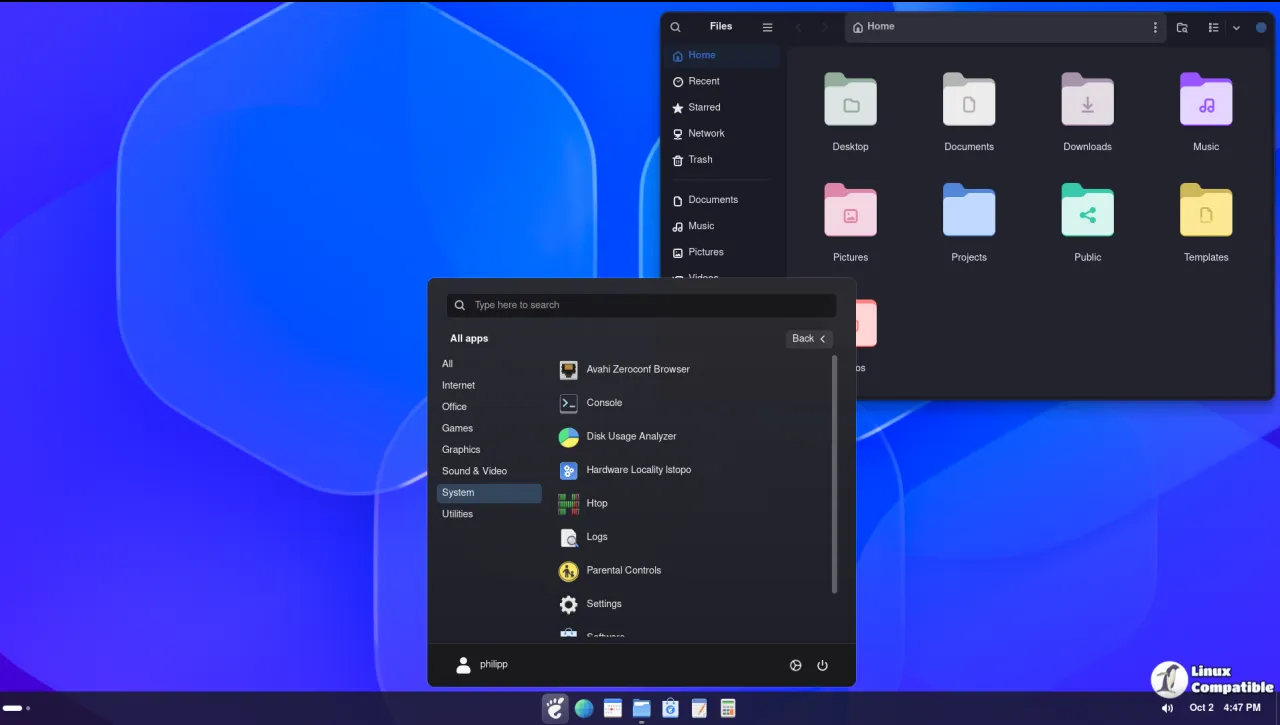
GNOME has always taken its own road when it comes to the desktop. Since its early releases, GNOME Shell deliberately downplayed the strip of running-application buttons that Windows and KDE users expect, favoring an "Activities" overview and a thin top panel instead. For a lot of migrants, that missing taskbar is the one thing that makes them turn back.
A whole ecosystem grew up to patch the gap. Dash to Panel and Dash to Dock are the big names, but they ask you to dig through mountains of settings before they look right. Simple Taskbar, from developer Sultech, makes a different pitch: a familiar taskbar nearly out of the box, keeping GNOME's clock, calendar, and Quick Settings intact.
It's a lighter alternative. In a sense it borrows from both competitors by pulling app launching and window management right into the panel.
Keep in mind that this isn't a slow-burning project. Simple Taskbar's GitHub repo was created on July 19, 2026. Version 71 lands roughly three months later, at a clip of one or two releases a week at peak. That velocity usually means one dedicated maintainer plus a few people sending pull requests. For what it's worth, one of those is microsoftruinseverything456, who has pushed click-through from open menus and auto-hide tweaks.
Preferences, redesigned
Version 71, called "Preferences Redesign," is primarily a rework of the settings screen. Sultech rebuilt it into what it calls "settings hubs," with cards for picking a panel mode and sliders for the numbers. It moves toward something more visual and less like a form you have to fill out.
Three things landed alongside it. There's a new "Cancel Show Desktop when a window is restored" option that keeps hidden windows available for bringing back. A Spanish translation joined the localization effort. And a few behavioral tweaks, most of them defensive.
Those tweaks are the unglamorous part, but they matter. Window previews are now capped at 2000 ms, with application labels given a 30px minimum width so they don't sprawl or render sloppily. Importing a profile now clamps out-of-range values back to defaults, so a corrupt or incompatible settings file is far less likely to wreck your setup.
There were real bugs to kill too. The preferences window used to crash on profile import. Sliders would overwrite settings restored by a panel-mode switch while you had the prefs open, which is a silent data-loss trap. Icons shrank when panel thickness tracked icon size, and the Start button sat on a dead zone where its padding went unclickable. All of that is fixed now.
Simple Taskbar itself offers more than a taskbar, and V71 leaves that core untouched. You can switch between five modes, each remembering its own settings: a Taskbar layout that merges pinned apps and open windows, a separate Dock mode (vertical panels supported), Windows XP and Windows 10 themes, and a fallback that just restores GNOME's native panel. Icon tricks range from macOS-style magnification to a "Magic Lamp" minimize effect. There's even an optional Windows 11-inspired Start Menu.
That's a lot to cram into one panel, and it's arguably why the settings side needed tidying. The extension had been adding features at a fair clip, so the configuration surface grew unwieldy. V71 looks like the developer finally turning around to straighten it out.
The bigger picture
Linuxiac ran a feature on the extension a day after it launched, with editor Bobby Borisov noting that it threads application buttons in alongside GNOME's core panel rather than replacing them. The takeaway was a more traditional layout that stays recognizably GNOME underneath. That's a fair read, and it's the positioning that has stuck.
On Reddit's r/gnome, users describe it as a clean taskbar out of the box, though the usual caveats about a fresh extension apply. The GitHub issue tracker shows the feature wishlist leaning hard toward deeper Windows and macOS-style niceties: per-app volume boost above 100%, a Pantheon-style layout, a macOS "Stack Fan View," and keeping the dock hidden in the Overview.
The point being that the audience wants heavy customization without abandoning GNOME's engine.
The whole thing sits in the middle of a real tension in the Linux desktop. GNOME loves guided, consistent defaults. Users often just want a familiar, tweakable shell. Simple Taskbar lets you keep Quick Settings, notifications, multi-monitor handling and accessibility while dressing the top in something more conventional.
V71's switch to visual settings hubs, layered on top of the profile-corruption fixes, reads like Sultech maturing the extension for a broader, less technical crowd. That crowd is exactly who Linuxiac flagged as the target. Not bad for a third release in a single day.
If you want to try it, Simple Taskbar lives on the GNOME Extensions platform under ID 10448, and it also installs through Extension Manager or straight from source using a package.sh script. It covers GNOME Shell 48 through 51, so older installs are covered too. It's GPL-2.0, and the developer runs a Buy Me a Coffee page if you feel like tipping.
Head here to install it on GNOME Extensions, or here for the GitHub repo if you'd rather read the code yourself.


