Kdenlive 26.08.0 lands with a heavy focus on stability and a surprising number of timeline upgrades
Kdenlive 26.08.0 is here, and it's doing exactly what you'd expect from a summer release that calls itself "stability-first." The KDE multimedia team has landed 11 crash fixes, tightened the QML engine, and forced several hundred linter warnings into submission. But it hasn't forgotten the people actually holding the mouse. The timeline just got a lot friendlier, new contributors are doing the heavy lifting, and if you've ever wanted to reorder tracks without a five-click workaround, you're in luck.
The big news in 26.08.0 is that Kdenlive is closing the gap on basic NLE ergonomics. Vineet Tiwari and Yash Bavadiya have driven most of the changes, and they're the kind of improvements that shouldn't be controversial but absolutely should have been here years ago.
Drag-and-drop track reordering is now supported. Audio and video tracks stay paired while you move them. Additive soloing via Shift+click lands in the audio mixer, which means you can actually isolate multiple tracks at once instead of fighting a one-track-at-a-time solo model. Copying a selection to a new sequence preserves the source cuts, which is a small but meaningful workflow shift for derivative edits.
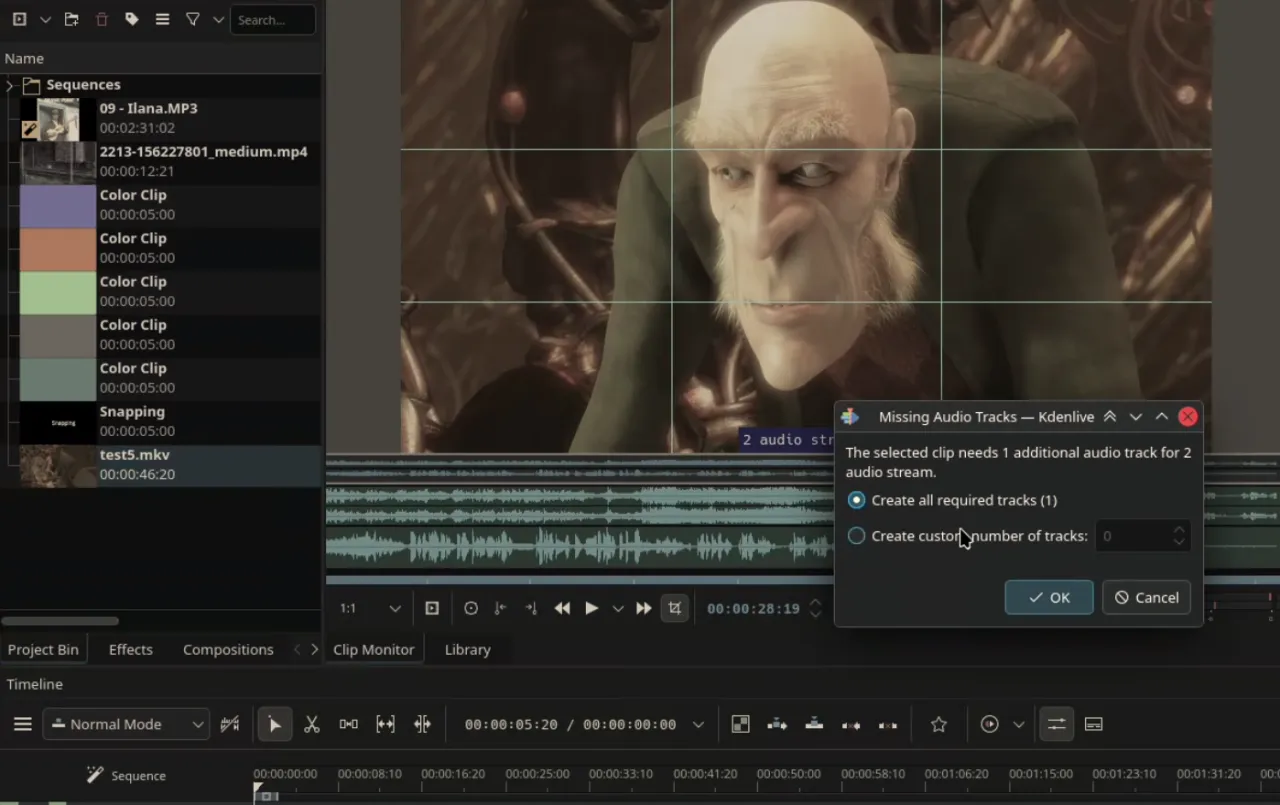
New users will appreciate that Kdenlive now auto-creates audio tracks when you drop a clip that has more stems than your timeline can handle. No more manual track creation before you can even start editing. If you're chasing that Resolve or Premiere Pro feel, the gap just got a little smaller.
Markers at gaps, playhead snapping when dragging the time cursor, and a new zoom toggle that centers on your mouse instead of the playhead are all present. The clip color configuration lets you customize how video, audio, titles, and images look on the timeline. And multi-clip speed changes now use full double precision, so you won't fight rounding artifacts when you tweak timing later.
Titler, effects, and the quiet upgrades
The titler gets snapping, configurable rounded corners on rectangles, and copy/paste for elements. Automatic clip replacement means editing a title no longer creates a duplicate; the timeline instance updates in place.
On the effects side, math expressions are now supported in effect parameters via QJSEngine. It's a small step toward procedural, formula-driven grading. The Transform effect now has an adjustable rotation anchor, and rectangular alpha masks are finally animatable. The default transition has switched from dissolve to luma after an upstream transparency bug in MLT was resolved. Not a flashy change, but one that will save headaches for anyone doing transparency-heavy work.
WebP image sequences are supported now, as are 1366x768 project profiles. Multi-cam editing can use embedded timecode metadata to align clips. Rendered output can be added back to the project bin instead of just saving to disk. Speech recognition completions now trigger a notification. Default transitions, file associations, and a return-playhead-to-start option round out the workflow tweaks.
Under the hood: hardening the foundation
This release is also doing the unglamorous work of keeping the lights on. The QML loader has been refactored for clips and compositions, with unified QQmlEngine usage across monitors and timelines. qmllint is now integrated into the CMake build with strict error rules, and dozens of QML type coercion and layout warnings have been fixed.
Minimum versions for Qt, KDE Frameworks, and MLT have been bumped. MLT now requires 7.38.0. LV2 and Libplacebo are disabled in this build due to compatibility issues, though that may shift in future cycles. A Windows MSVC build is now part of the CI pipeline, which is a long-overdue addition for binary testing on that platform.
The team also introduced document patch versioning, which allows backward-compatible fixes without forcing users to re-save projects. Security hardening includes better detection of malicious parameters in effects and a render preset loading fix that was previously tripling the dialog open cost.
New faces, familiar trends
The release notes explicitly celebrate first-time and infrequent contributors. It's becoming a 2026 tradition. Vineet Tiwari handled auto track creation, track reordering, copy-to-sequence, and multi-clip speed changes. Yash Bavadiya worked on gap markers, playhead snapping, and CLI file association. chocolateimage brought snapping, rounded corners, and element copy/paste to the titler. Patrick Williamson added additive soloing. Eduardo Guedes fixed the automatic clip replacement bug. Jaimukund Bhan tackled multi-cam timecode insertion and the render-to-bin workflow. Bernd Jordan extended font properties and added the frei0r color enhance effect. Jean Baptiste Mardelle, the core developer, handled rotation anchors, animatable masks, math expressions, and the QML modernization.
It's a solid distribution of work. The barrier to entry is clearly low enough that newcomers can ship meaningful features, and high enough that the code quality stays consistent.
What this means for you
If you're editing in Kdenlive, this is the release to grab. The timeline improvements hit the exact friction points that have existed since the early versions. The stability work should make future feature releases less likely to break your project mid-export. And the QML hardening means the app will feel a little more consistent under the hood.
The lack of upgradability is still a fair criticism of the codebase structure, but the new document patch versioning is a step toward reducing the save-and-reopen pain.
Head here for the full release announcement.


