GIMP 3.4 Preview: New file format and PSD overhaul head up the next major GIMP release
The GIMP team shares progress on a "zipped XML" format to replace XCF, non-destructive editing expansion, and a massive jump in Photoshop compatibility ahead of the next snapshot.
The GIMP development team has published its latest progress report for GIMP 3.4, and the headline isn't a single feature. It's the death of XCF as we know it. After nearly three decades as the native format, GIMP is moving to a "zipped XML" structure, alongside a massive overhaul to PSD support and significant expansions to non-destructive editing.
As of right now, GIMP 3.3.2 is still in the oven. The team is working through a backlog of 3.4 roadmap items before dropping the next development snapshot. If you can't wait, stable users should keep an eye out for GIMP 3.2.6, which is landing in the coming weeks with bug fixes and no new features.
A New Project Format After 30 Years
The switch to a zipped XML structure is the biggest long-term win here. XCF has accumulated limitations since 1997, especially around large projects. The new format enables faster saves by updating only the changed parts instead of rewriting the whole file. Auto-save, which was impractical with the binary format, finally becomes viable. Plus, it sets the stage for multi-page and animation workflows planned for GIMP 3.6.
The team notes that XCF files will remain loadable indefinitely. They even pointed out that a XCF logo file created in 1998 renders identically today, a strong sign of the old format's stability. However, at the same time, XCF won't be the target for new features. Keep in mind that new capabilities will only be added to the new project format once it is finalized.
PSD Support Gets Major Injection
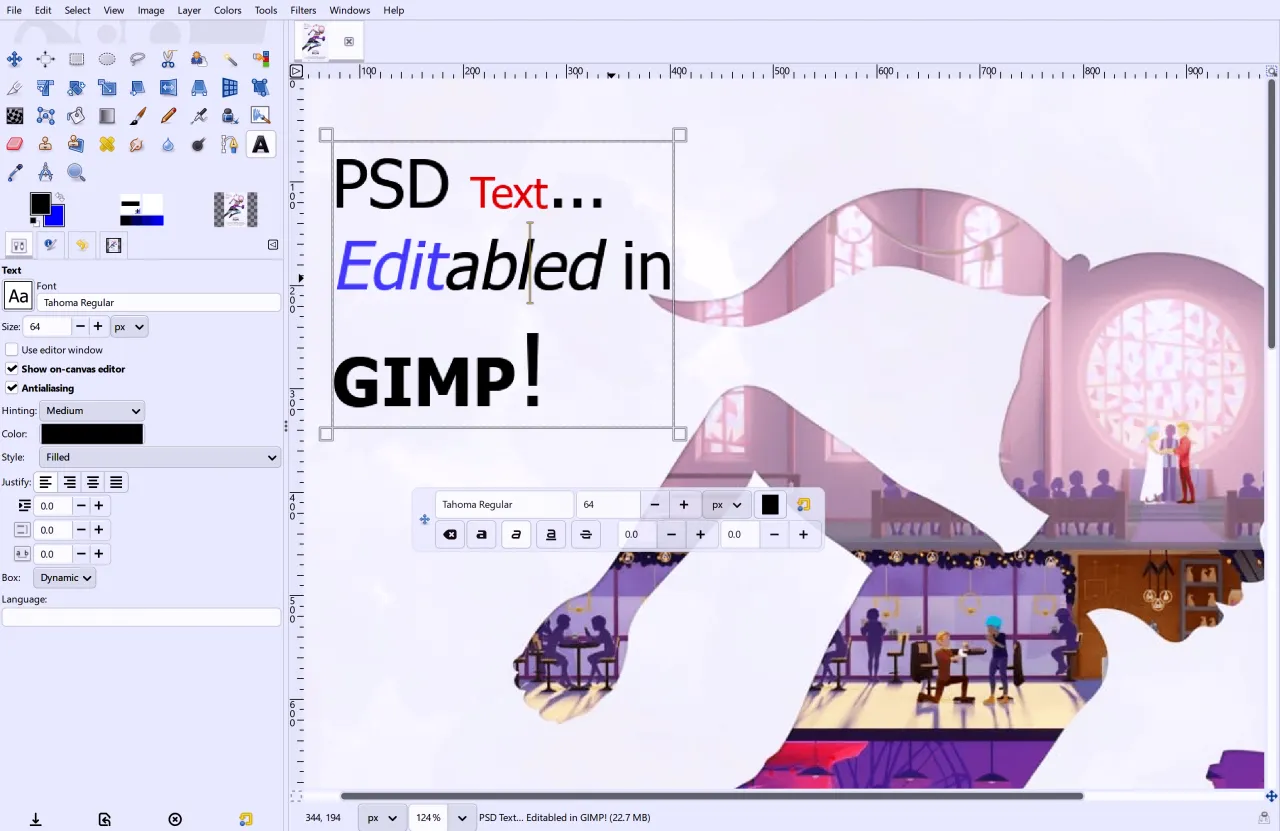
Photoshop compatibility is getting serious work. Multiple contributors have been tackling PSD parsing. Jacob Boerema implemented support for reading PSD Descriptors, the undocumented text format modern Photoshop uses. This unlocks editable text layers on imported PSDs, maps adjustment layers to native GEGL equivalents, and imports solid color shapes as vector layers.
Frank Teklote added metadata export for TIFF and JPEG files, complementing existing imports. So, paths and layer data you create in GIMP can now survive the trip to other formats. The benefit compounds over time as PSD compatibility improvements automatically extend to TIFF and JPEG exports. GSoC students Akascape and Waris Maqbool are continuing the heavy lifting on the import side.
Non-destructive editing continues to mature. Thanks to Alx Sa and designer Reju, layer masks can now have filters applied non-destructively, with a redesigned popover showing both layer and mask active filters side-by-side. The Gradient Tool also goes NDE via an "Editable Gradient" option that slots the gradient into the filter stack. Even filters without dialogs, like Invert, can now be applied on non-raster layers including layer groups, link layers, text layers, and vector layers.
MyPaint users get Spectral Blending, which simulates physical pigment mixing. Mix yellow and blue, you get green, not dark yellow. Cassidie Grogan added the feature alongside a Pigment strength slider. Michael Natterer also fixed blurry brush previews on high-resolution displays; thumbnails are now displayed at full size instead of being capped at 48×48 pixels.
The file open and save dialogs are finally getting ported to GTK3's native option, showing the OS standard browser on Windows, macOS, and KDE. macOS users will see the most visible improvement here, though more complex dialogs are still in progress.
Denis Rangelov redesigned layer lock icons and converted all 78 cursor icons to SVG. woot000 fixed performance issues with the rotated canvas transparency checkerboard. Richard Gitschlag added Shift+Click selection to the on-canvas text editor. And on the practical side, Ondřej Míchal swapped Spin Entry widgets for Spin Scale across many UI areas, which helps significantly on narrow panels.
Other notable changes include the Sharpen filter merging into GEGL, thanks to Waris Maqbool. Dmitriy Ryazantcev improved Windows ICO/CUR/ANI support for 32-bit icons, and Lloyd Konneker fixed a regression in Script-Fu scripts where parameter ranges disappeared. Security patches from Jacob Boerema and Alx Sa addressed multiple reports on image plugins.
So, when can you get GIMP 3.4? The team hasn't given a date, and GIMP 3.3.2 is still waiting on roadmap items to land. If you want to experiment, automatic nightly builds are available from the GIMP download page. For stability, GIMP 3.2.6 is the next stop, arriving in the coming weeks with fixes but no new features.
Head here to the GIMP download page for nightly builds.


