Valve released two coordinated beta updates today for the Steam Frame: SteamOS 0.5.8 and SteamVR 2.19.2, both available on the opt-in Beta channel. The runtime update is primarily corrective, restoring a lowered encoding floor, patching overlay and menu regressions from last week's quality bump, and hardening streaming against resolution changes and brief network hiccups. The OS update brings the headline feature, Room View, which lets remote desktops and mixed-reality VR games display alongside camera passthrough, though it requires opting into the SteamVR beta on your PC. Community response is mixed, with users praising the improved streaming quality while one unverified report warned that the build may be soft-bricking devices like its predecessor did.
Valve ships paired SteamOS and SteamVR betas to fix and extend the Steam Frame's wireless streaming
Valve released SteamOS 0.5.8 and SteamVR 2.19.2 side by side today, with the OS update adding Room View for PC streaming and the runtime update tidying up the rough edges left by last week's quality bump.
Valve shipped two beta updates today for the Steam Frame, and the pairing is no accident. The headset is, above all, a wireless streaming box that runs a PC game under your desk and beams the picture back to your face. Make that handshake work, and everything else follows. Break it, and you break the whole pitch. That is why Valve tends to ship the OS inside the headset and the streaming runtime on the PC at the same time. Today's pair follows the same logic.
The first update is a SteamOS 0.5.8 Beta for the Frame. The second is a SteamVR 2.19.2 Beta that tunes the PC side. Both ride the same opt-in Beta channel, and together they're really one effort aimed at one device.
Keep in mind that the Frame is a streaming-first headset, not a standalone console. Announced in November 2025 and delayed by component shortages, it launched September 14 with a Snapdragon 8 Gen 3, 16 GB of LPDDR5X RAM, and dual 2160 by 2160 LCD panels. It ships with two Frame Controllers, a Wi-Fi 6E adapter, and a copy of Half-Life: Alyx. It runs in two price points: $1,059 for the 256 GB kit, $1,299 for 1 TB. Not cheap. Both builds ship without a power supply, so count on a separate $29 45W USB-C charger.
The reviews came back mixed. Cable-free PC streaming earned genuine praise. One to two hours of battery life drew far more criticism. Grab it if you already play VR on a PC and want to cut the tether. Think twice if you're after a fully self-contained console.
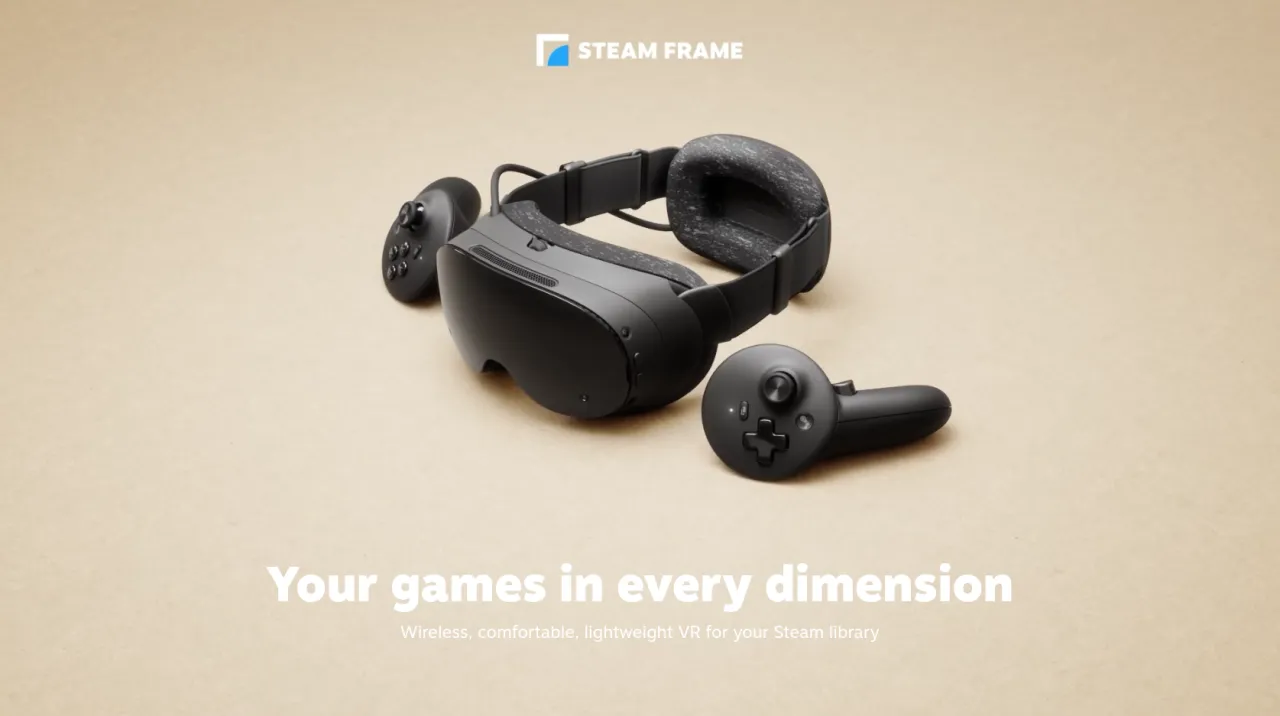
Fixing 2.19.1 and adding Room View
The previous major beta shipped November 2. SteamVR 2.19.1 was the headline quality update, lifting the recommended render scale to roughly 1.5 and targeting about 1.4 times panel resolution. It dropped an intermediate texture and an extra resampling step, bumped the Frame's encoded video size from 1152 to 1216, and sharpened text and color across all compatible headsets.
Big changes like that always bring regressions, which is exactly what 2.19.2 exists to fix.
It restores an encoding floor that had fallen out of the 2.19 line. You can again push encoding resolution down to 512, which matters on low-bandwidth networks. It patches the overlay and game-menu regressions from last week's quality bump, fixes an occasional crash when the streaming resolution changes, and smooths over the transient artifacts that came with it.
On top of that, the build hardens streaming against brief network hiccups and repairs a Linux launch problem where the SteamRT3 client ran without the Legacy Steam Runtime installed. There's also a fix for a Quick Access Menu battery tab that reported the right controller twice under some third-party drivers like the PSVR2. That's the "we'll clean up after ourselves" release in a nutshell.
If the runtime update is about fixes, the SteamOS 0.5.8 beta is about a genuinely new capability. Room View for PC streaming is the headline feature here, and it changes how you can actually use the headset.
Previously, turning on camera passthrough would hide remote content. You couldn't watch a desktop or a game theater while simultaneously seeing your real room. Now you can, and the pass-through overlay and remote desktop coexist without one killing the other.
PC VR games with OpenXR mixed-reality support can go further, blending VR content and passthrough at once. Valve points to X-Plane 12 as an example, so you can fly a virtual cockpit with your actual room still visible around the edges.
There is a catch, though. This requires opting into the SteamVR beta branch on your PC: right-click SteamVR in your library, open Properties, switch Game Versions to Beta, and select beta.
The OS update carries other fixes too. Overlay render quality is now pinned to Low on the Frame, with the option hidden away, which clears the crashes people hit when they picked Ultra. Eye-tracking self-calibration got better, some headsets no longer show mismatched low-end gamma between the two eyes, and WebXR in Chrome v157 works again after a permission problem blocked it. Developers gain a new blend mode, XR_ENVIRONMENT_BLEND_MODE_ALPHA_BLEND, for streamed mixed-reality content.
Context, caveats, and how to install
Today's releases aren't happening in a vacuum. The Frame has seen a steady stream of updates since September. SteamOS 0.4.5 in early October fixed a chroma regression, and earlier releases added up to 12% better battery life. The most recent one, 0.5.7 on November 4, quietly removed Advanced Supersampling, and that image-quality feature vanished without explanation. It drew more community grumbling than it probably deserved in isolation.
The through-line is that Valve is iterating fast, roughly every few weeks, and most of it targets the wireless PC VR promise that justifies the price tag. 0.5.8 fits right in.
Community reaction is a mix of enthusiasm and caution, as you'd expect from a beta. Many users say the recent wave has dramatically lifted streamed picture quality, with one r/SteamFrame poster claiming Valve had "insanely improved" the quality.
But there's a warning worth pausing over. A post on the subreddit titled "SteamOS 0.5.8 Beta is soft bricking my device the same way 0.5.7 did" surfaced right after release, suggesting a regression that could leave a device unbootable. Commenters noted a soft brick is often repairable by re-flashing firmware, pointing toward recovery steps involving external storage. This stays an unverified community report rather than a confirmed Valve-wide defect. Still, it's a reminder to weigh whether your daily driver really belongs on an unstable channel before you install.
There's also the version-number quirk. This is SteamOS 0.5.8, not 3.5.x, because the Frame rides its own 0.x track, separate from the 3.x line powering the Steam Deck. Valve skipped straight through 0.5.0 to 0.5.5 without much explanation, which prompted a fair point in the community: at least start a product at 1.0. Maybe it's just Valve being honest.
If you want to try either update, head to Settings => System => System Update Channel on the Frame, pick Beta, and check for updates. To use the new Room View feature, you also need to opt into the SteamVR beta branch on your PC. For advanced toggles like separate mic echo-cancellation controls, you'll want the Steam Client Beta too.
Head here to the change log for SteamOS 0.5.8 Beta, and here to the change log for SteamVR Beta 2.19.2.


