Tiling Shell v18.0 ships with GNOME 51 support and a new release model
The most downloaded GNOME tiling extension now spans GNOME 42 through 51, gains right-click activation, and starts shipping release candidates on GitHub first.
Tiling Shell v18.0 went live today. It now supports GNOME all the way from version 42 up to 51, which alone closes a long-pested-for compatibility gap. But the release also quietly changes how the project ships updates going forward, and for a solo-maintainer project that's arguably the bigger story.
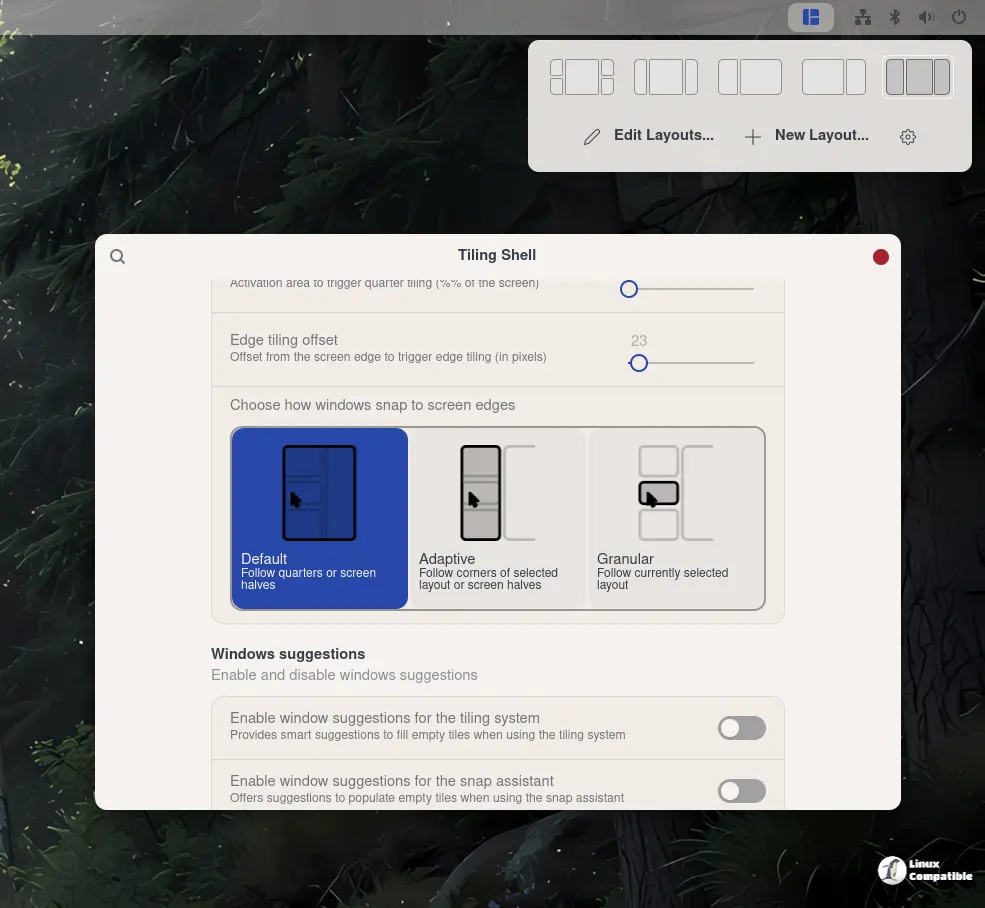
For anyone who hasn't tried it, tiling window management is exactly what it sounds like. Move a window toward a screen edge and GNOME reshuffles the rest to fill the gaps with no overlaps. It's fast once the muscle memory sets in. You stop dragging title bars and start firing off keystrokes.
The problem has always been that GNOME doesn't tile out of the box. You either wrote your own extension or patched your system. Tiling Shell, built by Domenico Ferraro (he goes by domferr online), has spent the last several years lowering that barrier. It's the reference point for GNOME tiling now, with somewhere around 875,000 downloads on extensions.gnome.org.
What's new in the release
The one people asked for most, right-click activation, is finally here. You drag a window, hold the right mouse button, and the layout overlay pops up. Ferraro said the idea came straight from Windows PowerToys, where "people love it," and that pulling it off took some real input-handling work, which contributor egme helped nail down.
Then there's the "untile everything" keybinding, contributed by RemyL. One shortcut sends every tiled window back to a messy pile of free-floating overlaps. It's a relief on the days your workspace has gotten too tidy.
A few things for the multi-monitor crowd. There's a new setting, off by default, that copies a workspace layout across every workspace, plus a "raise windows together" mode that limits the effect to your current display. That last one came from timheide, and you might want it so windows on your second screen don't lurch to the foreground every time you poke at one.
Telling you the truth, the fractional-scaling fix is the one most people won't notice. Since GNOME 49, fractional scaling is on by default on Wayland, but the extension had been assuming it was off. So at 150% scale the menus, the snap assistant, and the tile previews all rendered 1.5x too big. One tester said the menu "did not even fit the screen." Ferraro's fix adds an isFractionalScalingEnabled() helper and patches a handful of tile-geometry bugs.
It's a little funny, in a way, that a Linux extension is now quietly lifting the Windows 11 Snap Assistant concept that Windows itself has had for years. GNOME users have wanted this forever, though.
A solo maintainer, working smarter
The release strategy change is the part worth paying attention to. In the notes, Ferraro spelled out the problem plainly.
"Starting with Tiling Shell v18.0, the release strategy is changing... As a solo maintainer, thoroughly testing every feature has become increasingly time-consuming. Some features are also difficult for me to test directly because they require specific hardware or setups (for example, drawing tablet support)."
Here's how it'll work going forward. New versions hit GitHub as release candidates first, once they're basically done. The public can try them early and complain, and only after enough people confirm it working across the supported GNOME versions does it move to extensions.gnome.org.
It's a sensible move given the math. Supporting GNOME 42 through 51 means testing each release across a dozen versions, multiple desktop setups, and all kinds of hardware. No single person can run that gauntlet alone every six months.
The v18.0 rollout itself shows the process in action. Release candidate one dropped June 21-22, 2026, with issue #582 opening as the official testing thread. GNOME 51 support arrived September 19 alongside a final RC, and the official build reached GitHub today.
The testing had bumps, as expected
Issue #582 became a live testing ground through the fall. Testers' setups ranged from GNOME 48 up to 51 across Arch, Fedora, openSUSE Tumbleweed, Debian 13, CachyOS, and Ubuntu 26.04, often on multi-monitor rigs. Most headline features worked, and one tester on GNOME 51.1 said tiling behaved "as expected across multiple monitors both dragging... and with hotkeys."
The most common snag wasn't actually a Tiling Shell bug. It was a missing compiled GSettings schema, which threw a "gschemas.compiled: No such file or directory" error. Several testers worked around it by running a single compile command after extraction, then logging out and back in. Worth remembering if you go the manual route.
There were a couple of platform-specific gotchas too. On Ubuntu 26.04, enabling the extension seemed to do nothing because user extensions were globally disabled. On GNOME 51, the layout editor broke after the desktop dropped a cursor API, but contributor bhvym-sudo had a fix queued up as PR #619.
Installing it
Head here to the extensions.gnome.org page if you want the auto-update path, since installing there keeps you on the latest version automatically. For the manual route, GitHub has two builds for v18.0: one for GNOME 42 through 44, another for 45 through 51. Check your version first with gnome-shell --version.
Keep in mind that the manual route means you'll likely need to compile the schema, as noted above, before the extension will load.


