Simple Taskbar V77 Adds a Windows-Style Clock and a Pile of Polish to GNOME
The open-source extension, which turns GNOME's thin top panel into a taskbar with a Windows-style Start menu, has crossed its 77th tagged release.
Simple Taskbar is up to version 77, and it arrives with a Windows-style clock, finer control over icon magnification, and a fix for a freeze that used to bite users when toggling certain panel modes. There's a small wrinkle in the paperwork: the release is titled "V76 – 77," but no separate v76 tag exists. That tells you the maintainer bundled what would normally be two updates into one, so V77 is heavier than your usual few-day release.
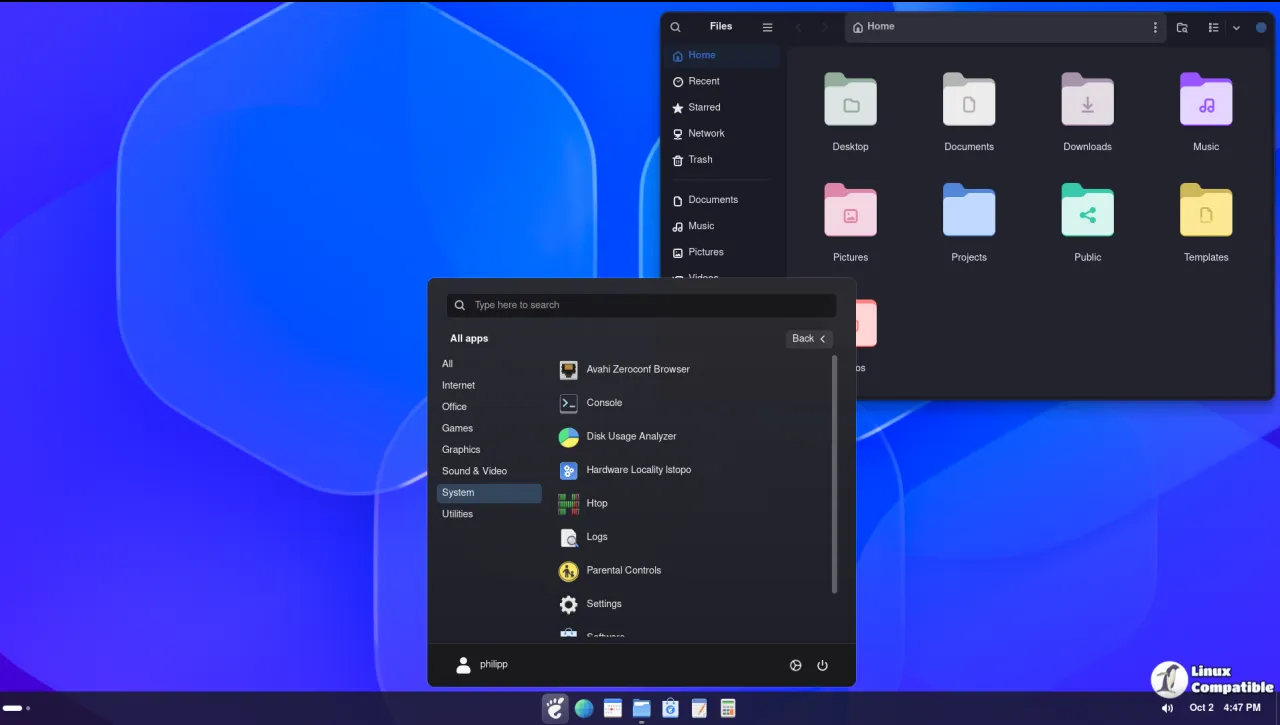
The update went live on October 31 at 23:19 UTC. Commit 05f2dfa is signed by Sultech, the developer behind the project. It's the latest in a release cadence that would make most well-funded software teams uncomfortable.
To see why the pace matters, start with the problem this extension exists to solve. GNOME has never shipped a bottom or edge taskbar the way Windows, macOS, or KDE do. Since GNOME 3 relaunched in 2011, it settled on a thin top panel and a full-screen Overview. Arriving from Windows, especially the centered-icon look of Windows 11, the missing taskbar is often the one thing that sends people back to another desktop.
A whole side industry grew to fill that gap. Dash to Panel and Dash to Dock are the best known, but both ask you to wade through mountains of settings before they look right. Simple Taskbar instead tries to be one self-contained extension that does the job with barely any fuss.
Keep in mind that Simple Taskbar is free and open source under GPL-2.0-or-later. The project opened on GitHub on July 19, 2026, and by late October had already topped 77 tagged releases. As of now it carries roughly 154 stars and 13 forks. Not bad for four months.
What's actually new in V77
The release follows the maintainer's usual New, Improved, and Fixed structure. The through line is polish rather than big new features.
The headline grabber is a Windows-style clock. A fresh "Clock Options" surface lets you reorder the date, and it taps into GNOME's own clock settings for weekday display, seconds, and 12- versus 24-hour time.
On the aesthetics front you now get corner radius control for the clock and Quick Settings button highlights, so the focus ring can go softer and more macOS-flavored. There's a Floating Gap slider to set how far a floating bar hangs off the screen edge, plus Snap to Screen Edge When Maximized with an adjustable gap for when that snapping is off.
A handful of spacing controls make up the bulk of the rest. Side Padding, Highlight Edge Gap, and Fit Highlight to Icon give you finer control over how the bar breathes. Taskbar Button Padding now defaults to 6 px in Dynamic Panel Mode and lives apart from the normal taskbar, so dynamic tweaks don't bleed into other layouts.
Magnification got the Start button and location items added to its hover-zoom treatment.
The fix that matters most is arguably the quiet one. Toggling Floating Panel Mode used to rebuild the whole extension, which froze everything. V77 stops that rebuild, so the toggle now behaves. The maintainer flagged it as a direct response to community feedback, which is a nice touch for a solo project.
Magnification was also refined to stay locked to the icon row, stop cleanly at the ends, and stop magnifying edge items off the screen. Window previews no longer shift back and forth, and the Show Desktop button stops drifting during magnification and panel transitions. That's not cheap to pull off, but those are the kind of things you only notice when they're broken.
A few defaults moved too. The bottom hot edge is off by default now, the Start menu profile picture shows by default, and the Windows 10 taskbar sits at 44 px thick by default. The settings page was reshuffled as well, with animations earning their own page and expandable rows cutting down on clutter.
Getting it installed
The recommended route is the official platform. Head here to the GNOME extensions page and enable it, or search for Simple Taskbar in Extension Manager.
If you'd rather run from source, clone the repo, run the package script, and install the built zip with gnome-extensions. Log out and back in if Shell doesn't pick up the new extension.
To remove it, disable and uninstall through Extension Manager, or run gnome-extensions disable and delete the folder by hand. The extension collects no telemetry and touches no network, though it flags one honest caveat: GNOME's own search providers may copy result text to your clipboard when you activate a hit.


