Simple Taskbar V75 Adds Dynamic and Floating Modes to GNOME
GNOME's rapidly released taskbar extension gets resizable panels and a floating look.
Simple Taskbar, the GNOME Shell extension that gives the desktop a conventional taskbar without discarding GNOME's own logic, has reached version 75. Released today, it adds a Dynamic Panel that resizes to fit its contents and a Floating Panel that lifts the bar off the screen edge. That's the headline. The rest of the update is a longer list of tweaks, settings reshuffles, and bug fixes.
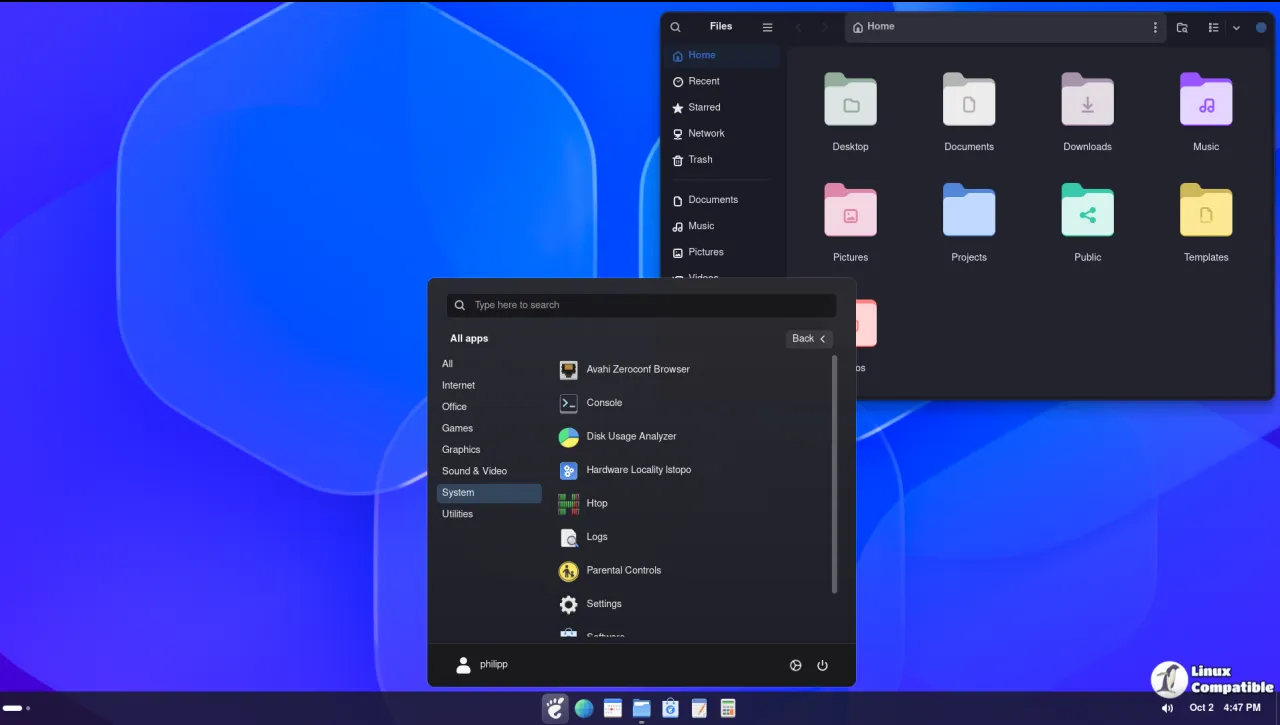
GNOME has never shipped a bottom or left-edge taskbar the way Windows or KDE do. The Shell settled long ago on an Activities overview plus a thin top panel, and for a lot of users coming over from Windows the missing taskbar is exactly what sends them back to another desktop. A whole side industry grew around plugging that gap. Dash to Panel and Dash to Dock lead the pack, though both want you wading through shelves of settings before they look right. Simple Taskbar's pitch from developer Sultech is simpler still: a familiar, tweakable bar that works almost out of the box while leaving GNOME's clock, calendar, and Quick Settings intact.
Beyond the V75 news, the extension is unusually loaded for a single add-on. You get Taskbar, Dock, and Windows XP- and Windows 10-themed panel modes, live window previews, hover-to-peek, a live Alt+Tab grid, and macOS-style icon magnification complete with a "Magic Lamp" minimize animation. The Start Menu lives behind the Super key, with Super+E for the home folder and Super+1 through 9 to jump to pinned apps. It collects no telemetry and touches no network, and the README flags one honest caveat: GNOME's own search providers may copy result text to your clipboard when you activate a hit.
As of October 2026, it sits at V75, the latest in what is arguably the fastest release cycle among GNOME extensions.
What V75 actually does
The maintainer splits the release into three buckets: New, Improved, and Fixed. Flexibility is the through-line.
The Dynamic Panel mode is the marquee feature. The bar grows and shrinks to match whatever sits in it, up to an adjustable maximum length. You get a compact strip that expands on demand instead of stretching edge to edge all the time. It sits somewhere between a fixed taskbar and a floating dock.
The Floating Panel mode is more about looks. It leaves a small gap between the bar and the monitor edge so the panel appears to hover rather than sit flush. Popular with the macOS-adjacent crowd, to say the least.
New options pile on top of those two modes. There's adjustable corner rounding so the curve matches your theme, a floating toggle that also reaches the separate Dock mode, a "Limit Reveal to Taskbar Edge" switch that stops stray edge hoverings from popping the bar back out, and a "Reveal in Overview" choice to keep hidden bars from cluttering the workspace view. There's also an "Open All" command for Start Menu folders that skips apps already running, a custom Overview shortcut if you've reassigned the Super key, and volume that can exceed 100 percent when GNOME's over-amplification is turned on.
Behind the scenes the Dock gains its own reveal, delay, and fullscreen controls so it no longer has to share settings with the taskbar, and a pile of panels got regrouped into new Thickness and Layout sections. The changelog also claims a dozen-plus bug fixes.
One thing that tells you about the project: a V70-era commit in the repo reads "remove trailing blank line from defaultPanelWindows.js." You only notice that if you're actually watching a project like this, and it says everything about how the code is being shipped, in small, frequent, tightly scoped bites.
The pace and the person
The repo opened July 19, 2026. By mid-October it had 75 tagged releases. That's roughly one update every few days at peak, built on a single primary maintainer and a handful of contributors with a handful of commits each.
Sultech runs this thing almost entirely solo. Beyond the lead, the notable contributors, adogecheems, microsoftruinseverything456, svarg, each sit at just a few commits out of nearly 956 total. The repo carries about 147 stars and 13 forks. On the official GNOME Extensions platform it's extension ID 10448 and counts in the thousands of downloads. It's free and open source under GPL-2.0-or-later, and Sultech runs a Buy Me a Coffee page for tips.
The extension is written in JavaScript and supports GNOME Shell 48 through 51, though it has famously flip-flopped on GNOME 51 support before, dropping it in one version and pulling it back.
You can grab it from the official platform at extensions.gnome.org/extension/10448, or search for "Simple Taskbar" inside Extension Manager. If you'd rather build from source, the project ships a small install script:
git clone https://github.com/Sultech/simple-taskbar.git
cd simple-taskbar
./package.sh
gnome-extensions install --force dist/simple-taskbar@sultech.shell-extension.zip
gnome-extensions enable simple-taskbar@sultech
Log out and back in if GNOME Shell doesn't pick up the new extension. Head here to the GitHub release page.


