Shotwell 33 Beta Fixes Crashes and Finally Adds a Keyboard Shortcut Overview
The latest Shotwell 33 beta drops today with a focus on stability and workflow tweaks that actually matter to people managing large photo collections. The update provides a redesigned printing interface, a long overdue keyboard shortcut reference, and patches for those annoying startup crashes that have plagued the app for months. This release keeps the project moving toward a stable final build without introducing unnecessary bloat or half baked features.
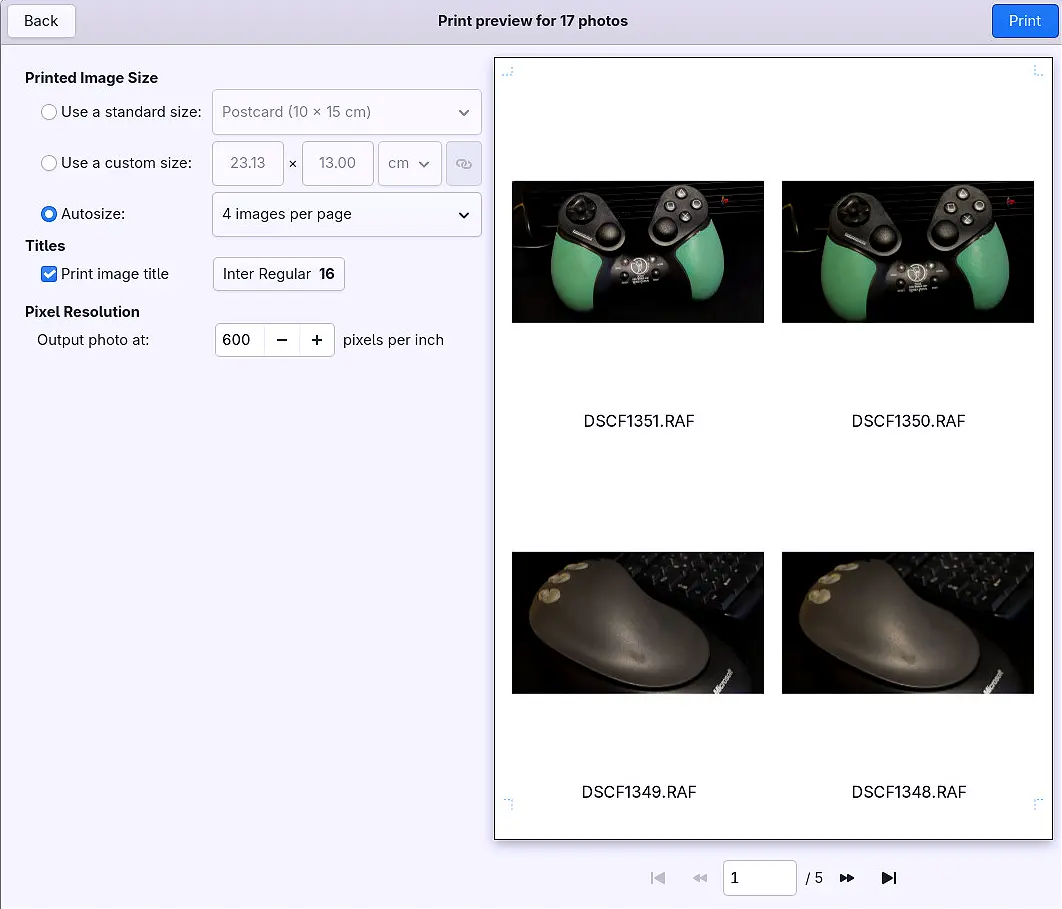
Printing Workflow Rework
The developers completely overhauled how photos move from the library to paper, adapting the entire process to match the new printing portal architecture. Previous versions forced users through clunky dialogs that often ignored system printer settings or failed silently when network printers were involved. This update aligns the export pipeline with modern Linux printing standards, which means fewer broken PDF exports and a cleaner preview window before committing to ink and paper. The team notes this represents the final major interface shift before the stable release, so expect the layout to settle down rather than change again.
Keyboard Shortcut Reference Finally Arrives
After years of guessing which key combination triggers a specific edit tool, Shotwell now ships with a complete keyboard shortcut overview built directly into the help menu. Power users who rely on batch processing or rapid culling will appreciate having every action mapped out without hunting through forums or reading outdated wiki pages. The reference covers navigation, tagging, and export functions, which saves time when working through hundreds of images in a single session. It is a small addition that removes a genuine friction point for anyone treating the app as more than a casual viewer.
Shotwell 33 Beta Crash Fixes for Startup and Routine Use
The changelog highlights patches targeting obscure crashes that triggered during application launch or while browsing large directories. These issues usually stemmed from race conditions when loading sidecar files or parsing corrupted EXIF metadata, which left users staring at a blank window or forced to kill the process via terminal. The beta resolves several of these edge cases by tightening up file validation routines and adding safer fallbacks for malformed image headers. Anyone who has lost unsaved edits after an unexpected shutdown will find this update worth testing immediately.
Translation Updates and Final Notes
A substantial batch of language files received updates across dozens of locales, which improves menu accuracy and reduces confusing phrasing for non English speakers. The project maintains a steady release cadence by pushing these localization improvements alongside core stability work rather than waiting for the final build, which is exactly how open source photo managers should operate instead of shipping incomplete features and calling it progress. Users running older distributions should verify their package repositories before upgrading, since some dependencies may require minor adjustments to avoid broken symlinks or missing shared libraries. The beta branch remains the safest place to test these changes without risking data loss on a production system.
Release Shotwell 33.beta
Git-EVTag-v0-SHA512: 9859ff8e46c4a7e1cb6cf6bc05a8bbf98dbbc730e8e25ff284aa04af6c1d0354ce9ab7cd8cc19915776c53bd34bff58f6243e3906c5a7767ff54b6ae37590ca5
Give the beta a spin in a virtual machine or secondary partition if previewing the printing changes before they hit the main setup makes sense for the workflow. Keep an eye on the project forums for any last minute regression reports, and enjoy the smoother experience when the final build arrives.


