Mabox 26.04 Brings a Simplified Profile and Tidy Panels
The latest Mabox 26.04 release finally gives users a straightforward way to hand off a Linux desktop without worrying about overwhelming them with tiling window manager quirks. This April refresh focuses on cleaning up the interface, tweaking the tint2 panel, and adding a proper simplified profile for non-technical family members. The changes target real friction points that usually make newcomers quit within their first week.
Mabox 26.04 Simplified Profile Cuts the Clutter
Mabox now ships with what the developers call a simplified desktop profile, which is really just a way to strip out the accidental triggers that break workflows. The team removed clickable screen corners and edges along with context menus that usually trigger unwanted window swaps. The old right-click menu system was just bloat anyway, offering half-used actions that nobody actually needed. Toning it down keeps the desktop from looking like a control panel for a spaceship while still leaving enough functionality to get actual work done. This matters because a tiling WM like Openbox can feel like flying a fighter jet when you just want to check email and browse the web. Many new Linux users accidentally close applications or spawn duplicate panels simply by clicking the wrong corner, so removing those triggers is a practical move for anyone setting up a machine for relatives.
Panel Tweaks and Autotheming
The tint2 panel configurations have been updated to work better with newer system tools, including a status icon that actually reflects update states instead of just sitting there as decoration. A wallpaper thumbnail now lives in the panel and ties directly into an autotheming feature that changes colors based on the active background. Clicking the thumbnail randomly swaps wallpapers while right-clicking opens deeper settings, and the Mabox logo shifts its color scheme to match. This kind of visual feedback helps users understand what is happening without digging through terminal commands or config files. The live session enables this by default so testers can see how the desktop adapts before committing to an install.
Menu Overhaul and Default Conky
The main menu and side panels got a complete rewrite to stop feeling like they were assembled from leftover parts. Navigation now follows a more predictable layout that reduces the time spent hunting for settings or application shortcuts. The default Conky widget also received an upgrade with a battery usage indicator and a logo that users can recolor through standard theming tools. These adjustments matter because visual clutter usually masks actual system information, making it harder to spot low battery warnings or high CPU spikes during troubleshooting. The updated user guide rounds out the release by documenting these changes before people start modifying config files on their own.
Mabox 26.04 with simplified profile option | MaboxLinux
Mabox 26.04, the April refresh of the ISO images, brings a substantial number of fixes in many areas, such as: Mabox now offers the ability to quickly switch to a simplified desktop profile.
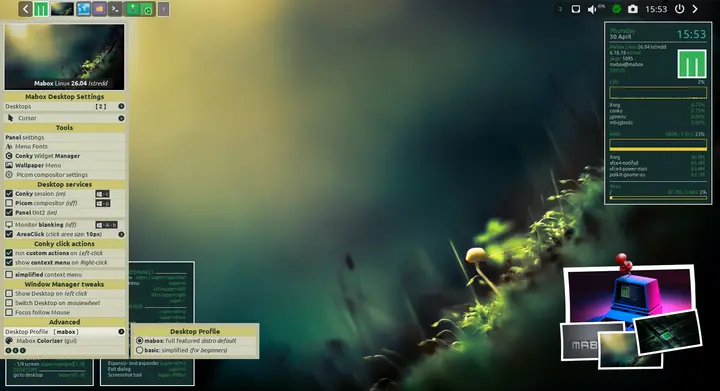
Give the simplified profile a spin if you are handing off a machine to someone who just wants a working desktop. The rest of the tweaks clean up enough loose ends that even seasoned tiling WM fans will appreciate the reduced friction. Grab the ISO, test it in a VM first, and let the panels do the heavy lifting while you focus on actual work.


