Krita AI Diffusion 1.51.1 Fixes Installation Headaches and Keeps Your Workflow Local
The latest update for Krita AI Diffusion finally patches those stubborn installation bugs that have been tripping up macOS users and Linux veterans alike. This plugin brings generative AI directly into the painting workflow without forcing artists to juggle external apps or pay for cloud credits every time a quick edit is needed. Version 1.51.1 focuses on stability, but the core features still deliver real control over how AI generates images inside the canvas.
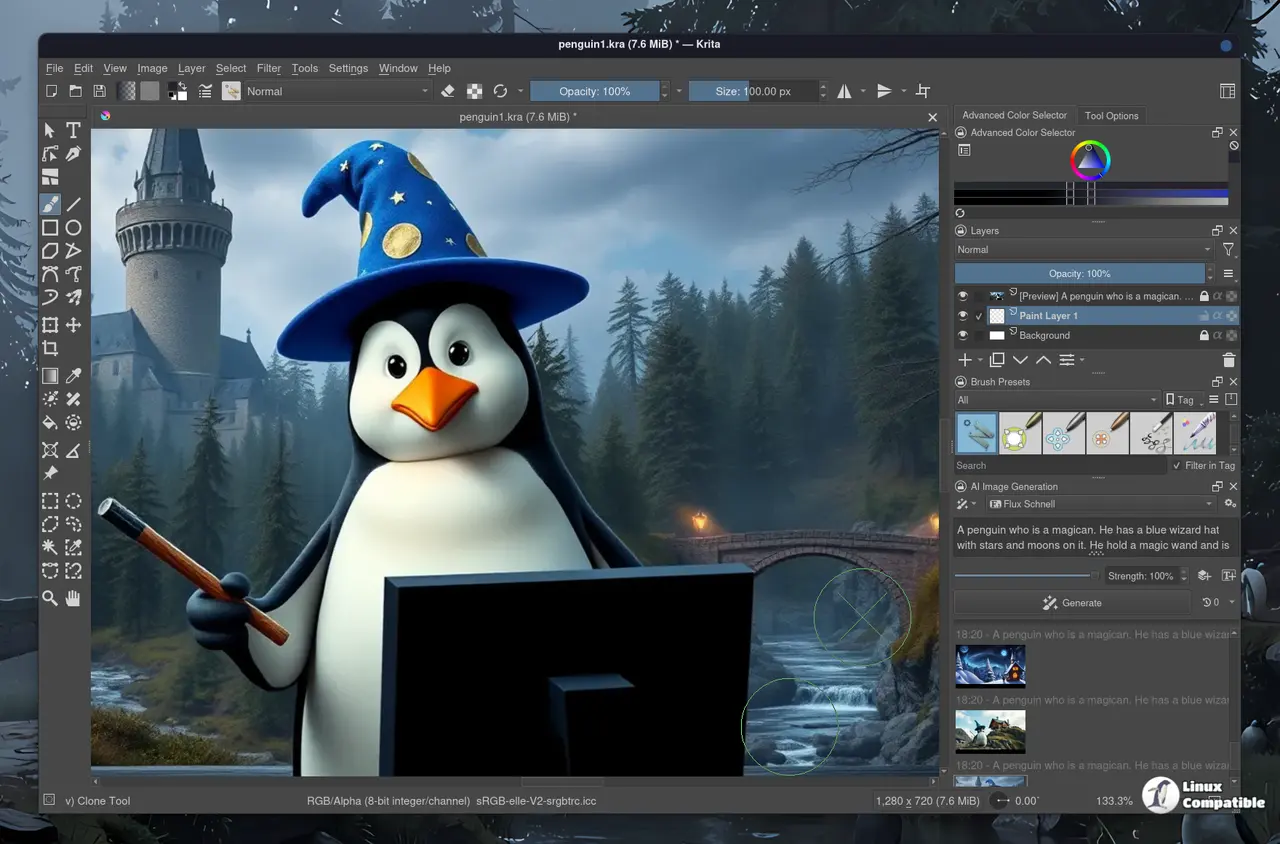
How Krita AI Diffusion Handles Precision Without Breaking Compositions
Most AI image tools force users to tweak obscure sliders and hope for the best when generating from scratch. The plugin takes a different approach by letting artists restrict generation to specific selections or layer masks instead of flooding the entire document with random pixels. It respects existing brush strokes, line art, and depth maps rather than ignoring them completely. Digital painters frequently waste hours fighting with external generators that completely miss the composition they already spent time blocking out. This tool keeps everything inside Krita so users can paint a rough sketch, apply a mask, and tell the AI to fill in only that area without blowing up the entire canvas. The strength slider works exactly as expected, allowing generated pixels to blend with hand painted details instead of replacing them entirely.
What Actually Changed in Version 1.51.1
The changelog for this update is short, but it targets two specific pain points that have annoyed users for months. Managed installations on macOS finally work correctly after a long standing bug broke the package structure during setup. Linux users who upgraded from older environments also receive a proper fix that prevents dependency conflicts when moving between versions. These are not flashy new features, but they remove the friction that usually stops artists from actually using the plugin. Running open source models locally still requires decent GPU memory, and getting past installation errors is half the battle before opening a drawing tablet.
Setting Up Without Breaking Your System
Getting the plugin running starts with downloading the latest release from the official Interstice Cloud repository. Users should always verify their Krita version matches the plugin requirements before attempting any manual extraction. The installer handles most of the heavy lifting by placing files in the correct extensions directory and registering the necessary Python dependencies. Skipping this step usually results in missing module errors that force a complete reinstall anyway. Once loaded, the interface appears as a dedicated panel inside Krita where artists can load custom models or stick with the default open source checkpoints. Cloud generation remains an option for machines without capable graphics cards, but local processing keeps everything private and avoids monthly subscription traps that usually vanish after the trial period anyway.
Release Krita-AI-Diffusion Version 1.51.1
Download krita_ai_diffusion-1.51.1.zip For Krita 5 (recommended: Krita 5.3.1) Changes Fixed managed installation on macOS #2505 Fixed managed installation upgrade from old environments (Linux)
Grab the update when ready and test it on a small canvas first. The plugin handles most of the heavy lifting automatically, so just let it run its course before tweaking any advanced settings. Happy painting.


