KDE Plasma 6.7 Development Update: Fixing HDR Colors, Taming AMD Backlight, and Smoother Graphics
The KDE developers just dropped another development update for the upcoming KDE Plasma 6.7 release, and this round focuses on the kind of technical improvements that keep your system from falling apart rather than flashy new icons. While the feature period is winding down, the team managed to sneak in some critical fixes for HDR color management and AMD laptop display quirks that have annoyed users for a while. If you are running Plasma 6.7 or waiting for the next stable point release, there are several changes worth noting before the polishing phase begins in earnest.
KDE Plasma 6.7 brings HDR color support and disables annoying AMD backlight modulation
Xaver Hugl added support for using ICC profiles while HDR mode is active. This matters because previous iterations often forced a default color space that made images look washed out or shifted hues on compatible displays. Now the system respects the profile you set, which helps photographers and designers who need accuracy even when pushing high dynamic range output. Without this fix, anyone calibrating their monitor for professional work would have to disable HDR entirely just to get correct colors, which defeats the purpose of having a high-end panel.
The update also addresses adaptive backlight modulation on AMD laptops. Many modern AMD machines change screen colors at low brightness levels to improve visibility, but this feature often results in a purple or green tint that ruins media consumption and makes text hard to read. Users can now disable or control the intensity of this behavior directly within Plasma settings instead of hunting for kernel parameters or writing custom scripts to suppress it. This is a welcome relief for laptop owners who just want their screen to look normal at 10% brightness.
Discover cleans up duplicates and Kickoff finally lets you remove favorites
Discover has received improvements to de-duplicate apps that appear in both system and user Flatpak installations. This is a common pain point where the same application shows up twice with different icons or versions, causing confusion when trying to launch software. The update ensures the package manager presents a cleaner list without cluttering the interface with redundant entries, which has been a frequent complaint since Flatpak integration became more prominent.
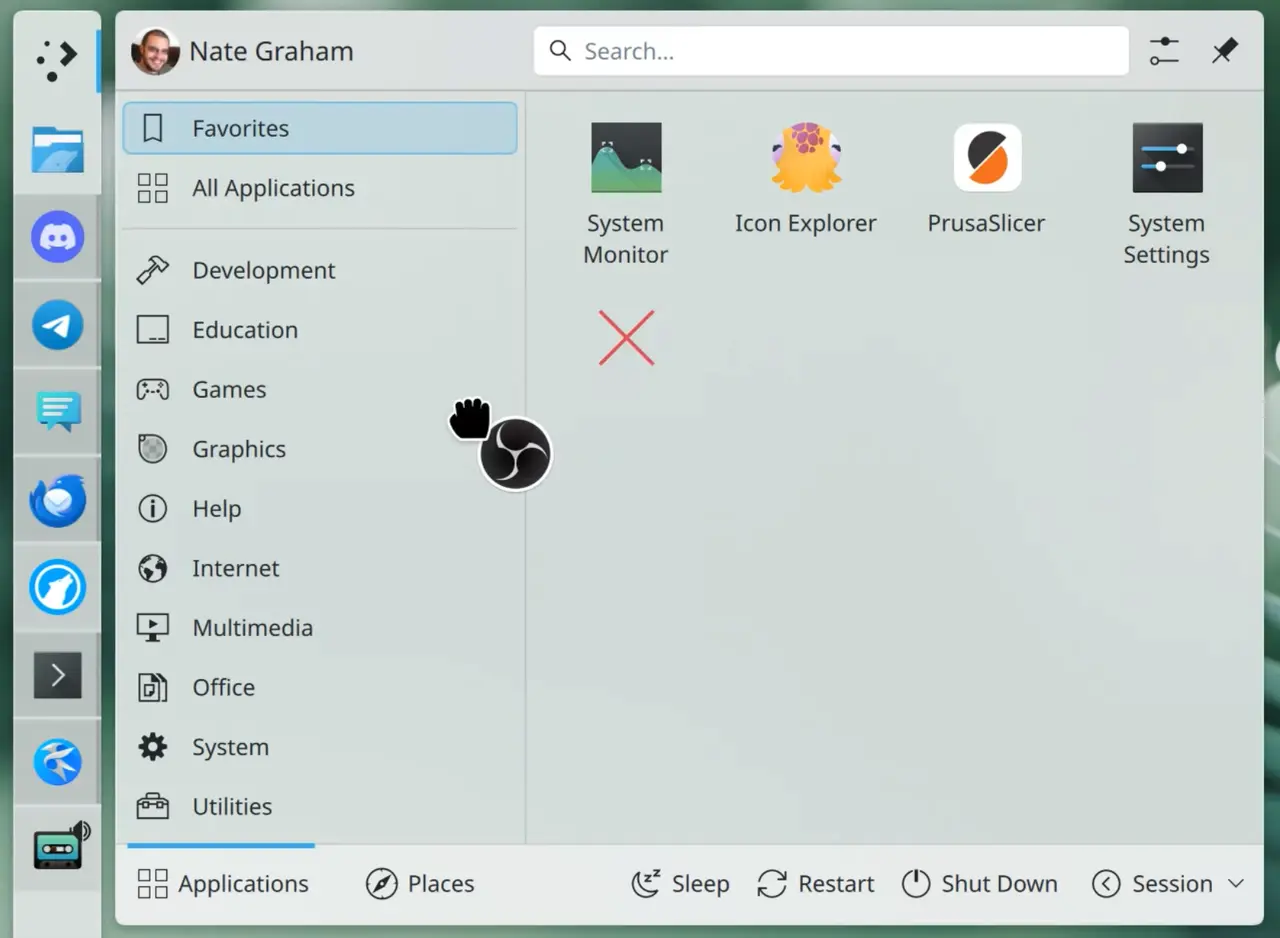
The Kickoff Application Launcher now allows users to remove apps from the Favorites view by dragging them out and over any part of the widget. This simple interaction removes the need for right-click menus or settings dialogs just to clear a shortcut that is no longer useful. It feels like basic functionality that should have been there from day one, but at least it is finally implemented without requiring a context menu dance.
Other UI tweaks include the Printers widget showing badges with active and queued print job counts, which helps in shared office environments where printer status can get messy. The Info Center Sensors page now respects system-wide temperature unit configurations instead of forcing Celsius on everyone, so users who prefer Fahrenheit no longer have to do mental math while monitoring their CPU temps.
Critical fixes for multi-GPU stutters and vanished windows
Plasma 6.6.5 includes a fix for periodic freezes and stutters on systems with multiple discrete GPUs. This issue likely affected users who switch between integrated and dedicated graphics, causing the desktop to lag or hang unexpectedly during transitions. The patch stabilizes the rendering pipeline to prevent these interruptions, which is crucial for laptops that use Optimus-style switching or desktop setups with hybrid graphics configurations.
Window rules that use negative position properties to move windows partially off-screen no longer cause those windows to disappear completely. Previously, applying such a rule would make the window unreachable, forcing users to rely on keyboard shortcuts or terminal commands to bring it back into view. This regression fix restores control over window placement for power users who manage complex layouts and often hide secondary monitors behind the primary display edge.
The update also resolves an issue where power buttons vanished from launcher menus on systems running version 260 of systemd. Since systemd changed internal behaviors, Plasma had to adjust how it queries the session manager to ensure shutdown and restart options remain accessible. It is a reminder that desktop environments live in constant tension with system services, and small upstream changes can break basic functionality if not caught quickly.
Under-the-hood gains for CPU rendering and battery life
Xaver Hugl improved performance and power efficiency for software using CPU rendering, which covers most QtWidgets-based Qt applications. This optimization reduces resource usage during heavy workloads without sacrificing responsiveness, making older hardware feel a bit more snappy when running legacy tools or system utilities.
KWin now uses better heuristics to determine when it can employ direct scan-out for full-screen windows. Direct scan-out bypasses the compositor to send frames straight to the display, which lowers latency and saves battery power on laptops by reducing GPU activity. The improved logic ensures this feature activates more reliably, so users get the performance benefits without worrying about tearing or missed frames during video playback.


