IPFire releases fireperf, a benchmarking tool that tests firewalls like a firewall
The free, open-source utility probes connection churn, dropped sessions and handshake latency while using roughly a seventh of the CPU iperf3 usually demands.
IPFire has now published fireperf, a free network benchmarking tool built for a job iperf3 can't do. Point iperf3 at another machine, open a connection or two, and watch the gigabit counter climb. That number tells you something real about a link. It tells you nothing about the firewall standing in front of that link.
A firewall isn't a link. Neither is a NAT router or a load balancer. Those are stateful devices, which means what actually wears them out isn't throughput but connection churn. How many fresh connections can the device accept per second before the conntrack table fills up? Can it hold hundreds of thousands of sessions open for hours without quietly forgetting them?
Every sysadmin has hit the real-world symptom, whether they knew it or not. That SSH session, or that VPN, tends to freeze up after lunch. Nothing on the client side is actually broken. The firewall simply aged out its state entry and started dropping the packets. There's no fix from your laptop; only an idle timeout you can't touch resolves it.
fireperf exists for exactly that gap. The project says it outright: iperf3 tells you how much data gets from one machine to another, and a firewall rarely struggles with that. It struggles with thousands of new connections every second and with keeping track of all of them.
IPFire isn't new to this work either. It started in 2004 as a fork of IPCop, which itself forked from Smoothwall, and it has grown into an independent project with roughly 100 contributors spread across some 199 countries. The project is financially independent, funded by sponsors and by Lightning Wire Labs, a German firm in Datteln that sells IPFire hardware and support. No investors to answer to, and that sometimes shows in the best possible way: the tool is free and the license stays true to that.
The numbers
CPU efficiency is the headline figure. The project ran a test sending from a 2-core virtual machine and measured CPU time per gigabyte sent. fireperf using io_uring burned 0.071 CPU seconds per GiB while pushing 19 Gbit/s. iperf3 on default settings burned 0.505. That's about a seventh of the work. Even iperf3's own zerocopy mode, at 0.153, still runs roughly twice as hot.
Connection rate is the other number worth remembering. Over loopback on a 16-core machine, fireperf pushed through more than 230,000 connections per second, spending about 20 microseconds of CPU per connection on the server side. Not a huge gap in absolute terms, but that CPU is the whole point. Those cycles stay available for the traffic, not the test.
The design is built so the benchmark doesn't become the thing holding the test back. fireperf runs as a server and a client, and the client tells the server which test it wants when it connects. A single server instance can therefore run many different tests at once. Each CPU gets its own worker thread, and those workers share nothing on the data path. The server opens one listening socket per worker on the same port using SO_REUSEPORT, letting the kernel spread connections across them. That keeps firewall rules dead simple: allow one port, move on.
Two I/O backends do the actual work. io_uring offloads the plumbing so you aren't making a system call per operation. epoll covers the places io_uring won't run, like certain containers and older kernels. fireperf picks io_uring when it can and falls back to epoll otherwise, and you don't need to know which one is doing the work.
The sending path is where the design gets particular. A big chunk of send cost is copying data from user space into the kernel, so fireperf draws from a 32 MiB pool of random data. That's deliberate. Random traffic won't compress and mirrors real patterns better than repeated byte sequences, and the kernel sends it straight from the pool without copying.
There's a real difference in how connections open too. Set a rate with --rate=N and fireperf opens on a fixed schedule regardless of what happened to the ones before it. iperf3 waits for each connection, which means it only measures the slowest part and slows down to match it. fireperf instead reports how many connections came late, got skipped or failed outright, so you can actually tell whether the limit is the firewall or your own test box.
Failures aren't just counted, they're categorized. A connection timed out, was rejected, hit a local limit, or stopped short. Established connections that end without a clean close count as reset. That's precisely what happens when a firewall drops its state.
A keepalive test targets the frozen-after-lunch problem directly. Point fireperf at a crowd of open connections, send a byte over each once every ten seconds, and watch for the ones that stop echoing. Those count as lost. That's a live measurement of silent firewall dropouts.
Where it fits
You don't have to rip out iperf3. When a client connects, it sends a short 37-byte message describing what it wants. The server replies, both sides identify each other automatically, and there's no config to wrangle. A fireperf server can also serve iperf3 and even iperf (v2) clients alongside native fireperf clients. iperf3 clients can test against a fireperf server too. Keep in mind that iperf3 uses a separate control connection handled by one worker and won't understand retransmits or CPU usage.
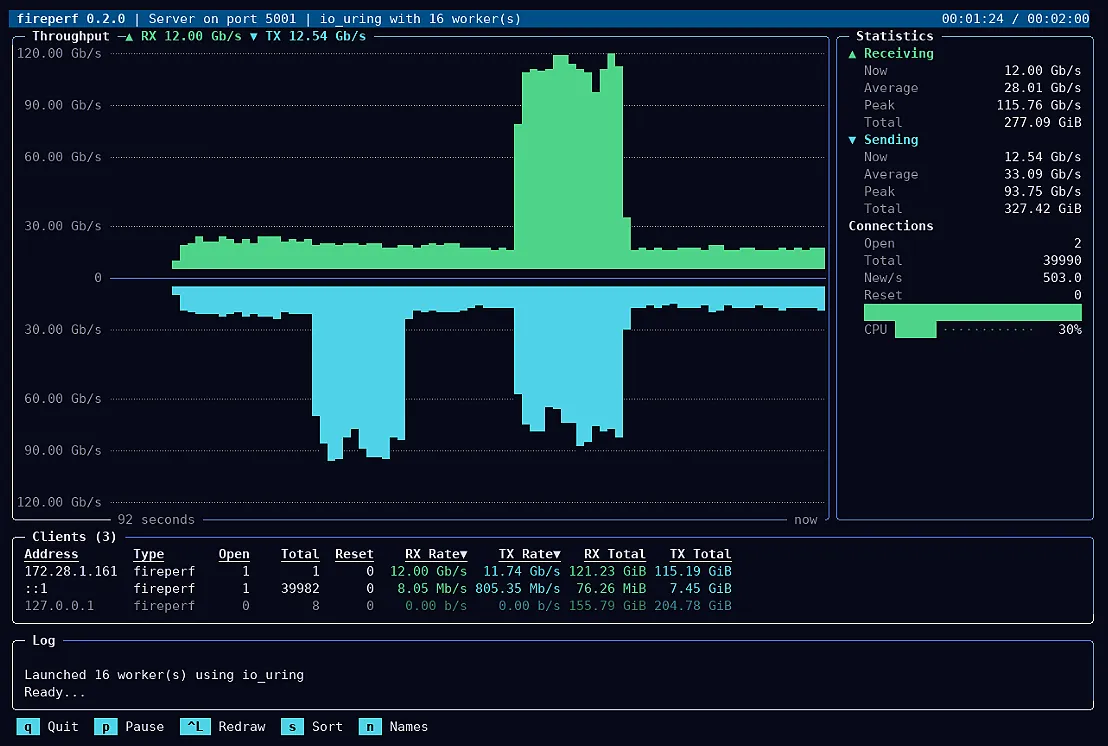
The output options cover the practical spread. There's an interactive TUI with a live graph, handshake timing, per-worker CPU, and a breakdown of every connected client, and it auto-detects dark or light terminals. Pipe through --no-tui for one line per second, or --json for JSON Lines aimed at dashboards and scripts. Messages go to stderr so stdout stays clean for piping into jq.
fireperf is free software under GPL v3 or later. Building from source wants a C compiler, Autotools, pkg-config, ncursesw, gettext and intltool. liburing 2.3 or later is optional but recommended. Signed packages cover Debian, Arch Linux, RHEL 9 and 10 plus clones, and openSUSE Tumbleweed. A systemd unit runs the server as an unprivileged user, and it listens on port 5001 by default without starting on install.
Here's the one caveat the project stresses. To actually test a device in between, the client and server must run on hosts on either side of it. Run them back-to-back and you're measuring the pair of hosts, not the firewall, so a number near that maximum tells you almost nothing about the firewall's real capacity. fireperf also flags when your own host limits are the likely bottleneck instead, listing things like local ports, file descriptors, conntrack and listen backlog.
It doesn't need a press release to justify its existence, though IPFire's is a quick, worthwhile read. It's built by people who live inside connection-tracking tables day in and day out, and that shows in a key assumption: the test machine is the bottleneck unless it proves otherwise. For anyone who evaluates firewalls, routers or other stateful gear, this is the first open-source tool to measure connection establishment rate, failure reasons and handshake latency with the same rigor iperf3 brought to bandwidth, at about a seventh of the CPU.
Head here for installation instructions


