Goverlay 1.9.4 brings AMD Fluid Motion Frames to Linux with one click
The open-source gaming config tool now installs and configures afmf-linux on its own, so you can roughly double your frame rate without editing a single text file.
Goverlay 1.9.4 shipped today. The headline feature is frame generation on desktop Linux, and more precisely AMD's Fluid Motion Frames running through the open-source afmf-linux layer. New version downloads and installs it for you. A while back that meant hand-editing environment variables and dropping a .so manifest in the right folder by hand. Now it's a toggle.
That's a bigger deal than it might sound. For years interpolated frames were basically a Windows or NVIDIA DLSS thing. Now the barrier to trying them on Linux has collapsed to something you click through.
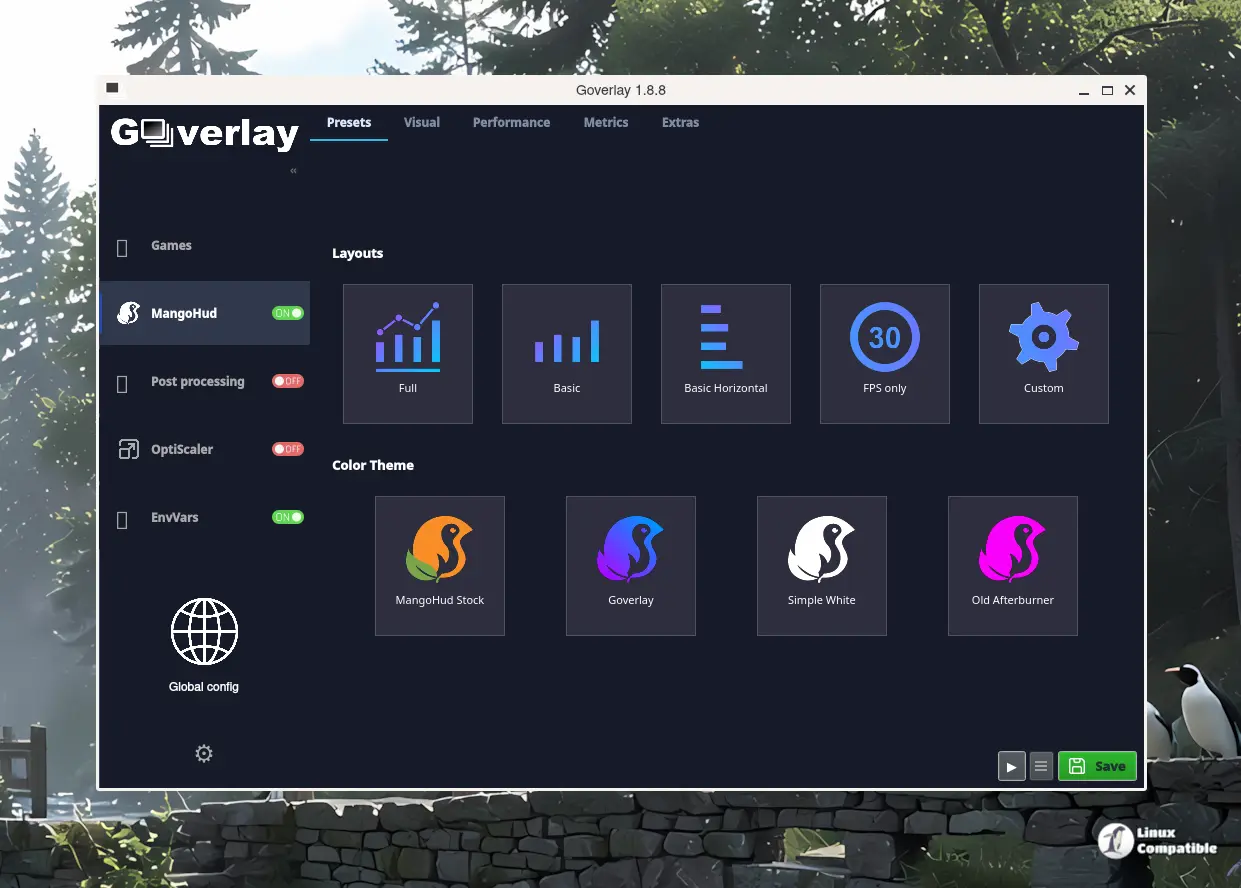
What Goverlay actually does
Let's set the stage. Goverlay is a free, open-source Qt6 front-end for Linux, written in Free Pascal under the Lazarus IDE. Maintainer Benjamigois describes himself as a network engineer who likes Linux and gaming. He runs the project under GPL-3.0, and it's sitting around 1,500 GitHub stars now, with roughly 70 forks.
The point is to stop you from hand-editing finicky Vulkan config files. Instead you get a card-based GUI that spits out the config and launch commands you paste into Steam, Lutris, or a Steam Deck. Under the hood it manages MangoHud, vkBasalt, vkSumi, OptiScaler, and a growing pile of Proton environment tweaks.
Each game gets its own XDG-compliant config directory with the usual files, plus a launch-command box at the bottom that generates a bgmod command ending in %command%. That bgmod binary is compiled Free Pascal rather than a bash script, a deliberate change from the older fgmod approach. It intercepts game arguments, exports variables, sets up Wine overrides, and keeps your game folder tidy in the process. There's even a bgmod-uninstaller binary if you want to strip it all back out.
The app also ships PasCube, a full Vulkan demo compiled from the PasVulkan engine, so you can preview your overlays in real time without launching the actual game.
How afmf-linux works
afmf-linux is an open-source implementation of AMD Fluid Motion Frames as a Vulkan implicit layer, originally built by contributor serialexperimentslainnnn. The way it works, roughly: it hooks swapchain creation and, on every present call, copies the new frame into a two-frame history, runs FidelityFX Optical Flow between the frames, and synthesizes the in-between frame by warping both along the estimated motion.
The end result is one interpolated frame for every real frame your game renders. That effectively doubles what you see. Keep in mind that it's tuned mainly for RDNA3 and RDNA4 GPUs with the RADV driver, though it isn't AMD-specific at its core and people have reported it working on some NVIDIA cards too.
The afmf-linux author cites doubling base frame rates in titles like Monster Hunter Wilds, Cyberpunk 2077 with ray tracing, DOOM: The Dark Ages, Overwatch 2, and Borderlands 4. Goverlay folds all of that into an experimental settings group under Tweaks. "Experimental" usually means "works most of the time," so take the numbers with a grain of salt.
There are caveats. Don't stack it with other frame-gen layers like lsfg-vk or OptiScaler, and keep the game's own FSR 3 or 4 frame generation enabled. The release notes also mention a safety-advisory Experimental tweaks card bundling advanced switches, including an NVIDIA DLSS Ray Reconstruction override, a customizable ray-tracing acceleration structure multiplier, and a unified low-latency toggle.
The rest of the release
It isn't just frame generation. Goverlay 1.9.4 rounds out the update with a batch of usability work.
There's now a dedicated time-format dialog for MangoHud, so you can set standard presets or roll your own strftime format for frametime graphs and on-screen timestamps. Goverlay 1.9.4 also resolves proxy DLL conflicts between ReShade and OptiScaler, so those two stop fighting over the same files, plus it now discovers current ReShade versions online instead of making you chase downloads.
On the visual side, the OptiScaler and Post-processing Method cards were widened for consistency, GPU driver selection moved into the main options, and the Finish dialog gained grayscale launcher icons with HiDPI support. The bundled PasCube preview was recalibrated against a real-hardware benchmark set too.
Bug fixes and where to get it
Three fixes are worth singling out. Goverlay 1.9.4 resolves illegible black text on buttons under KDE Plasma light and hybrid themes by syncing widget palette roles with the stylesheets. It fixed Lutris launch paths that contain spaces, which bites more people than you'd expect. And it hardened Proton and Wine launch argument handling so values don't get lost when you reload the UI. That last fix happens to be a first-ever contribution from a new contributor named Josu-A.
Goverlay is spread across a lot of install methods. You can grab a Flatpak from Flathub, an AppImage, a tarball, or native packages for Arch, openSUSE, and Solus. Fedora, Debian, and Ubuntu users are nudged toward Flatpak or AppImage since distro repos tend to lag. You can build it from source too, if you have Lazarus with Qt6 support installed.
That's all for 1.9.4. If you run demanding games on Linux and want to test frame generation without a terminal open, it's probably worth the install.
Head here to the repo and full release notes.


