Flowblade 2.24.2 Fixes a Crash and Keeps Linux Video Editing Alive
The latest update to the open source video editor brings stability back to users running MLT version 7.38. Flowblade 2.24.2 patches a crash that has been quietly breaking projects for anyone who recently updated their media framework layer. This release keeps the multitrack timeline intact while preserving the workflow that actually works on Linux without forcing users into bloated proprietary suites.
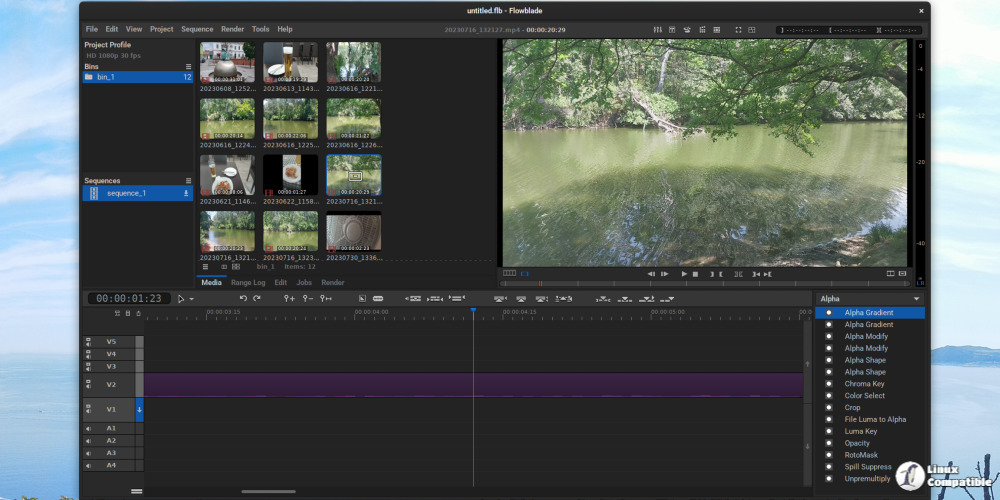
Flowblade 2.24.2 Keeps Your Timeline Stable
The MLT framework sits right under the hood of most Linux video editors, and it does not play nice with sudden version jumps. A recent update to version 7.38 introduced a memory handling quirk that sent the application straight into a hard crash during timeline rendering. Editors who rely on this software have been stuck watching their progress bars freeze or lose unsaved cuts after a routine system package refresh. The patch targets that exact instability by adjusting how the editor communicates with the updated framework. This keeps project files intact and stops the program from throwing a fatal error when loading complex sequences.
Workflow Features That Actually Save Time
The timeline still supports up to twenty one tracks with drag and drop functionality that does not fight back when rearranging clips. Clip parenting and audio syncing handle the messy parts of multi camera edits without requiring manual frame matching. The compositor layer lets users mix, zoom, and rotate sources with keyframed animation tools while keeping blend modes adjustable per clip. Forty plus pattern wipes and standard image blending options like Hardlight or Overlay give enough visual control for most independent creators. G'Mic integration stays useful for applying complex effects that other editors charge extra to access. Batch encoding saves hours when exporting multiple cuts, and the media re linking tool actually fixes broken project paths instead of just throwing a generic error message. Some modern editors pad their interfaces with unnecessary social sharing buttons and AI upscaling toggles that slow down basic cutting. Flowblade skips that bloat and focuses on what matters for actual editing.
Rendering Options and Hardware Support
Video rendering relies on the installed MLT and FFmpeg codecs, which means most common formats work out of the box without extra configuration. Users with NVIDIA or AMD graphics cards can tap into Vaapi and NVENC encoders to speed up exports without burning through CPU cycles. The custom FFmpeg argument field lets advanced users tweak compression settings when default presets do not match specific delivery requirements. USB shuttle jog wheels still get full playback control, which matters a lot for editors who prefer tactile navigation over mouse clicks. Numbered frame sequences and SVG vector graphics load cleanly alongside standard JPEG or PNG imports.
The source code of the new version can be downloaded from GitHub. For detailed installation instructions, visit this page. The timeline will thank you when the next render finishes without throwing a fit. Happy cutting.


