Faugus Launcher 2.5.3 rolls out with a focus on speed, not new features
The open-source Linux game launcher doubles down on its fast, lightweight identity with real-time settings and on-demand cover-art loading.Running Windows games on Linux used to mean wrestling with Wine prefixes, hunting for the right Proton build, and squinting at terminal logs until something finally booted. Valve's Proton smoothed most of that over, though only inside Steam. Your GOG, Epic, and Battle.net libraries still needed manual fiddling, as did that one stray .exe sitting in your Downloads folder.
Enter Faugus Launcher, an open-source tool that describes itself with deliberate modesty: "A simple and lightweight app for running Windows games using UMU-Launcher." It runs on top of UMU, the Unified Linux Game Launcher, a community runtime that picks the right Proton version, sets the prefix, and applies compatibility fixes automatically, all without Steam.
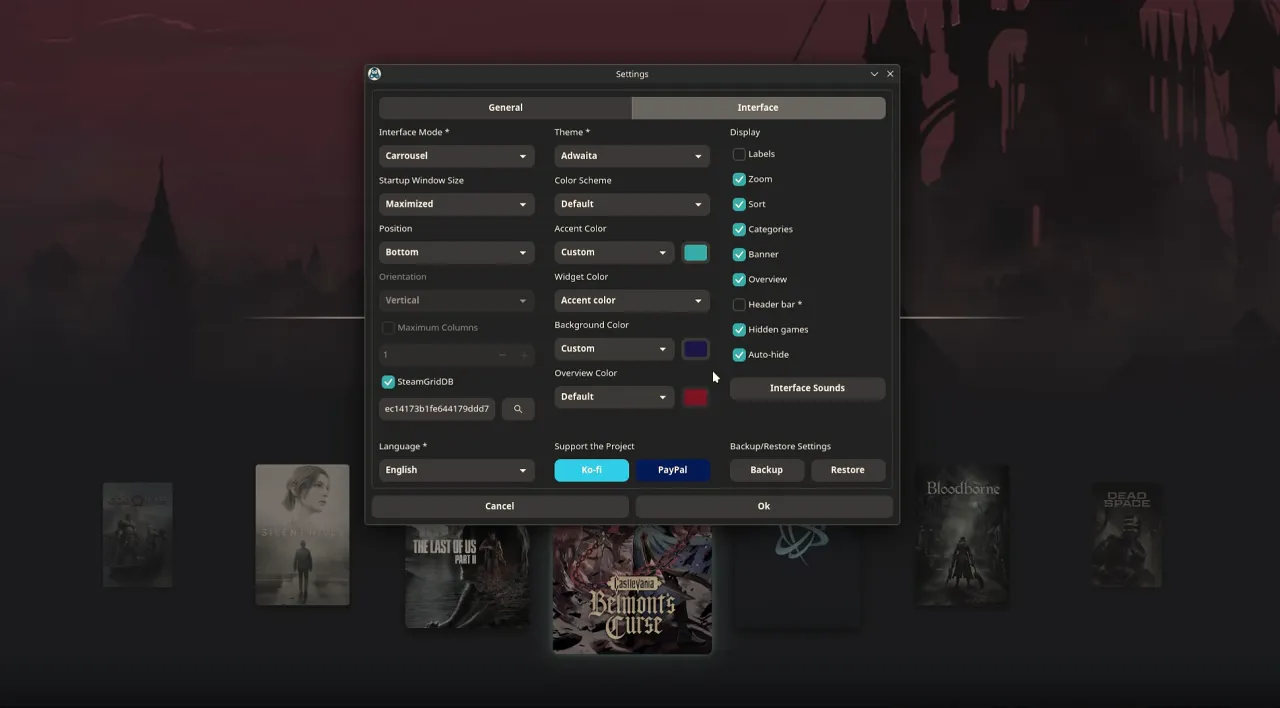
Faugus 2.5.3 dropped today. It's a quality-of-life update rather than a feature overhaul.
Keep in mind that this is the newest in a tight streak of releases. The project has been shipping at a monthly, sometimes multiple-times-a-month, cadence through 2026. Back in July, version 2.0.0 ported the app from GTK3 to GTK4, and that rewrite is widely credited with putting it on the map.
What's new in 2.5.3
The headline changes are real-time settings, smooth scrolling, and on-demand asset loading. Most settings now apply without a restart. The few that still require one are marked with an asterisk after their name, which is a small but clear courtesy to users.
Other touches arrived too. Tooltips now sit beside most Settings options, the splash window gained a progress bar, the main screen can auto-hide its widgets, and the gamepad database updates on a weekly schedule. Long game titles get truncated in List mode so the window stops stretching out.
The fixes are the sort of thing you only notice when it's broken. Scrolling now actually reaches the end when you're navigating with keyboard or gamepad. The post-launch script no longer gets killed when you close a game. And a grab bag of interface-customization inconsistencies finally got sorted out.
The performance work matters most if you keep a large library. Covers and banners now load on demand instead of all at startup, images are resized to match your display scale, and memory is freed as you scroll. Banners run on their own thread. Some visual effects were trimmed to cut rendering overhead.
The team is unusually upfront about the trade-off here. On a small library you'll feel nothing. On a large one, especially in Covers mode, the difference is "huge," in the team's own words. They documented a test scrolling through 1,000 games at 100% scaling and openly admit CPU usage rises during scroll, since 1,000 images now load on demand rather than all at once. That kind of candor is rare in a changelog.
Where it fits
Faugus was confirmed not affected by the malware incidents that have surfaced elsewhere in the Arch Linux AUR, and the community keeps pushing for official inclusion in distro repositories. It's worth remembering that the project has also been trimming the dead weight. Version 2.5.1 dropped Proton-EM and UMU-Proton support because those builds stopped getting updated, a signal that Faugus is consolidating around actively maintained Proton variants like GE-Proton and DW-Proton.
One thing worth keeping in mind: Faugus is maintained mostly by a single developer, @Faugus. Features, translations, and bug reports roll in from a community that has now landed roughly 2.5k stars and 93 forks on GitHub. Translations alone this release spanned Bulgarian, Chinese (simplified and traditional), French, German, Italian, Polish, Portuguese, Spanish, and Ukrainian.
That's the whole model here. Ko-fi and PayPal fund it, not venture money or corporate backing, which is about as standard as it gets for open-source Linux tooling.
Installation is about as painless as Linux packaging gets. It's in the AUR for Arch users, Fedora's Copr, a PPA for Ubuntu/Mint/KDE Neon, plus a direct .deb and a Flatpak on Flathub. There's a Meson-based build-from-source path if you're into that sort of thing, though the AppImage will want you to have pygobject, gtk4, libadwaita, and libmanette installed separately.
Flatpak users may need to grant permissions for Steam detection to work. That means running override commands to grant filesystem access to the Steam directory and let the app talk to the Flatpak system. Your prefixes live under ~/Faugus/, and Protons go under ~/.local/share/Steam/compatibilitytools.d/.
Head here to the GitHub releases page for the latest build.
It's a solid release. Faugus 2.5.3 doesn't chase feature parity with the bigger launchers, and it doesn't need to. It's arguably competing with them on taste and speed instead. The one lasting caveat is still the Epic and EA App situation, where platform updates keep breaking compatibility. But for the core job of launching your Windows games quickly and cleanly, this is about as tuned-up as it gets.


