Faugus 2.4.3 ships per-game Proton choices and customizable widgets
Faugus, the lightweight Linux front end for running Windows games through UMU-Launcher, has released version 2.4.3. It adds two headline touches: per-game control over which Proton build launches each title, and the ability to recolor the launcher's widget.
The release went live today. It lands right after a genuinely busy stretch for the 2.4.x series, which already saw 2.4.0, 2.4.1, and 2.4.2 roll out over a couple of weeks. So this feels more like tidying up than a fresh start.
Faugus describes itself as "a simple and lightweight app for running Windows games using UMU-Launcher." Built on GTK4 and LibAdwaita in Python, it hands you a Steam-like library grid with covers and carousels, then pushes the actual compatibility work off to UMU-Launcher. You never touch a terminal.
The two headline changes
By default, 2.4.3 keeps every game on the system-wide default Proton. Existing users should notice nothing out of the box. But you can now pin a specific Proton to a single title, which actually matters if a game runs better (or only) on something like GE-Proton. The rest of your library stays untouched.
There's also a new option to recolor the widget, following a broader customization push that kicked off earlier in the cycle. The dev team posted example screenshots to show it working.
The rest of the update rounds out smaller details. The "Remove" button in the Proton Manager now uses a fresh color for clearer distinction. A flowbox fills vertically when the orientation is set to horizontal, which fixes a grid layout quirk. The "Run file in the prefix" option finally honors environment variables you've set for that prefix, so custom prefixes behave more predictably. Some general code refactoring came along too, keeping the codebase sane as features pile on.
Bug fixes cover the usual handful of annoyances. Gamepad bumpers no longer fail to switch Settings tabs, and duplicate game IDs stop spawning when you re-add a title with a reused name. Gamepad navigation now works with multiple controllers plugged in, which counts for households juggling more than one pad. Playtime and "last played" update properly when launching from a shortcut, the "Backup now" button stops stuck flipping to "Cancel backup," and underscores in game names render correctly in the system tray.
Translations got refreshed as well, this time via Weblate across Bulgarian, Simplified and Traditional Chinese, French, Georgian, German, Italian, Japanese, Portuguese (Brazil), Russian, Spanish, Swedish, and Ukrainian.
Why Faugus exists, and where this fits
Faugus only makes sense alongside UMU-Launcher, its backend. Maintained under the Open-Wine-Components umbrella (GPL-3.0, roughly 3,800 stars), it's essentially a repackaged version of Valve's Steam Runtime Tools and Steam Linux Runtime — the same "pressure vessel" containerization that Proton relies on, modified so it can launch games without Steam at all.
Feed it an environment, a wine prefix, a chosen Proton, and the executable, and you can run a Windows game through Proton exactly as if Steam were involved, minus the library. It also taps a shared online database of protonfixes, applying game-specific patches automatically based on a unified game ID. That benefit spills over to Lutris, Bottles, and Heroic too. In short: Faugus is the friendly front end and UMU-Launcher is the engine.
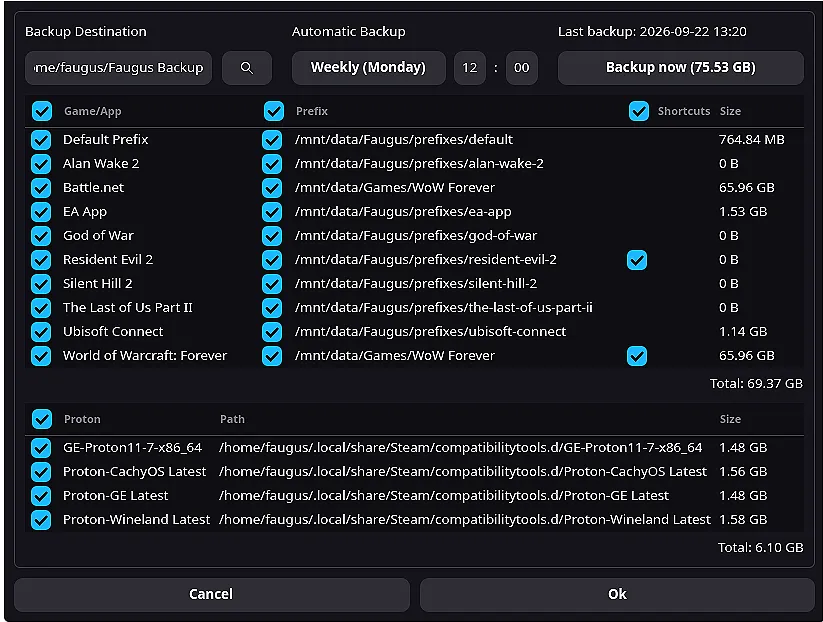
The 2.4.x cycle has been the project's most active yet. 2.4.0 alone (24 Sep 2026) introduced a backup system for individual games, prefixes, shortcuts, and Protons, an overview panel, per-view color and orientation controls, a tabbed Settings window, automatic icon extraction, and the removal of an always-on logging option that was found to tank performance when left running. That cadence, several stacked releases within weeks, really does signal a team listening to its community.
Keeping in mind that, this 2.4.3 is a quality-of-life release rather than a sweeping overhaul. The per-game Proton choice gives power users tighter control without complicating things for casual players, who keep sensible defaults. For what it's worth, paired with widget coloring, fresh translations, and a tidy list of fixes, it reinforces Faugus as one of the most approachable front ends for running Windows games on Linux. Not a revolution. Just a healthy one.
Installation follows the usual channels. Arch users grab it from the AUR, Fedora and Nobara from a Copr repo, Debian and Ubuntu families from a PPA or a standalone .deb, and everyone else from a Flathub Flatpak. You can also build from source with Meson and Ninja.
Head here to check out Faugus 2.4.3.


