Deepin Technology released deepin 25.2.0 on July 7, 2026, delivering a major stability overhaul to its homegrown Treeland Wayland compositor. The update introduces AI-powered local image search, per-window taskbar grouping, and fine-grained file indexing controls that significantly improve desktop workflow. Deepin now supports four CPU architectures including Loong64 and a new technology-preview build for RISC-V, reflecting its growing hardware ecosystem ambitions. Existing users can upgrade via the terminal or Control Center, though a fresh install is recommended for those still running versions prior to 25.1.1.
Deepin 25.2.0 lands with a mature Treeland compositor and AI-powered image search
Deepin Technology has pushed out deepin 25.2.0, the latest point release for its Debian-based Linux desktop.
The update landed on July 7, 2026, and brings the longest-running project on its roadmap to a head. The Treeland Wayland compositor has finally outgrown its early teething problems. Pair that with AI-driven image content search, per-window taskbar icons, and native RISC-V previews, and you have a release that actually feels ready for daily driving.
For context, Deepin has been building toward this moment since alpha testing began in March 2025. The team spent the last eighteen months rewriting how the desktop talks to the display server, swapping out the X11 stack for Treeland, a compositor written entirely in-house. It sits alongside Sway and Mutter as one of the few Linux compositors that does not rest on top of a larger desktop framework.
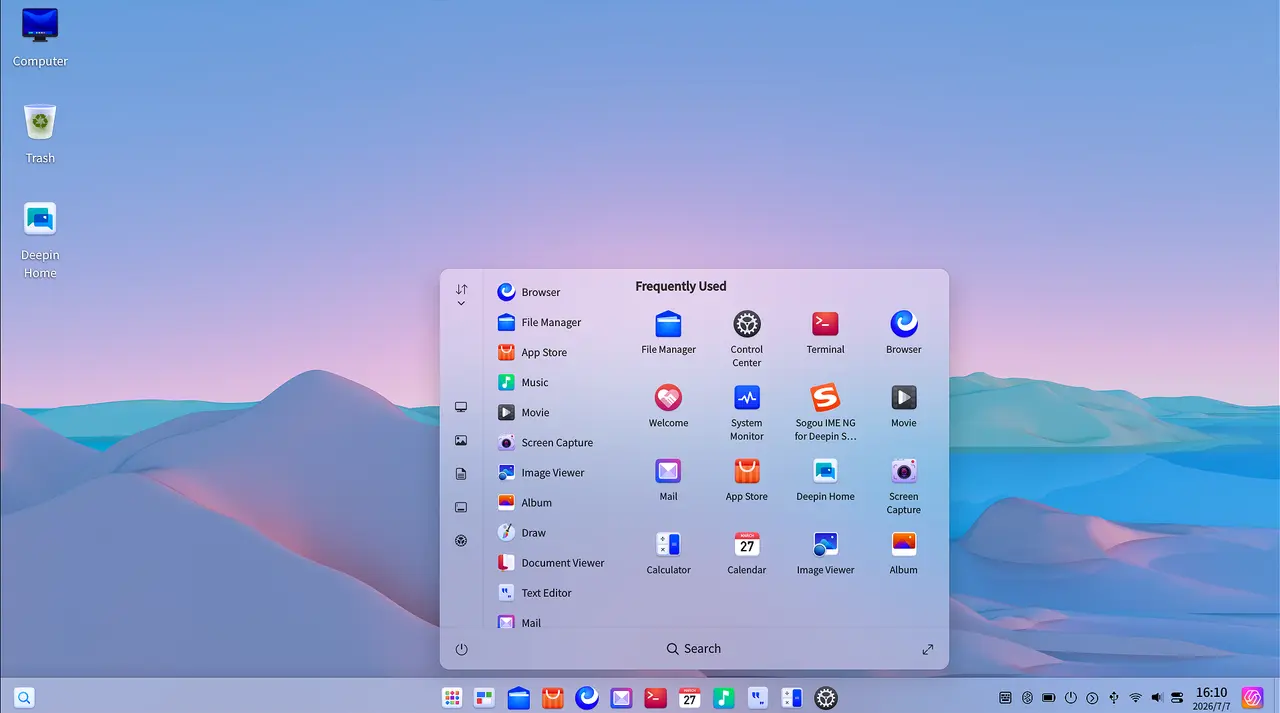
The Treeland Compositor Hits Its Stride
The headline shift in 25.2.0 is not just that Treeland works. It is that it works reliably. The team has patched more than 20 stability issues touching login and logout flows, multitasking views, window management, and focus switching. Input handling across mouse, keyboard, and touch is fully adapted. Display cloning, extension, per-screen resolution, and scaling all function under the new backend, along with suspend, standby, and dynamic wallpapers.
Deepin claims a 100% rendering performance jump over X11 and a 50% boost in animation smoothness after rebuilding desktop components in QML. Real-world gains will still depend heavily on your GPU and driver stack, though the continuous integration logs show the compositor is finally syncing properly with the Deepin Desktop Environment's core input, personalization, and power management layers.
Cross-screen splicing now supports horizontal, vertical, and matrix layouts, which is a practical win for multi-monitor dashboards and presentation setups. The dock theme also follows dark and light system modes under Treeland now, something that flickered or broke in previous previews.
Search, Taskbars, and the Usual Desktop Polish
On the user-facing side, the file manager finally gets AI-assisted image search. You can type a keyword, and it will pull up screenshots, scanned documents, and photos containing that text. It is essentially local OCR tied directly into the indexing pipeline. You will need to enable the feature manually in the file manager settings, but it works without uploading anything to a cloud service.
File indexing is now a toggle you can control per-drive. Flip it off when you are trying to balance background resource usage, flip it on when you need speed. Text matches show highlighted snippets in both the file manager and global search results, which saves you from squinting at raw filenames in a sea of matches.
The taskbar finally switched to per-window icons instead of per-application. Open WeChat, a mini-program, and a file dialog, and you will see three distinct icons in the dock rather than one squished logo. It is a small change, though multi-window workflows were previously a nightmare of guesswork.
Other desktop tweaks include automatic mirror selection for system updates, optimized network switching when multiple NICs are active, and a series of targeted fixes for the Mail, Music, Album, and Movie Player apps. The Archive Manager got split-archiving and encrypted filename fixes, and the document viewer now supports line-by-line arrow key scrolling for screen reader compatibility.
Under the Hood: Kernels, Security, and Four Architectures
Deepin 25.2.0 ships with Linux kernel branches 6.6 and 6.18. Full support is locked in for AMD64, ARM64, and Loong64, while RISC-V lands in technology preview status. The ARM64 build officially supports Phytium D2000 through D3000 and E2000 through S5000C chips, plus the Kunpeng 920. The Loong64 image targets Loongson processors for China's domestic CPU ecosystem. RISC-V support keeps Deepin in the early-adopter tier for the architecture, which has heavy backing from Chinese semiconductor initiatives.
The base component refresh brings Qt6, PipeWire, ALSA, libvirt, and os-config into the fold. Security-wise, the release syncs multiple CVE fixes across OpenSSL, OpenSSH, curl, poppler, xorg-server and Xwayland, and ffmpeg. It is a necessary cleanup, especially since Xwayland is still being kept alive for legacy app compatibility during the X11 transition.
For the rest of the 25 series feature set, Deepin keeps the Linyaps containerized app framework running alongside native DEB, AppImage, and Flatpak packages. The UOS AI integration handles voice commands, translation, and drag-and-drop file parsing through the AI Bar. Mobile sync works with Redmi, OPPO, HONOR, OnePlus, vivo, Xiaomi, and Huawei devices. Distrobox is also available from the app store for one-click subsystem installs of Ubuntu, Debian, Arch, and Fedora.
How to Get It
Existing deepin 25 users can jump straight to 25.2.0 via the control center or a quick sudo apt update && sudo apt dist-upgrade. If you are running anything before 25.1.1, a clean install is probably your best bet. Incremental upgrades over long stretches tend to pile up configuration drift.
ISOs are available across all four architectures, with AMD64, ARM64, and Loong64 builds landing between 5,200 and 6,700 MB. Checksums are published alongside the release for verification.


