Ardour 9.5 Brings Serious MIDI Editing Tools to Your DAW Workflow
Ardour 9.5 lands with a heavy focus on MIDI editing, chord quantization, and a bunch of quality of life tweaks that actually matter for daily tracking. The update fixes long standing gripes about pianoroll navigation, adds stacked automation lanes, and finally brings reference notes to the table without forcing users into third party plugins. Here is what changes in the workflow and how to make the most of it.
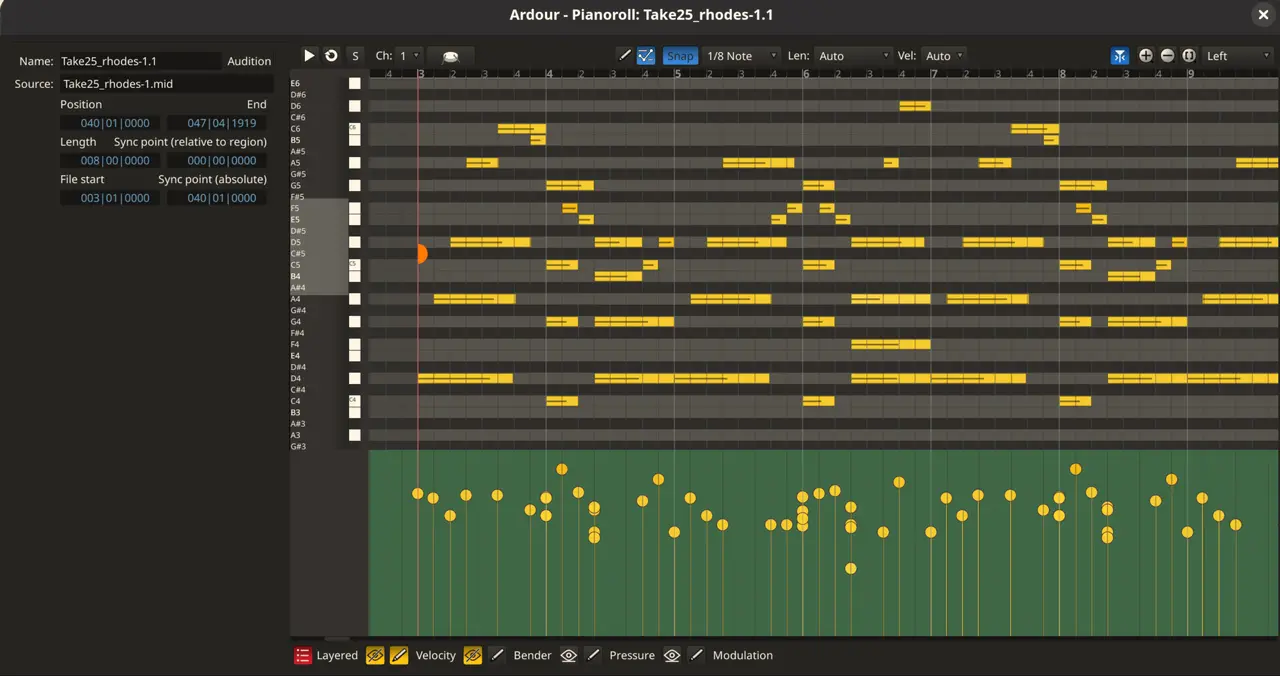
Chord Editing and Reference Notes Actually Work Now
The pianoroll finally gets a left sidebar for chord editing that does not feel like an afterthought. Users can switch to draw mode, pick a three or five note chord shape, and just click the root note to place the whole thing. It saves time when laying down basic progressions or fixing sloppy MIDI performances. Quantization works alongside this by letting you snap those drawn chords to a grid without breaking their harmonic structure. The real win here is the reference notes feature. You can open multiple regions in one view and keep inactive ones faded in the background for comparison. This matters because arranging complex parts usually means jumping between windows or exporting temporary files just to check voicings. Now you can switch active regions with a dropdown or edit everything at once when the timing lines up.
Stacked Automation Lanes and Better Visual Feedback
Automation lanes in the pianoroll now stack on top of each other instead of forcing users into four predefined slots. You can add any lane, drop control points, or clear tracks with a single click. This removes the old workflow friction where tweaking multiple parameters meant fighting through hidden menus. Color schemes for notes also get more options like velocity, channel, track, and pitch mapping. The pitch theme is fully configurable, which helps when sorting out polyphonic MIDI data that looks like a mess in default views. A Cubase style cross cursor rounds out the visual upgrades by giving a clear orientation line while drawing or painting automation curves.
Windows Builds, Plugin Views, and LLM Control
The summary pane got thinner with zoom controls moved to the right side, making it less obtrusive during long mixing sessions. RegionFX control points now appear on hover instead of requiring a click to reveal them. Plugin views in the bottom editor pane can collapse down to show just bypass toggles, which keeps the interface clean when swapping out effects frequently. Track templates are also accessible from the mixer page, letting users drop preconfigured processing onto existing tracks without rebuilding chains from scratch. Two new color themes ship with this release called Arc and OneDark for those who prefer darker interfaces over the default light setup. Windows users finally get initial MSVC support for building Ardour locally, though official releases still rely on MinGW. The project also ships an opt in MCP server that lets a local large language model control the DAW through HTTP. Users enable it under Edit Preferences Control Surfaces and tick the experimental checkbox. This keeps the feature disabled by default so casual users do not accidentally trigger background network requests or expose their session data to unverified processes. After enabling, copying the provided URL into a local LLM client establishes the connection without requiring complex server configuration.
Bug Fixes That Actually Matter
The changelog reads like a cleanup of long standing edge cases that would quietly break sessions during export or recording. Latency compensation gets fixed when side chain sends are active, and muted aux sends stop producing audible artifacts. MIDI chase logic now clears locate trackers properly if the playhead lands in empty space, which prevents phantom notes from triggering on restart. The update also handles unusual characters in Windows MIDI device names without crashing, a common headache for users with multiple controllers plugged in. Automation points near existing lines snap correctly now, and undo redo behavior stays stable when adding the first point to a region gain line. These fixes matter because they stop sessions from corrupting or behaving unpredictably during critical tracking phases.
Give it a spin on your main session and see how the chord tools handle your MIDI sketches. The pianoroll finally feels like a proper composition space instead of an afterthought.


