AnduinOS 2.0.5 brings optional AI coding agents, a new maintainer-controlled boot stack, and clearer Secure Boot reporting to its Windows-11-flavored Ubuntu distro. Current users get no forced migration, the new anduinos-shim-signed is only suggested, so ordinary apt upgrades keep your existing Ubuntu boot chain intact. The batch also adds Shuangpin input, a GNOME layout profile, a consistent Fluent unlock screen, and installer improvements like ext4 partition shrinking, though disk encryption and TPM auto-unlocking are deliberately held back. It's a mature, stable build for older hardware, with one caveat: don't do-release-upgrade to Ubuntu 26.10, or you'll lose Btrfs /boot support.
AnduinOS 2.0.5 Adds AI Coding Agents, a New Boot Stack, and Cleaner Secure Boot
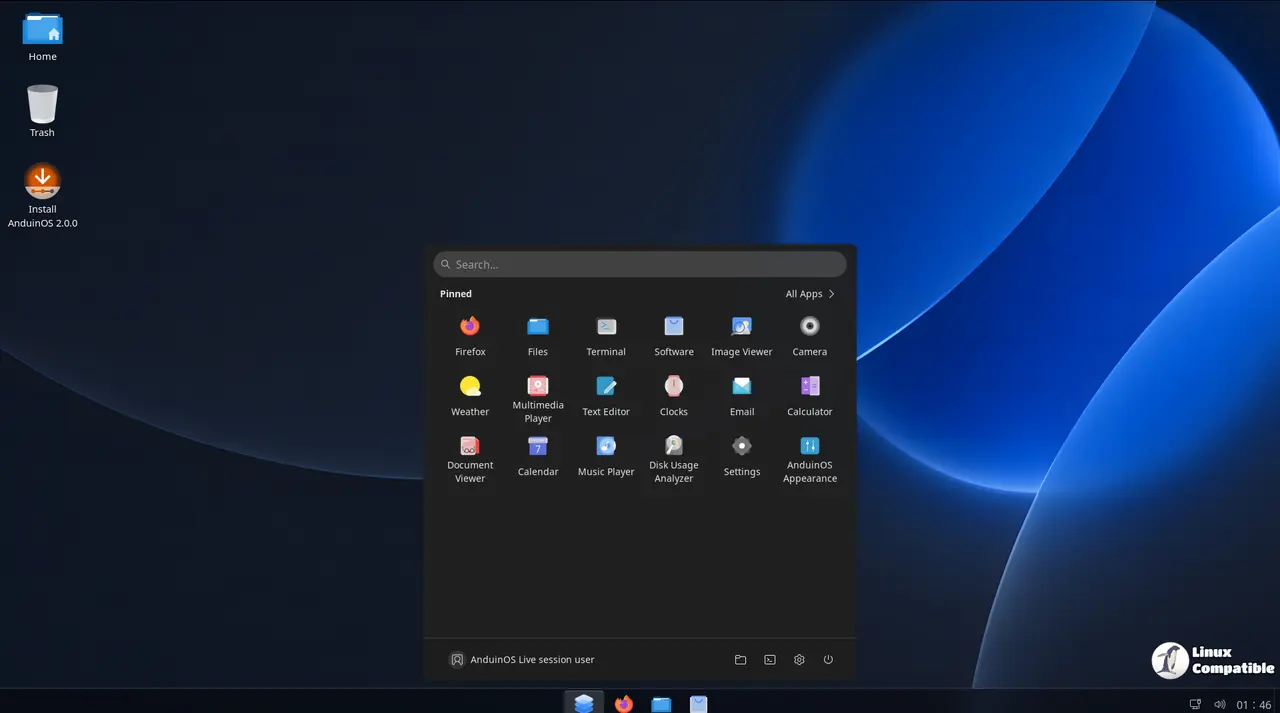
A Windows-11-looking Linux distro just got more ways to get in and out the door. AnduinOS 2.0.5 shipped on October 25, 2026, from Aiursoft, the Hong Kong company now behind Anduin Xue's popular Ubuntu-flavored project. The release leans on three themes: optional AI coding assistants, a freshly-maintained boot stack, and a Secure Boot status report that stops telling you your system is broken when it isn't.
For the uninitiated, AnduinOS is the "feels like Windows, runs on Ubuntu" distribution that built a following without much of a marketing budget. Under Aiursoft it's gone from a solo hobby to something with a real backroom.
The headline feature: agents you can opt into
The biggest change is a page in the Welcome Center called "Control Your Computer with Natural Language." It shows logo cards for various AI coding assistants and tracks their install status, logs, and menus. You can skip the whole thing if you don't care.
Who you see depends on your language. Mainland Simplified Chinese users get Kimi Code, DeepSeek Harness, GLM through OpenCode, MiniMax Code, and Qwen Code. Everyone else gets Claude Code, Codex, GitHub Copilot, Antigravity, and OpenCode.
Installation asks for a third-party risk confirmation and shows expandable command logs along the way. DeepSeek will prep the latest Node.js via a user-local nvm if it needs to, and yes, it tells you that before you commit. Provider accounts, API keys, and billing stay separate from AnduinOS, which is the part worth appreciating: your OpenAI tab doesn't need to leak into your filesystem just to use a chatbot.
A new boot stack, and no, you don't need to migrate
Here's the part that will make current users breathe. Fresh AMD64 and ARM64 installs now use an Aiursoft-maintained boot stack, anduinos-grub plus anduinos-shim-signed, backed by a machine-local signing certificate. If your install makes a new EFI System Partition, it also sets a default boot path so the system has a fallback if a firmware entry goes missing.
Existing installations are not forced to do anything. The new shim is only suggested, not required. So when you run your ordinary apt upgrade, you keep the Ubuntu boot stack you already have. No certificate re-enrollment. No midnight surgery.
It's a smart call, honestly. Most distro teams would have quietly broken your boot and handed you a forum thread to figure out. AnduinOS chose the path of least pain.
Secure Boot that stops misreporting itself
Secure Boot has been a selling point for a while ("No MOK enrollment nightmares"), but status reporting was muddled. Driver Center now separates "AnduinOS is ready but Secure Boot is disabled" from something that actually needs repair. Enrolled certificates won't throw a bogus "needs preparation" warning just because your firmware enforcement is off.
Setup Mode gets its own separate guidance instead of being mistaken for a MOK problem. And the redundant "Prepare AnduinOS for Secure Boot" button finally disappears once enrollment is complete. Small things, but they're the difference between a distro that respects your machine and one that treats it like a test bench.
The rest of the batch
Not everything here is seismic. Some of it's just good housekeeping.
Chinese typists get three new Shuangpin layouts in Rime, Natural Code, Microsoft, and Xiaohe, accessible by pressing F4 with a text field focused. No separate input-method setup. The Fluent unlock screen now actually stays Fluent after suspend (a bug that used to revert it to something stock-looking). And Appearance gains a GNOME profile that cleanly disables Dash to Panel, ArcMenu, and Blur my Shell if you want the stock look, then reconfigures everything back when you switch.
The installer got its own fixes, though these need freshly built 2.0.5 media since they aren't delivered over APT. Keyboard selection now comes before Wi-Fi setup, and advanced partitioning can finally shrink eligible unmounted ext4 partitions, not just NTFS, to make room for a second install. Factory Reset gains a snapshot-history cleanup option, and Software Source lets you pick between official Flathub and the USTC mirror.
Three new Live boot entries also appeared under Advanced Options: a Console Compatibility mode that sidesteps certain splash-screen freezes, and a Skip Media Check option for when you're confident your USB is fine.
Worth the trouble?
At this point AnduinOS 2.0 has matured into a real thing. It ships on Ubuntu 26.04 LTS, supports 28 languages in a single ISO. For older hardware that can't clear Windows 11's TPM and CPU hurdles, it's still one of the more frictionless doors in.
The one thing to keep in mind: stay on the supported base. Aiursoft explicitly warns against running do-release-upgrade to Ubuntu 26.10, since that drop Btrfs /boot support from its signed GRUB. And note that disk encryption and TPM auto-unlocking are deliberately not here yet, the new GRUB does carry Btrfs, LUKS2, and Argon2 support as groundwork, but the feature itself is coming later, not this release.
If you want to try it, the ISO is available through Aiursoft's news site and package repositories at packages.anduinos.com. It needs roughly 4 GB of RAM and 25 GB of disk space, which is modest enough that a ten-year-old laptop is probably fine.
Head here for the full release notes and the boot-architecture guide if the signing details interest you.


