Simple Taskbar Lands V72 for GNOME With a Focus on Polish
The latest release of Sultech's popular GNOME taskbar extension is about polish, not new features. It brings performance tweaks and fixes for some of the trickier geometry found in vertical and multi-monitor setups.
When GNOME first shipped its shell in 2011, it made a call that still splits Linux desktop users today. Windows and KDE arrived with a strip of application buttons. GNOME swapped that strip for an Activities overview and a thin top panel. For newcomers arriving from macOS or Windows, that missing bar has long been the single most common reason they turn back.
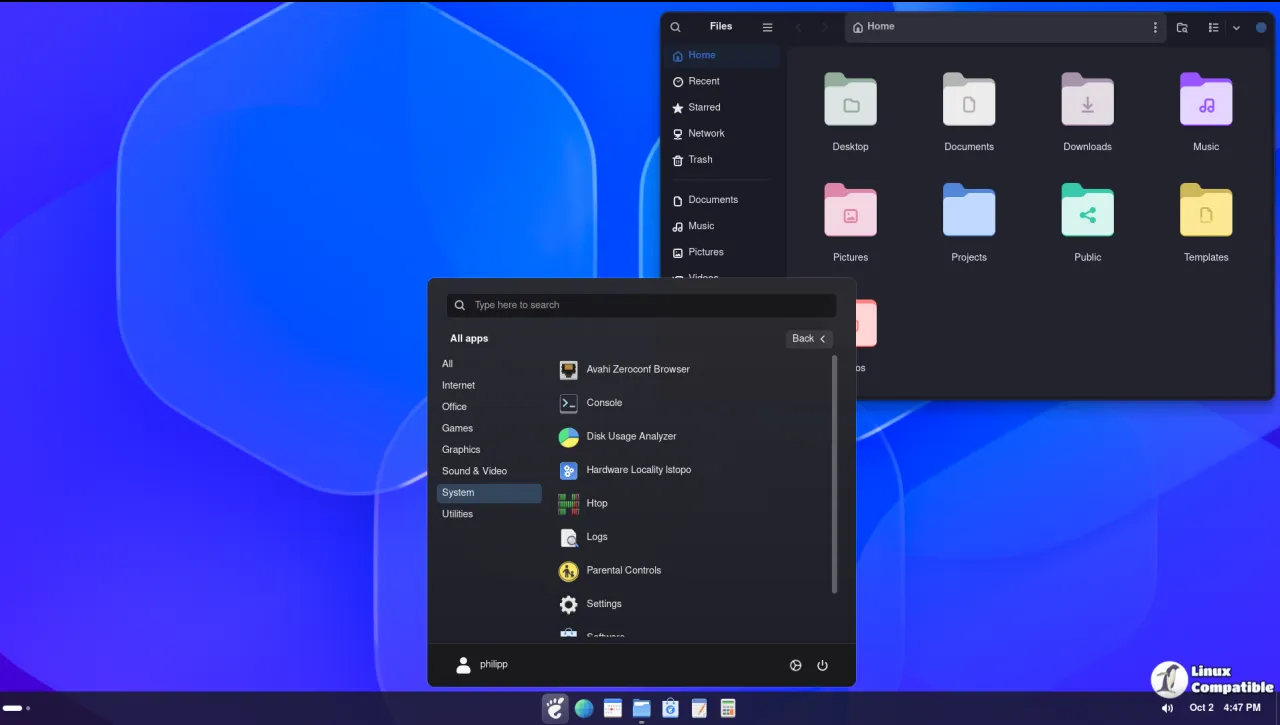
A whole ecosystem grew up to plug the gap. Dash to Panel and Dash to Dock are the biggest names, and both make you dig through mountains of settings before they look right. Simple Taskbar, a free open-source extension from developer Sultech, pitches itself on being simpler. The pitch is a familiar taskbar almost out of the box, with GNOME's own clock, calendar, Quick Settings and notifications left untouched.
The project is young and fast-moving. Its GitHub repo was created on 19 July 2026. By mid-October, a little over three months on, it had reached version 70. Now, on 21 October 2026, Simple Taskbar has landed V72, branded "Taskbar Improvements."
What V72 Actually Changes
V72 is explicitly a polish and stability release. There's no new theme or mode to get excited about. The title says as much, and the changes follow.
The performance side is modest by design. It caches taskbar settings on the main and secondary panels to cut redundant reads as the panel redraws. On top of that, it stops rebuilding buttons when an app reports a window change that doesn't actually affect what's shown on screen. That's a small win, but one you notice only when it's missing.
The bulk of the visible work is in the fixes. Ten of them, to be precise, and they mostly concern geometry. Several involve icons shrinking on vertical taskbars: the taskbar thickness failing to follow the icons, jittering caused by the clock recalculating its own layout, and a Start button highlight that lands off-center on odd icon sizes. Others cover vertical panels on secondary monitors, where clock centering, the Start menu's target monitor and even auto-hide all go slightly sideways when window dodge is engaged. Two more fixes stop auto-hide from letting notification banners overlap the panel, and one restores panel blur after you toggle Blur My Shell off and back on.
Keep in mind that these are the kinds of bugs that never make a press release. Fixing the geometry of vertical and multi-monitor layouts is exactly the unglamorous maintenance that separates an extension that merely works from one that feels done.
The Release Cadence
V72 is only the third in a streak of weekly releases that kicked off in mid-October. V71, the day before, redesigned the preferences into what the author calls "settings hubs" and added a Spanish translation. V70 the previous week landed a Windows 10 theme. The tag history alone is striking for a project this young: roughly 900 commits against about 70 tags, meaning small, frequent, tightly scoped changes rather than grand periodic drops.
Here's a detail that tells you where the maintainer's head is. During the V70 era, one commit message read simply "remove trailing blank line from defaultPanelWindows.js." Nothing to see there. Move along. It's a perfect microcosm of a single developer chasing GNOME's internal APIs as fast as they move. The repo now shows 163 stars and 13 forks, with about 9,300 downloads on the official GNOME Extensions site.
Sultech runs this essentially as a single-maintainer effort, with a handful of contributors sending pull requests. Reception has been healthy for such a niche tool. On r/gnome users have called it "a clean taskbar out of the box," and the feature wishlist leans hard toward Windows- and macOS-style niceties: per-app volume boost above 100%, a macOS "Stack Fan View," keeping the dock hidden in the Overview.
Simple Taskbar already does an enormous amount for a single extension. Five layout modes, roughly 23 click animations, live window previews, an optional Windows 11-inspired Start menu, and panel thickness that runs up to 175px. It collects no telemetry and touches no network, which is getting rarer than you'd expect. It's arguably the most feature-packed taskbar extension available, which is arguably why the focus on polish now makes sense.
However, at the same time, this project's longevity depends entirely on one person sticking around. V72 isn't a reason to celebrate so much as a sign that things are heading in the right direction. If you've been meaning to try a "real" taskbar on GNOME without throwing away Quick Settings and notifications, this is a reasonable moment to start.
git clone https://github.com/Sultech/simple-taskbar.git
cd simple-taskbar
./package.sh
gnome-extensions install --force dist/simple-taskbar@sultech.shell-extension.zip
gnome-extensions enable simple-taskbar@sultech
Log out and back in if GNOME Shell fails to discover the extension. Full changelog lives at the GitHub releases page, and the code ships under GPL-2.0-or-later.


