Simple Taskbar 7.4.2 lands with polish fixes for GNOME Shell’s most ambitious replacement panel
A solo developer pushes a focused update just days after the GNOME 51 stable release, tightening up Alt-Tab navigation, notification badges, and cross-platform nostalgia themes.
Simple Taskbar has been quietly becoming the default answer for Linux users who missed a proper taskbar the moment they installed GNOME. The extension replaces the stock top bar with a configurable system that supports macOS-style floating docks, Windows XP and 10 themes, and a responsive grid-based Alt-Tab switcher. If you've been following the GNOME extensions ecosystem, you've probably seen it sitting at roughly 37,793 downloads on extensions.gnome.org. That number climbed faster than most mature desktop projects in their first year.
The repository only opened in mid-July 2026. Since then, maintainer Sultech, known publicly as Sul, has tagged more than 70 versions. If you remember the early V70 days when the Alt-Tab switcher still cycled backward by accident, the current state feels like a different product entirely. At this point, the project has settled into a rhythm of tightly scoped patches rather than massive feature drops.
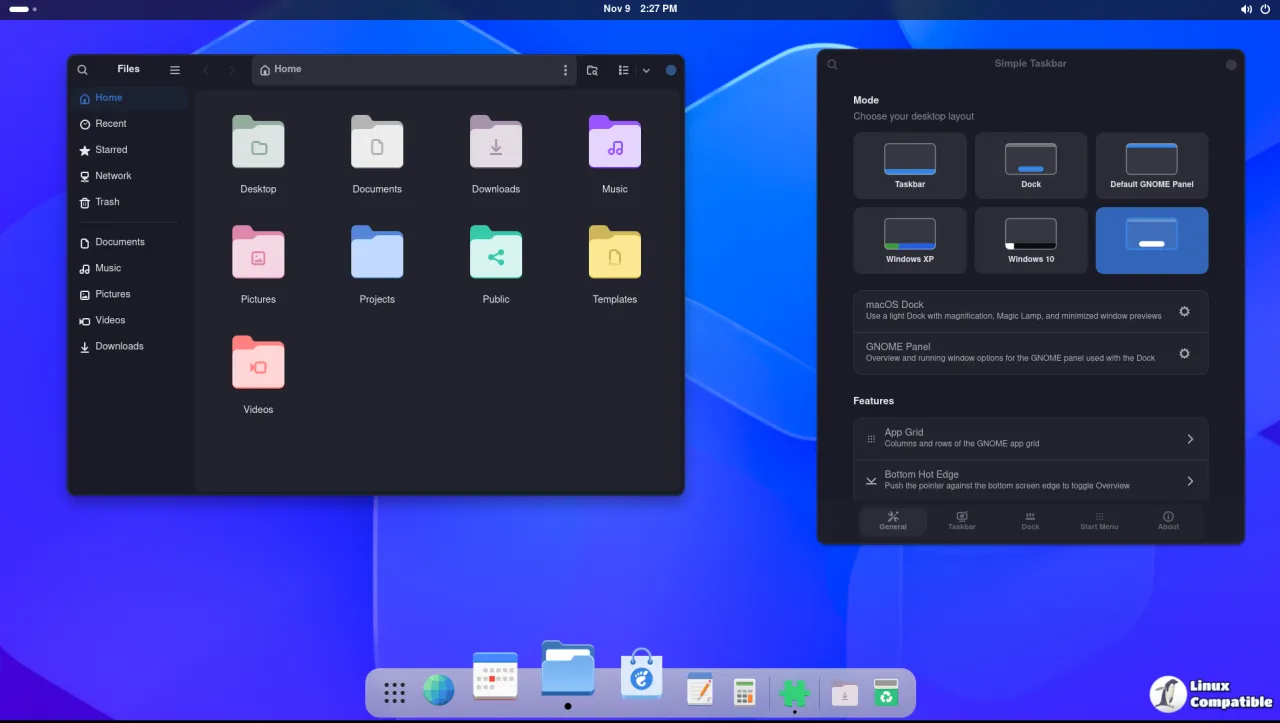
What actually shipped in 7.4.2
This latest release is a straight polish pass. Sul addressed four reported bugs, including a regression where Alt+Shift+Tab stopped cycling in reverse inside the grid switcher. Notification badges were also blurry when icons hit magnification mode, a scaling pipeline bug that finally got corrected. The dynamic panel banner alignment bug that stretched system notifications to the screen edge instead of matching the taskbar width is gone now, and the Start Menu settings button no longer throws a crash if you forgot to install GNOME Settings.
There are several meaningful quality-of-life tweaks layered in, too. The Start Menu and Spotlight search now render a second line for description text, which means GNOME Calculator actually shows you the full answer as you type instead of truncating it. Ptyxis terminal recognition got added for anyone running Ubuntu 26.04 or Fedora 41. Performance got a quiet bump as well, with the magnify hover animation shedding some per-frame overhead on lower-end hardware.
Sul also used this release to tidy up the codebase ahead of an extensions.gnome.org compliance review. GObject classes now use constructor(), app lookups switched to GioUnix.DesktopAppInfo, and several small settings modules were merged. It's a minor technical cleanup, but the extensions platform review process has been notoriously inconsistent for GNOME Shell add-ons, and this kind of prep work usually pays off with a cleaner, more stable listing.
The single-maintainer model remains the obvious vulnerability here. When a project carries 37,000 downloads and updates roughly every other day, your reliance on one developer's spare time becomes a genuine risk if a real GNOME Shell update breaks something overnight. Feature bloat is also a constant tension. With 23 click animations, eight indicator styles, and a Start Menu that handles categories, search, and system shortcuts in one window, new users can easily drown in options. The "works out of the box" design philosophy helps, though the settings depth can still feel steep if you're coming straight from Windows 11.
For what it's worth, the extension fills a very real gap. Windows migrants consistently rank the missing taskbar as their biggest friction point with Linux, and a single extension that handles grouping, previews, badges, and a proper start menu cuts out the three separate add-ons most people used to patch together. Privacy gets a quiet nod too, since the extension collects zero telemetry and never touches the network. Sul explicitly lists it as a privacy feature, which is a deliberate stance given how many GNOME extensions historically shipped with analytics collectors. GNOME's own search providers still handle the actual results, and the README flags that some of them copy text to your clipboard when you activate an entry, which is worth keeping in mind if you're used to strict sandboxes.
Head here to GNOME extensions to grab the update through the official site, or pull the source from here if you prefer manual installs.


