Proxmox VE 9.2 finally automates cluster balancing with a dynamic load balancer that shifts workloads in real time without breaking high availability rules. The update also bakes native WireGuard and BGP support directly into the software-defined networking stack, which neatly sidesteps the usual headache of patching together external routing scripts. Administrators get a proper web interface for custom CPU profiles and a handy HA arm or disarm toggle that stops the cluster from throwing unnecessary failovers during maintenance windows. Under the hood it runs on Debian 13.5 with kernel 7.0 and updated core tools, making standard APT upgrades straightforward for most existing deployments.
Proxmox VE 9.2 Brings Dynamic Load Balancing to Tame Your Overloaded Cluster
Proxmox VE 9.2 drops today with a dynamic load balancer that actually tries to keep your cluster from choking on uneven workloads. The update also adds native WireGuard and BGP support, custom CPU model controls, and a maintenance mode that stops the high availability stack from panicking during upgrades. This version fixes some of the most frustrating manual balancing headaches while keeping the underlying Debian base fresh with kernel 7.0 and QEMU 11.0.
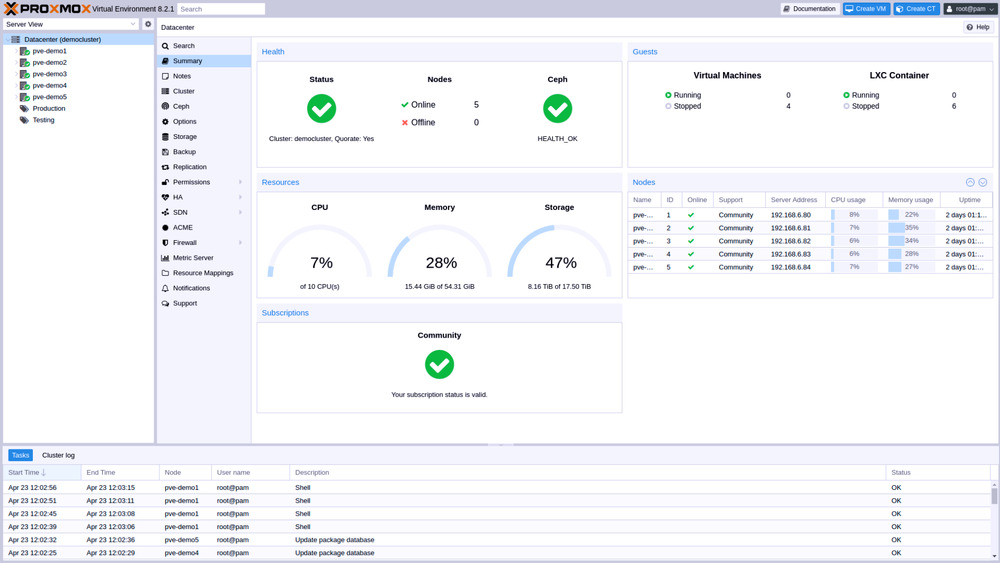
Proxmox VE 9.2 Dynamic Load Balancer
The new dynamic load balancer finally automates what used to require constant manual intervention or third party scripts. Instead of relying on static rules, the cluster resource scheduler now watches real time node and guest utilization before deciding where to place virtual machines. It even migrates high availability managed guests across nodes to smooth out hotspots while strictly honoring user defined placement rules. The system exposes configurable sensitivity parameters so administrators can dial in how aggressively it rebalances workloads. This matters because uneven resource distribution usually means some nodes sit idle while others throttle under heavy loads, and manual migration scripts often break during peak hours. A real world example shows why this helps: a small lab running several database containers noticed one node consistently hitting ninety percent CPU while the rest sat at forty percent. The new balancer detected the drift and shifted two light workloads to cooler nodes without interrupting active connections.
Expanded SDN and Network Controls
Software defined networking gets a serious upgrade with native WireGuard and BGP integration baked directly into the fabric layer. Route maps and prefix lists now allow fine grained control over route redistribution, which keeps routing tables from becoming an unmanageable mess during complex multi site setups. OSPF fabrics gain proper route redistribution support, EVPN controllers get additional configuration options, and IPv6 underlay support finally arrives for EVPN deployments. These additions matter because legacy networking stacks often force administrators to patch together external tools just to get basic BGP filtering working. The built in controls cut out that middleman step and keep network policies tightly coupled with the virtualization layer.
Custom CPU Models and HA Maintenance Controls
Managing custom CPU profiles used to require command line edits or risky config file tweaks, but Proxmox VE 9.2 moves everything into a dedicated web interface under the Datacenter section. Administrators can create, edit, or remove custom CPU profiles directly in the browser, and the integrated flags selector instantly shows which features are supported across all cluster nodes. This prevents those awkward moments where a VM refuses to start because one node lacks a specific instruction set flag. The update also introduces an HA arm and disarm feature that temporarily suspends the high availability manager during planned maintenance windows. Disarming the stack stops unwanted fencing actions while preserving resource states, so everything snaps back to its original placement once the cluster arms itself again after upgrades. This matters because forced reboots or node replacements often trigger unnecessary failovers that disrupt running services.
Underlying Stack and Upgrade Path
The foundation rests on Debian 13.5 Trixie with Linux kernel 7.0 as the stable default, alongside QEMU 11.0, LXC 7.0, ZFS 2.4, and Ceph Tentacle 20.2. These components deliver better performance for modern workloads while keeping the open source architecture intact. Upgrading from older releases works through the standard APT package management system, which means most existing deployments can roll out the update without rebuilding from scratch. The ISO installer remains available for fresh bare metal setups, and a Debian base installation option still exists for those who prefer to layer Proxmox over an existing OS. Enterprise support contracts start at one hundred twenty euros per year per CPU core, which covers direct expert access and stable security patches.
Give the update a test run in a lab environment before pushing it into production. The load balancer alone is worth the upgrade for anyone tired of manually shuffling workloads around. Keep an eye on the release notes for edge case quirks, and enjoy the smoother cluster management.


