Faugus 2.4.4 ships as a hotfix, fixing a Proton install bug
The lightweight Linux game launcher pushes a corrective patch just hours after 2.4.3, rescuing users from a critical installation failure.
Faugus 2.4.4 is out, and it's a hotfix rather than a feature release. The point of this update is narrow and important: it repairs a bug that left the launcher unable to install under the new default-Proton behavior. Without it, fresh installs simply didn't work. Not a great look for software people use to reach their games.
The fix moved fast though. Faugus 2.4.3 and 2.4.4 both shipped on 8 October 2026, and 2.4.4 went out roughly seven hours after the earlier one. They're nearly identical on paper. In practice, 2.4.4 is a corrective follow-up, a patch to a regression spotted shortly after 2.4.3 went live.
Faugus itself is a lean front-end for running Windows games on Linux, built on top of UMU-Launcher. It deliberately keeps its footprint small, offering a clean library view, a place to pick compatibility tools, and a launch button while leaving the messy execution work to Proton underneath. It's positioned against heavier libraries like Lutris and Bottles, and with roughly 2,500 stars and just under 90 forks on GitHub, it's smaller but not insignificant. The project runs under the MIT license and leans on donations via Ko-fi and PayPal.
The real magic is the UMU-Launcher connection. UMU-Launcher is essentially Valve's Steam Linux Runtime, repurposed so it runs entirely outside Steam. That means you can launch non-Steam games through Proton, pull in community protonfixes, and avoid being locked to any one storefront. Optional. But functional.
What changed in 2.4.4
The headline fix is credited to contributor @Blumlaut. It resolves the launcher failing to install under the new default-Proton setup, and the release notes flag it above the horizontal rule, which is the maintainers' way of flagging the important part.
Beyond that, 2.4.4 carries forward earlier refinements. Games now use the default Proton installation out of the box, which casual users will appreciate. You can still override per game and pin a specific version if a title needs it. A few interface tweaks ride along too, including a new widget color option, a recolored "Remove" button in the Proton Manager, and a flowbox that populates vertically in horizontal orientation.
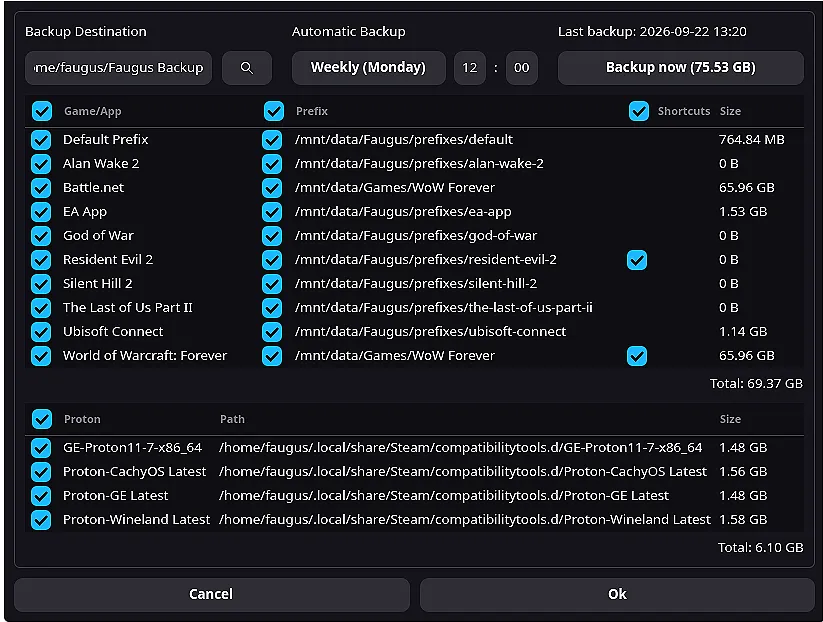
The bug list is where the release does most of its quiet work. Gamepad bumper navigation was breaking tab switches in Settings and now works again across multiple input devices. Duplicate game IDs, which popped up when you reused a game name, are now prevented, per a fix from @ammuench. Playtime and last-played counts update correctly when you launch from a shortcut, and the "Backup now" button stopped getting stuck on "Cancel backup." No stuck buttons. No lost gamepad input.
Two things stand out here. First, the maintenance pace. Shipping a corrective patch within hours of a release shows a responsive maintainer model, and that matters a lot when the tool sits between you and your game library. A broken install path can strand you. Fixing it quickly buys trust. Second, simplicity as a selling point. The broader Linux gaming category keeps piling features onto its launchers, while Faugus keeps trimming. Whether that holds up long-term is another question, but right now it offers a genuinely lean option.
Getting the update
Faugus 2.4.4 ships in four binary formats, plus a Flatpak and source builds. The .deb package was the most-downloaded asset in the first hours after release, ahead of the AppImage, following a pattern from earlier releases where the .deb alone logged hundreds of downloads.
Available formats include an AppImage for portable use, a tar.zst for Arch-based AUR systems, an RPM for Fedora 44, and a .deb for Debian, Ubuntu, and Mint.
If you're on Arch, yay -S --noconfirm faugus-launcher pulls it in. Fedora and Nobara users enable the Copr repo first, then install the package, while Debian-based systems work through the PPA. If you prefer sandboxed apps, the Flatpak lives on Flathub under io.github.Faugus.faugus-launcher. Build-from-source folks can run meson and ninja, and source dependencies include pygobject, requests, pillow, vdf, psutil, dbus-python, icoextract, gtk4, libadwaita, and libmanette.
One heads-up for AppImage users: the dependencies can't be bundled inside the file, so you'll need pygobject, gtk4, libadwaita, and libmanette already installed. Otherwise the Flatpak or package manager route is the smoother path.
The release credits 12 named contributors, including Blumlaut, ammuench, bittin, nixxo, and others, alongside translations maintained through Weblate covering Bulgarian, French, German, Japanese, Russian, Spanish, Ukrainian, and several others. All of it is free and open source.
Head here to grab 2.4.4 from the release page on GitHub, with the repo itself and the underlying UMU-Launcher also available if you want to dig into how it all fits together.


