Audacity 4.0.0 ships with a full Qt rewrite, new clip-based editing, and a refreshed logo
After years of under-the-hood work and a messy acquisition era, the 26-year-old audio editor finally gets the overhaul its userbase has been waiting for.
Audacity 4.0.0 is here, and it’s the biggest change to the free audio editor in more than a decade. Released today, the new version completely ditches wxWidgets for Qt, introduces a clip-based editing model, and ships with an entirely new .aup4 project format. The old interface is gone. So is the old way of working with tracks.
The road to 4.0 wasn’t a straight line. Muse Group, the company that acquired Audacity in 2021 amid telemetry and license controversies, took a pragmatic approach to the rewrite. The timeline for that pivot looks roughly like this: October 2024 marked the official switch to Qt, borrowing infrastructure directly from MuseScore 4. Six months later, developers from the MuseScore studio started showing up on the Audacity commit history. It was a quiet transfer of institutional knowledge that paid off, even if it meant waiting another year for a public preview.
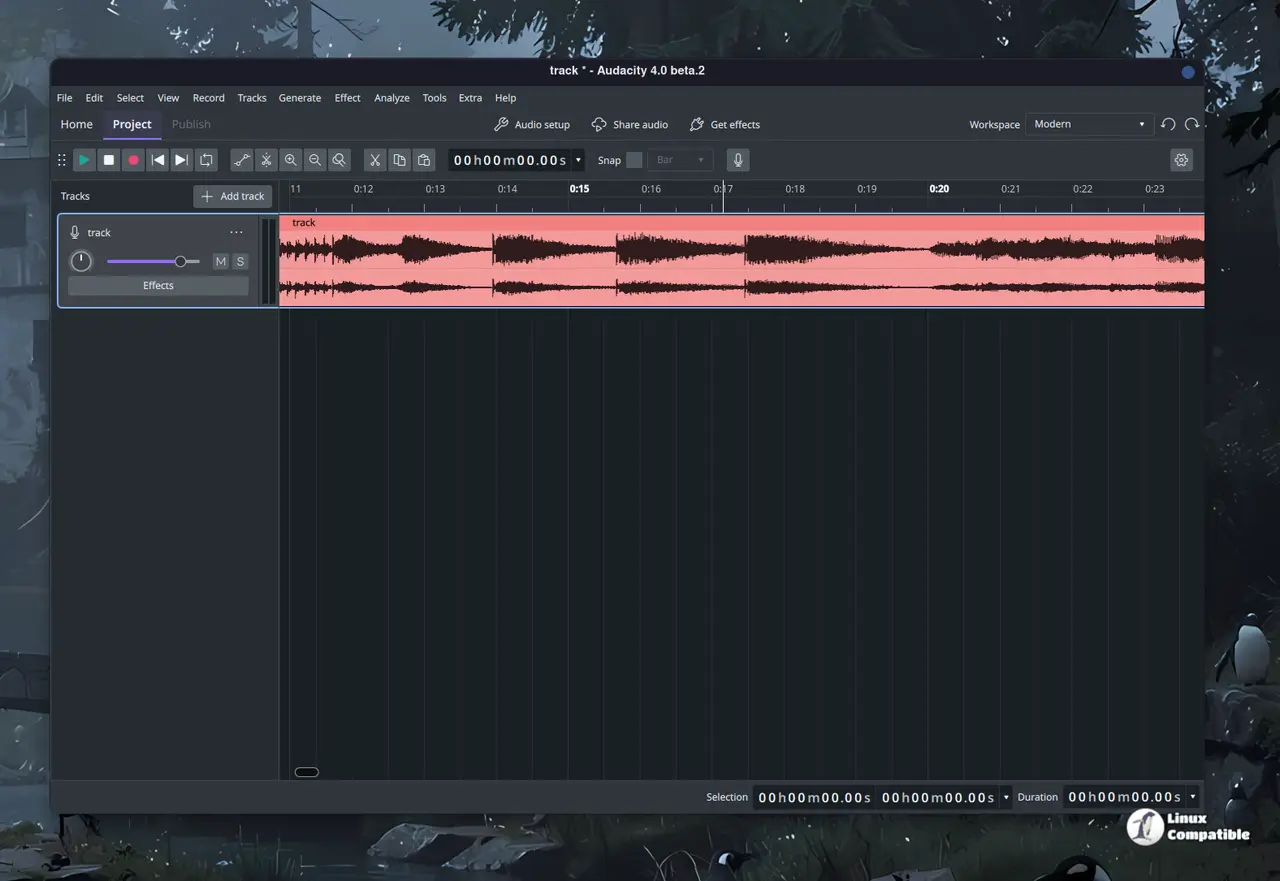
The new edit model and interface
Head to the new workspace and you’ll notice right away that Audacity no longer runs on a rigid, fixed timeline. Clips are now first-class citizens. You can click a clip header to select it, Shift-click to grab several, and trim or time-stretch them in bulk. Grouping keeps clips together during moves and copies, and placing a clip over another replaces the overlap instead of blocking your progress. There’s also a dedicated Split tool now (hold S), alignment guides, and sample-boundary snapping. Paste commands got smarter, too, since they will auto-create tracks when needed and adapt channel layouts.
The Qt migration brought high-DPI rendering, floating and dockable panels, and three shipped workspaces (Modern, Classic, Music). Light, dark, and high-contrast themes are in, along with accent colors and track palettes. The old Select, Envelope, and Draw mode toggle is dead. Functions are now context-sensitive: volume envelopes show up in Clip gain mode, and you can sample-draw when zoomed all the way in. Sync-Lock is gone. Replaced by explicit gap versus move-later variants. It’s a steeper learning curve if you’ve been on 2.x or 3.x, but it makes sense.
What’s missing and why it matters
Not everything made the cut. Time Tracks, MIDI, the mixer, Macro Manager, and the old VAMP/LADSPA plugin standards are nowhere to be found. Play-at-speed practice mode is also absent. The team has been upfront about this. Audacity 4.0 isn’t trying to be a full DAW. It’s fixing years of UX snags and rebuilding the core editing experience. Those missing features are queued for future releases. If you need a dedicated MIDI piano roll or a hardware mixer emulation, you’ll still need to look elsewhere.
Projects now save as .aup4. Open an old .aup3 file, and Audacity converts it without touching the original. You can’t save it back to .aup3 though, so treat the migration as permanent. The license situation has also normalized. The current build ships under GPL-2.0-or-later, with VST3-enabled builds using GPL-3.0-only for compatibility. The AGPL drama and telemetry pushback from 2021 are officially in the rearview. On Windows, official ASIO support is finally here. No more third-party workarounds for low-latency recording.
It’s a rather heavy lift for a project that’s been shipping incremental patches since 2019, but the payoff is clear. Audacity 4.0 feels like it was built for 2026, not 2011. The app sizes run from roughly 36 MB on Windows ARM up to 85 MB for the universal macOS build, and you can grab it directly from audacityteam.org, the Microsoft Store, or GitHub Releases. Just keep in mind that this is a UI and architecture overhaul, not a magic feature drop. The long edit session? That’s where the new clip model actually earns its keep.
Full release notes and download assets are live on GitHub. If you run into migration friction with older sessions, the team’s got a conversion guide ready. And if you’re still waiting for MIDI support, the roadmap says it’s coming. The wait is just a matter of months.


