Amethyst Mod Manager 2.0.0 Hits Release With Complete Qt UI Overhaul
The Linux-native Nexus modding tool finally gets a modern interface, faster performance, and new sharing features.
Amethyst Mod Manager just shipped version 2.0.0 today, and the most obvious shift is a ground-up rewrite of the entire user interface. After years of dealing with scaling bugs and UI freezing on heavy modlists, solo developer ChrisDKN finally pulled the trigger on a complete switch from CustomTkinter to Qt. It’s been about 4.5 months since the project first appeared on GitHub, and the development pace has been relentless.
If you’ve been trying to mod Bethesda titles, Cyberpunk, or Witcher 3 on Linux, you know the usual workaround involves wrestling with Wine prefixes or Windows-only managers like Mod Organizer 2. AMM steps into that gap by offering direct Nexus Mods API integration, native Proton and Steam Deck wizard tools, and support for over 45 games. The new version doesn’t just slap a fresh coat of paint on the app. It restructures how panels, overlays, and file previews actually behave.
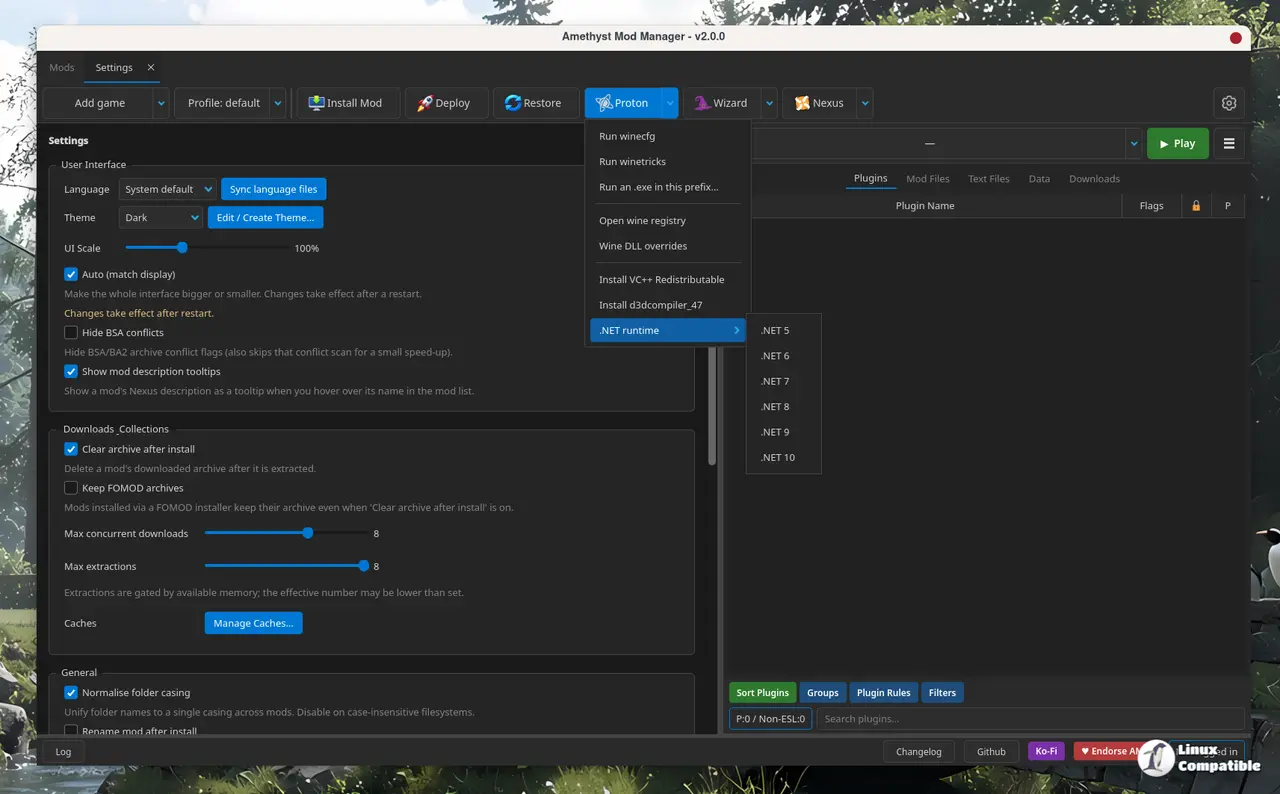
The Interface Gets a Serious Tune-Up
Tabs now open as undockable panels instead of floating overlays. You can drag them around, right-click to reposition them, or close them to redock. Progress bars and notifications will now hide behind other elements instead of blocking your buttons. The old archive tab is gone. Clicking a BSA or BA2 file in the mod files section will just open its contents directly in the main view.
Performance tweaks hit the backend too. The filemap rebuild process has been reworked to reduce UI freezing when toggling mods on large lists. Plugins.txt is now copied instead of symlinked to the game directory, which fixes a bunch of compatibility issues where games refused to read the linked files. The default staging folder has shifted to ./home/games/Amethyst to play nicer with Flatpak sandboxing. Skyrim AE community plugins will now auto-append to plugins.txt, and Cyberpunk 2077 setups will warn you if the game falls back to symlinks when hardlinks aren’t possible.
New Features, Removed Wizards, and Export Codes
AMM has always been a Swiss Army knife for Linux modders, but v2.0.0 adds some specific tools for workflow. Profile export codes are now live. Instead of zipping up your entire modlist, you can generate a compact text string that bundles your Mod IDs, file IDs, FOMOD settings, and load order. Importing that code opens a collection installer that recreates the exact state you were in. It’s handy for troubleshooting or sharing configs without handing over megabytes of redundant assets.
The theme editor got an overhaul, and localization support is now baked in using the DeepL API. You can add custom regex rules to strip data from archive names, run JAR files directly from the client, or use a wizard tailored for the Discord version of xedit. Pragmata font support landed for Skyrim SE and VR. Filter tags moved into the modlist search bar, giving you an alternative to the magnifying glass dropdown.
Not everything stayed. As ChrisDKN put it in the release notes, the BepInEx wizard was cut “as this is just a mod that can be installed normally like any other.” The generate separators function vanished for the same reason. A couple of bug fixes rounded out the release: FOMOD installer casing mismatches are handled properly now, and non-UTF-8 characters in archive files no longer block the filemap cache from building.
It’s a rather ambitious release for a project that’s essentially a solo endeavor. ChrisDKN carries the vast majority of the commits, and the near-daily update schedule during the transition to v2.0.0 is impressive but leaves little room for burnout. The Qt rewrite solves scaling headaches, but it’s untested at scale, so expect some rough edges as the community starts stress-testing it with hundreds of mods. Flatpak users will still need to manually download the runtime, and distro packages beyond Arch’s AUR are still waiting in the wings.
If you’re running Arch, grab it from the AUR right now. AppImage users can pipe the installer script through bash to pull down the latest build. There’s a Flatpak file on the GitHub releases page, and you can also find it listed as mod #1714 on Nexus Mods. The old CustomTkinter UI is gone for good, so if you were relying on specific legacy behaviors, you’ll need to adjust to the new tab system. Head to the GitHub releases page for the full changelog and to report any regressions.


