Software 44189 Published by

VSCodium 1.110.1 drops a tidy set of fixes that straighten out icon sizing in the status bar, tighten up tab spacing, and correct the pixel‑perfect look of the minimap’s bottom pane. The update also gives users a quick toggle to turn off Copilot’s inline suggestions, which can be a real nuisance after an extension hiccup. A simple JSON tweak disables those pop‑in hints while preserving the rest of the editor’s AI features. After a restart, the UI should feel smoother and the Copilot pop‑ups will no longer interrupt typing flow.


VSCodium 1.110.11631: Tweak Font Settings and Disable Copilot Inline Actions

The latest VSCodium build, 1.110.11631, drops a few tidy fixes that make everyday coding smoother. If you’ve been juggling messy icons or unwanted Copilot suggestions while debugging, this patch is the quick win you need.
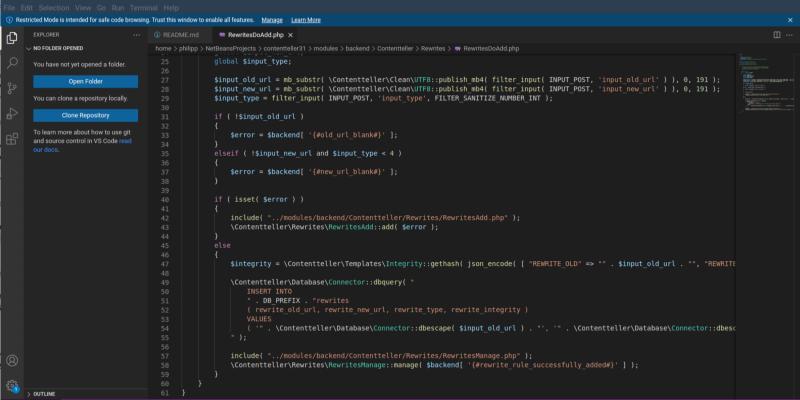
Gnome_shell_screenshot_5gc050

Disabling Inline Copilot Actions

Copilot’s inline actions sometimes pop up in the middle of code reviews and can clutter the view. The new update turns that feature off by default. For developers who use the extension for code completion but prefer to keep the editor free of extra UI elements, this change eliminates accidental clicks on “Show Copilot suggestions” buttons while navigating large files.

Bottom‑Pane Icon Size Tweaks

A handful of users reported that the icons in the terminal and debug console were too small after an earlier font tweak. The patch restores a more readable size without altering the overall layout. This is especially handy when you’re working on low‑resolution displays or with high DPI settings where tiny glyphs can become frustratingly hard to spot.

Clean Tab Spacing

Tabs used to have uneven spacing that made the active tab look oddly offset from its neighbors. The new font fix re-aligns icons and text inside each tab, so the active tab stands out just enough without being a visual headache when you switch files rapidly. This is a subtle but noticeable improvement for anyone who keeps dozens of tabs open at once.

How to Upgrade in Minutes

Open VSCodium, go to the menu bar Help Check for Updates, and follow the prompts. The installer will overwrite the old binaries and leave your settings untouched. If you’re running a custom build from source, replace the binary folder with the new files and restart the editor.

Release VSCodium 1.110.11631

x86 64bits

WindowsUser Installer VSCodiumUserSetup-x64-1.110.11631.exe
System Installer VSCodiumSetup-x64-1.110.11631.exe
.zip VSCodium-win32-x64-1.110.11631.zip
.msi - updates enabled VSCodium-x64-1.110.11631.msi
.msi - updates disabled VSCodium-x64-updates-disabled-1.110.11631.msi
Remote Host vscodium-reh-win32-x64-1.110.11631.tar.gz
Web Host vscodium-reh-web-win32-x64-1.110.11631.tar.gz
CLI vscodium-cli-win32-x64-1.110.11631.tar.gz
macOS.dmg VSCodium.x64.1.110.11631.dmg
.zip VSCodium-darwin-x64-1.110.11631.zip
Remote Host vscodium-reh-darwin-x64-1.110.11631..tar.gz
Web Host vscodium-reh-web-darwin-x64-1.110.11631.tar.gz
CLI vscodium-cli-darwin-x64-1.110.11631.tar.gz
Linux.deb codium_1.110.11631_amd64.deb
.rpm codium-1.110.11631-el8.x86_64.rpm
.tar.gz VSCodium-linux-x64-1.110.11631.tar.gz
AppImage VSCodium-1.110.11631.glibc2.30-x86_64.AppImage VSCodium-1.110.11631.glibc2.30-x86_64.AppImage.zsync
Snap codium_1.110.11631_amd64.snap
Remote Host vscodium-reh-linux-x64-1.110.11631.tar.gz
Web Host vscodium-reh-web-linux-x64-1.110.11631.tar.gz
CLI vscodium-cli-linux-x64-1.110.11631.tar.gz
AlpineRemote Host vscodium-reh-alpine-x64-1.110.11631.tar.gz
Web Host vscodium-reh-web-alpine-x64-1.110.11631.tar.gz

ARM 64bits

WindowsUser Installer VSCodiumUserSetup-arm64-1.110.11631.exe
System Installer VSCodiumSetup-arm64-1.110.11631.exe
.zip VSCodium-win32-arm64-1.110.11631.zip
CLI vscodium-cli-win32-arm64-1.110.11631.tar.gz
macOS.dmg VSCodium.arm64.1.110.11631.dmg
.zip VSCodium-darwin-arm64-1.110.11631.zip
Remote Host vscodium-reh-darwin-arm64-1.110.11631.tar.gz
Web Host vscodium-reh-web-darwin-arm64-1.110.11631.tar.gz
CLI vscodium-cli-darwin-arm64-1.110.11631.tar.gz
Linux.deb codium_1.110.11631_arm64.deb
.rpm codium-1.110.11631-el8.aarch64.rpm
.tar.gz VSCodium-linux-arm64-1.110.11631.tar.gz
Snap codium_1.110.11631_arm64.snap
Remote Host vscodium-reh-linux-arm64-1.110.11631.tar.gz
Web Host vscodium-reh-web-linux-arm64-1.110.11631.tar.gz
CLI vscodium-cli-linux-arm64-1.110.11631.tar.gz
AlpineRemote Host vscodium-reh-alpine-arm64-1.110.11631.tar.gz
Web Host vscodium-reh-web-alpine-arm64-1.110.11631.tar.gz

ARM 32bits

Linux.deb codium_1.110.11631_armhf.deb
.rpm codium-1.110.11631-el8.armv7hl.rpm
.tar.gz VSCodium-linux-armhf-1.110.11631.tar.gz
Remote Host vscodium-reh-linux-armhf-1.110.11631.tar.gz
Web Host vscodium-reh-web-linux-armhf-1.110.11631.tar.gz
CLI vscodium-cli-linux-armhf-1.110.11631.tar.gz

PPC 64bits

Linux.tar.gz VSCodium-linux-ppc64le-1.110.11631.tar.gz
Remote Host vscodium-reh-linux-ppc64le-1.110.11631.tar.gz
Web Host vscodium-reh-web-linux-ppc64le-1.110.11631.tar.gz

RISC-V 64bits

Linux.tar.gz VSCodium-linux-riscv64-1.110.11631.tar.gz
Remote Host vscodium-reh-linux-riscv64-1.110.11631.tar.gz
Web Host vscodium-reh-web-linux-riscv64-1.110.11631.tar.gz

Loong 64bits

Linux.tar.gz VSCodium-linux-loong64-1.110.11631.tar.gz
Remote Host vscodium-reh-linux-loong64-1.110.11631.tar.gz
Web Host vscodium-reh-web-linux-loong64-1.110.11631.tar.gz

s390x

LinuxRemote Host vscodium-reh-linux-s390x-1.110.11631.tar.gz
Web Host vscodium-reh-web-linux-s390x-1.110.11631.tar.gz
Release 1.110.11631 · VSCodium/vscodium