Tiling Shell for GNOME 17.3 released
A fresh release of Tiling Shell for GNOME 17.3 has landed, bringing a host of refinements and new features to the popular window‑tiling extension.
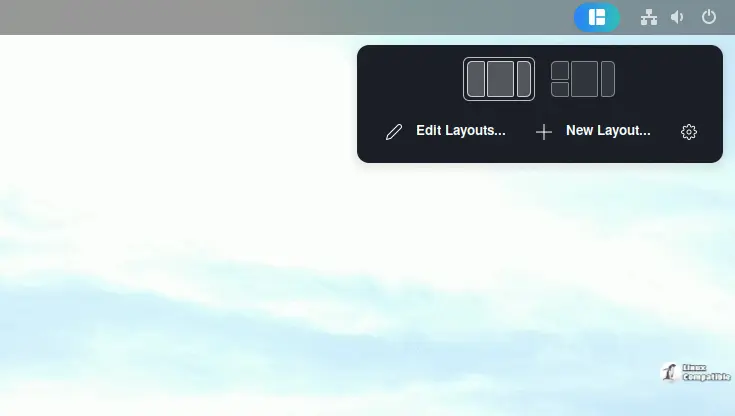
Tiling Shell extends GNOME’s native two‑column layout into a full‑blown tiling system that can adapt to any arrangement you prefer. The update works on GNOME Shell versions 42 through 49, whether running under X11 or Wayland, and retains all prior functionality while adding the latest bug fixes.
Key highlights of Tiling Shell include:
- A Windows 11‑style snap assistant that feels familiar to users of Microsoft’s desktop.
- Robust multi‑monitor support, even when displays run at different scaling levels.
- An in‑extension layout editor that lets you create, edit, reorder, or delete arrangements on the fly.
- Flexible tiling rules: tiles can span multiple slots if desired.
- Automatic application of your GNOME theme’s UI elements for a seamless look.
The user interface continues to evolve. The new edition introduces several conveniences, such as
- A keyboard‑driven layout cycling that works both forward and backward when Shift is held.
- Touchscreen support for window suggestions, making the experience smoother on hybrid devices.
- The ability to reorder layouts directly from the editor dialog.
- Enhanced edge tiling with three distinct modes—Default, Adaptive, and Granular—that determine how windows snap to screen edges based on the current layout or a quarter‑division strategy.
- Fixes that eliminate visual glitches caused by GNOME extensions drawing borders over dialogs.
Additional tweaks improve usability:
- An option now lets you bring all tiled windows to the front simultaneously; toggling it is available in settings.
- The “Sync layout when tiling with Snap Assistant” setting keeps your active layout in sync after using the snap helper, ensuring a consistent workspace experience.
Translations received updates and additions across several languages, thanks to community contributors. Graphics tablet support—particularly for Wacom devices—is now built into the extension, closing an open issue from earlier releases.
Installation remains straightforward via the GNOME Extension Manager or by downloading the package directly from GitHub. This latest iteration keeps Tiling Shell at the forefront of efficient window management on modern Linux desktops.
Release Tiling Shell v17.3 | Enhanced edge tiling, reorder layouts, new translations, support graphics tablets and more! · domferr/tilingshell
new: updated
translation. Thanks albanobattistella new: updated
translation. Thanks ChrisLauinger77 new: updated
translation. Thanks alewicki95 new: added
translation. Thanks EkaterineP...