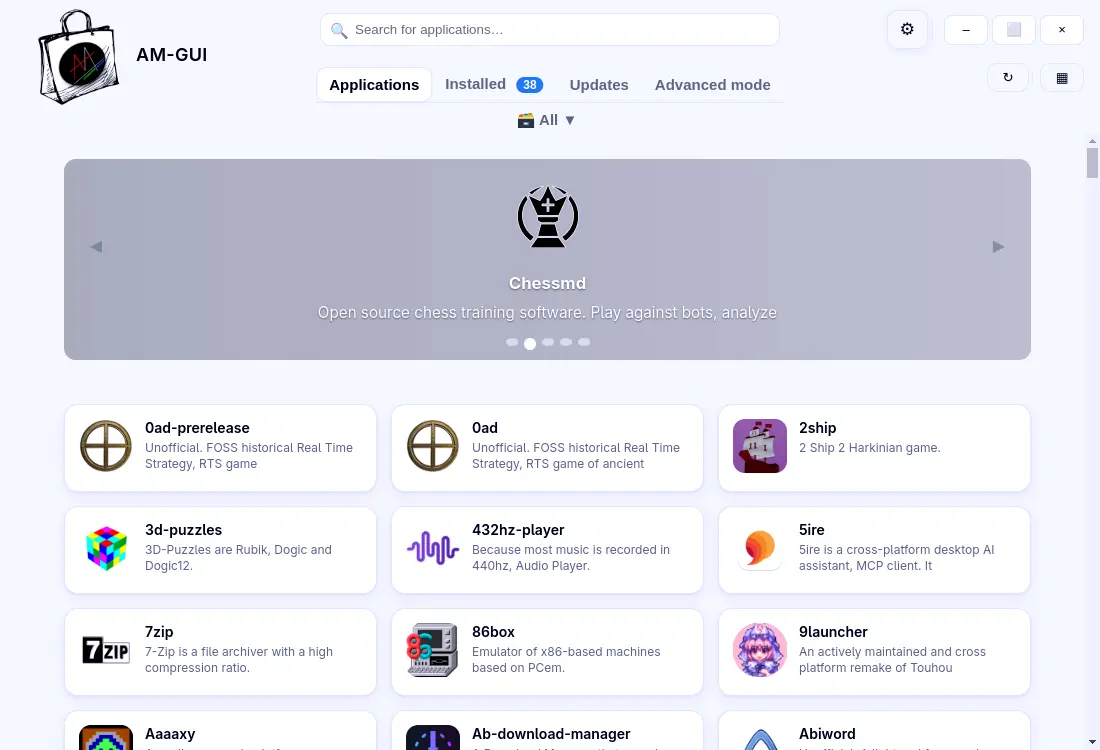
AM 9.9.3 updates the AppImage Package Manager with a bigger catalog (2,779 entries), a fix for missing launchers when using custom .desktop locations, and better handling of Ubuntu’s namespace restrictions. The release also adds an experimental GUI (“AM‑GUI”) that lets you browse and install AppImages with clicks instead of commands.
AppImage Package Manager AM 9.9.3 – what’s actually new and why you might care
If you’ve been juggling AppImages with a half‑baked script or a desktop file that keeps disappearing, the latest AM release is worth a quick look.
What AM does (and doesn’t) for your portable apps
AM’s core job is simple: it pulls an AppImage or other portable binary from its source, drops it into the right folder and writes the .desktop entry so the program shows up in your menu. By default everything lands in a system‑wide directory; add --user if you prefer a per‑user install.
What AM won’t do is fix a broken upstream AppImage. If an application crashes because its developer shipped the wrong library version, that’s on the maintainer, not on AM. You can still use am -a PROGRAM to read the description and get contact info, or am -d PROGRAM to download the install script for a manual inspection.
How to grab the 9.9.3 release
The upgrade is as easy as typing:
sudo am -u
That command pulls the newest version from the official repo and replaces the old binary. If you prefer a user‑only install, drop sudo. After the update run am -s to sync the local database; this makes the new 2 779 entries visible.
Why the extra step? AM stores its catalogue in a plain text file that isn’t automatically refreshed on every binary upgrade. Running -s forces a rescan, so newly added AppImages appear in am -l without you having to restart your session.
Small fixes with a surprisingly big impact
The release notes call the LAUNCHERS_DIR tweak “small”, but for anyone who’s ever watched an app vanish from the menu after moving .desktop files, it feels like a life‑line. In my own setup I keep local launchers under $HOME/.local/share/applications, and before 9.9.3 AM would silently ignore that path when using the appman wrapper. After the patch, those entries stick around, which means less time hunting for missing icons.
The long‑awaited GUI – nice to have or unnecessary fluff?
Version 9.9.3 ships with “AM‑GUI”, a thin graphical front‑end contributed by @Shikakiben. Install it with:
am -i am-gui
or, if you’re using the AppMan alias:
appman -i am-gui
The interface lets you browse the catalogue, click “Install”, and watch a progress bar instead of parsing terminal output. It’s functional enough for newcomers who shy away from the command line, but power users will probably keep typing am install …. The dark theme works on most DEs, yet the app still feels experimental – expect occasional crashes or missing features.
Namespace restrictions on Ubuntu and why they matter
Ubuntu’s recent sandbox tweaks have been choking Chromium‑based AppImages that rely on bwrap. AM now detects those “namespace restrictions” more gracefully, switching to proot when needed. I ran into a situation where the latest Slack AppImage refused to start after a kernel update; after pulling 9.9.3 the fallback kicked in automatically and Slack launched without me having to edit any config files.
Should you bother upgrading?
If your current workflow is “download, chmod +x, drag‑to‑menu”, you’ll probably notice nothing dramatic. The real value comes from three things:
- A larger catalogue – 122 new programs means more one‑click installs.
- The launcher fix – eliminates a common annoyance on custom DE setups.
- The GUI – optional, but handy for anyone who prefers clicks over commands.
For most “I already have my own script” users the upgrade is low risk and worth the extra entries. If you’ve been fighting missing .desktop files or Ubuntu sandbox quirks, 9.9.3 should smooth those rough edges.
Happy hunting for that elusive AppImage, and enjoy the occasional GUI window if it saves you a few keystrokes.
Release "AM" 9.9.3
Small changes... big numbers! This release brings small changes to the way the CLI interacts with the system... but also an increase in the number of apps in the database.