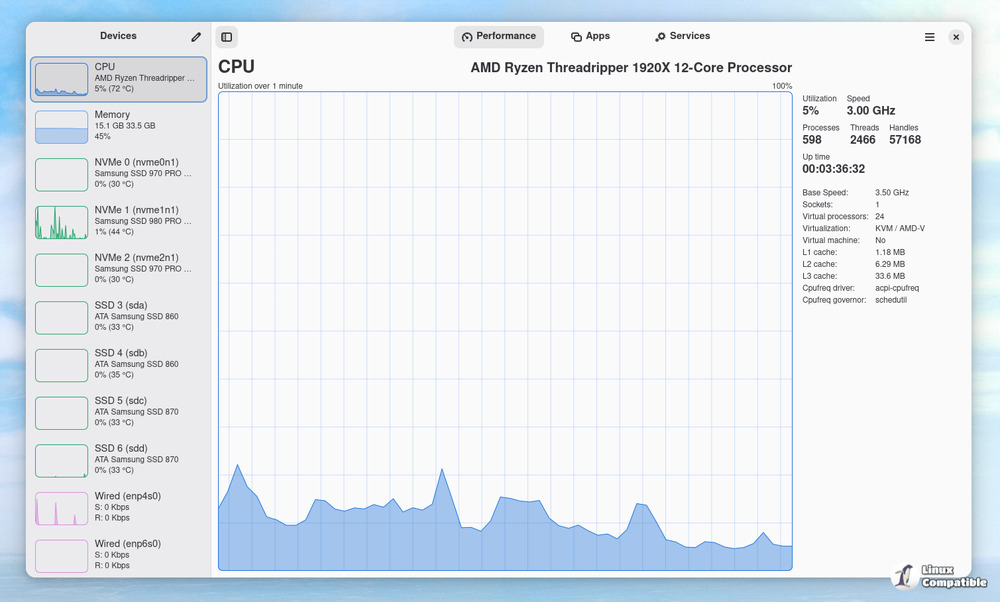
Mission Center 1.0.0 has been released on Flathub and is a Linux application designed to monitor system resource utilization, encompassing CPU, memory, disk, network, and GPU usage. The application provides capabilities for monitoring system processes, thread and handle counts, uptime, clock speed, cache sizes, RAM and swap usage, disk utilization and transfer rates, network utilization and transfer speeds, as well as GPU usage. The tool additionally oversees system fans and offers a streamlined summary view for efficient monitoring.
Intel GPU monitoring is limited to Broadwell and subsequent GPUs, and it does not provide support for VRAM, power, or temperature monitoring. The update features a comprehensive refactor of the Gatherer, now designated as Magpie, which is compatible with other monitoring solutions. The application provides SMART data for both SATA and NVMe devices, facilitates the ejection of removable storage devices, and features a revamped Apps Page that offers enhanced information for each application and process. The update encompasses several bug fixes, including the restoration of missing memory composition graphs, adjustments to the service details window, and the resolution of memory leaks. Translation updates are now accessible in multiple languages.
Install Mission Center on Linux
Monitor system resource usage
Monitor your CPU, Memory, Disk, Network and GPU usage
Features:
- Monitor overall or per-thread CPU usage
- See system process, thread, and handle count, uptime, clock speed (base and current), cache sizes
- Monitor RAM and Swap usage
- See a breakdown how the memory is being used by the system
- Monitor Disk utilization and transfer rates
- Monitor network utilization and transfer speeds
- See network interface information such as network card name, connection type (Wi-Fi or Ethernet), wireless speeds and frequency, hardware address, IP address
- Monitor overall GPU usage, video encoder and decoder usage, memory usage and power consumption, powered by the popular NVTOP project
- Monitor system fans
- See a breakdown of resource usage by app and process
- Supports a minified summary view for simple monitoring
- Use hardware accelerated rendering for all the graphs in an effort to reduce CPU and overall resource usage
- Uses GTK4 and Libadwaita
- Written in Rust
Limitations (there is ongoing work to overcome all of these):
- Intel GPU monitoring is only supported for Broadwell and later GPUs; and does not support VRAM, power, or temperature monitoring
- When using Linux Mint/Cinnamon, launched applications may not show up in the "Applications" section (Upstream issue: https://github.com/linuxmint/cinnamon/issues/12015)
Comments, suggestions, bug reports and contributions welcome
Changes in version 1.0.0
Major Changes:
- Complete refactor of the Gatherer, now called Magpie
- Magpie available as a standalone set of libraries and executable; can be used by other monitoring solutions
- Show SMART data for SATA and NVMe devices
- Allow ejecting removable storage devices (optical disks, USB thumb drives, etc.)
- Per-process network usage (see https://gitlab.com/mission-center-devs/mission-center/-/wikis/Home/Nethogs)
- Redesigned Apps Page with more information available for each app and process
Noteworthy changes
- A new option to make graphs, in the Performance Page, glide smoothly
- Visual and functional improvements in the Memory view
- Enabled all NVTOP supported GPUs including RaspberryPi (see https://github.com/Syllo/nvtop?tab=readme-ov-file#gpu-support)
- Right sidebar in the Performance page is now more consistent between devices
- Support for keyboard shortcuts
- Show maximum bitrate for all network interfaces
- Allow customizing units for memory, disk and network usage
- Removed a bunch of unsafe code from the main app
- Lower overall memory usage
- Lower overall CPU usage
- Improved overall responsiveness of the app and minimized time deviations between refresh cycles
- Enable full LTO for AppImage, Flatpak and Snap builds
Bug fixes:
- Missing memory composition graph after update to libadwaita 1.7
- Service details window to narrow after update to libadwaita 1.7
- Integer overflow when copying large files to/from slower storage devices
- Gatherer stops responding after a period of time
- Don't call `lsblk` to figure out if a drive has the root partition
- Fixed memory leak that would occur on some OS/HW combinations
- Don't target a specific CPU architecture variant when building Magpie
- Fix GPU encoding/decoding graphs misrepresenting the type of workload
Translation updates
- Catalan by Jaime Muñoz Martín
- Chinese (Simplified Han script) by Zhang Peng
- Chinese (Traditional Han script) by jhihyulin, D0735, Peter Dave Hello
- Czech by pavelbo
- Dutch by philip.goto
- Estonian by Priit Jõerüüt, Indrek Haav
- Finnish by Ricky-Tigg
- French by europa91m DenisMARCQ, Louis-Simon
- Galician by Espasant3
- German by Aircraft192, Lauritz, Tieste, ItsGamerik
- Hebrew by yarons
- Italian by beppeilgommista, ppasserini, svlmrc
- Japanese by rainy_sunset
- Korean by darkcircle.0426
- Norwegian Bokmål by ovl-1, Telaneo
- Polish by keloH
- Portuguese by hugok79
- Spanish by Espasant3
- Tamil by anishprabu.t
For a more detailed set of release notes see: https://gitlab.com/mission-center-devs/mission-center/-/wikis/Release-Notes/v1.0.0