Mabox 26.03 review brings better Conky control and task management
The latest update to the Arch-based desktop environment offers some specific tweaks for power users who like their systems clean. Readers will find out how to manage widgets without accidental clicks and get a new way to track tasks directly from the status bar. This release focuses on usability rather than flashy new graphics or massive kernel updates.
Conky handling improvements
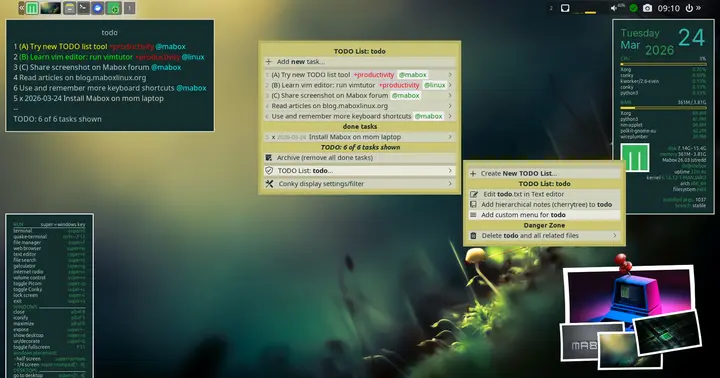
The team has finally addressed some of the nagging issues with how Conky widgets behave under your mouse cursor. This simplification is a welcome change given how often accidental clicks trigger unwanted scripts in Linux desktops. You can now set a simplified context menu that removes several advanced functions which might trip up an accidental right click. There is also a new option to completely disable clickable features for both left and right clicks if you just want data on display without interaction. The default sysinfo widget in the top right corner now displays the battery charge level so you do not have to hunt for that information when running low on power.
TODOlist tool integration
A brand new Mabox tool arrives to handle simple task lists without forcing you into a complex project management suite. It includes a command line interface and a dynamic menu that launches with a specific key combination while running in the background. The system relies on the todo.sh script from todotxt.org but adds some enhancements like support for multiple todo lists and notes via Cherrytree if you choose to install it. Some users might prefer existing solutions but having this built into the base ISO saves time configuring things from scratch.
Keyboard shortcut editor updates
An improved window now shows the currently configured keyboard shortcuts for quick reference without digging through config files. Editing key bindings manually has always been a pain for newcomers to Openbox so this visual editor is a significant quality of life improvement. This panel is available by clicking the Conky widget located in the bottom left corner of the screen where most users look first. Besides providing a quick overview you can launch the editor from it and reload the Openbox configuration so that any changes take effect immediately.
If you are just starting out with this distribution there is plenty of documentation available to help you get oriented before you try these features.
Mabox 26.03 - conky improvements, TODOlist and keyboard shortcuts
The March release of Mabox 26.03 brings improvements to Conky support, a new tool for managing task lists, and easier previewing and editing of keyboard shortcuts You can set a simplified context menu…
Mabox 26.03 - conky improvements, TODOlist and keyboard shortcuts