Linux Mint 22.3 has been released as a Long-Term Support (LTS) version, offering stability and support until 2029. This new version includes several improvements to troubleshooting tools, including the upgraded System Information tool, which provides more detailed information about system configuration. Cinnamon 6.6 also receives significant updates, such as better keyboard layout support, improved on-screen keyboards, and revamped application menus. Additionally, various other components like Nemo, Timeshift, Warpinator, Captain, and MintBackup have received important improvements to enhance usability for regular users.
Linux Mint 22.3 released
Linux Mint 22.3 "Zena" has officially landed as the Long-Term Support (LTS) version, promising stability and support right up until 2029.
One area where it shines better is troubleshooting tools. Even developers can't prevent every little hitch from popping up; sometimes users need to dig into issues themselves. Making sure you have accurate info about a problem when asking for help out there really speeds things along.
The System Reports tool has undergone some changes and gotten quite the upgrade; now it’s called System Information. Beyond that name tweak, several new pages offer even more detailed looks at your system configuration, which can help track down common problems. For instance, there are four extra sections you can explore for deeper dives.
Another addition is the System Administration applet, designed to operate with admin rights and tackle essential system management tasks directly. This brings one specific page called the "Boot menu" into play, which is handy for those tweaking their boot experience or juggling multiple kernel series, especially if they dual-boot with Windows.
The developers also shifted away from relying on Adwaita symbolic icons in applications entirely; that project isn't maintained beyond the GNOME environment anymore. To fill the gap, they introduced XApp Symbolic Icons (XSI), a new system delivering its own consistent set of quality symbols across everything and preventing any potential regressions.
Beyond these dedicated tools, Cinnamon 6.6 itself has seen some action, too. Key improvements include much better support for different keyboard layouts, plus IBus input methods are now handled properly alongside traditional setups, making language configuration way smoother than before. On top of that, the on-screen keyboard (OSK) gets a native Cinnamon redesign.
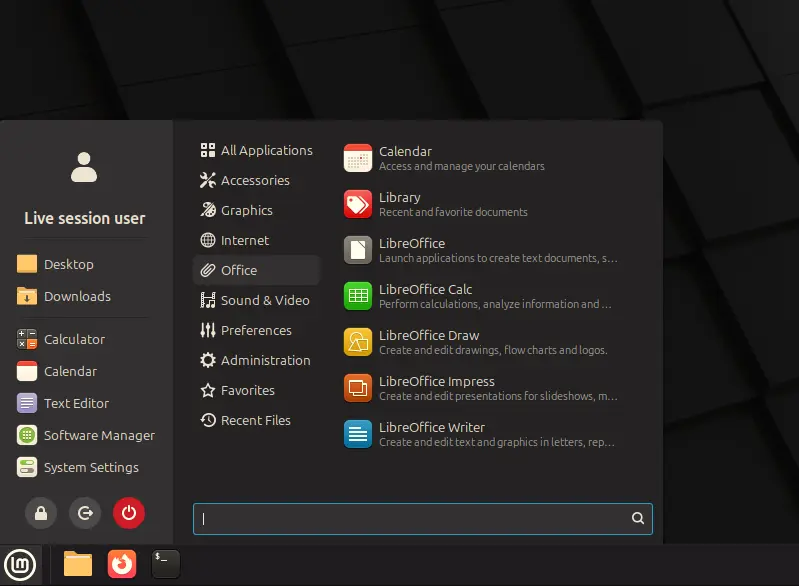
The overall look and feel of application menus saw significant work as well, thanks to a major Cinnamon applet overhaul. Now you'll find sections for user avatars, system locations like Places, and your favorites, all neatly arranged in this new sidebar format. Plus, customizing its appearance is easier than ever with options to hide/show parts or tweak the search bar.
Nemo 6.6 arrives packed with improvements too: a template manager makes organizing files feel more polished; file operations now feature pause/resume capability for interrupted downloads/transfers; searches have gotten faster and more accurate; and thumbnails offer better previews, especially useful for spotting issues quickly. You'll also notice notification badges to ensure you catch everything missed before, plus an updated workspace switcher showing only visible windows.
Cinnamon's core window manager, muffin, has received major updates too, boosting its compatibility with Wayland displays significantly. Hot corners are now visible even in fullscreen mode if desired; a suspend action can be activated manually from battery-critical situations; and fractional scaling options help tailor the experience for different screen resolutions or pixel densities.
Then there's XApps proper getting ready: Timeshift adds pause/resume during snapshots, creating safer restores sometimes necessary when things go sideways fast. Warpinator now supports IPv6 too; it's good to have consistency across all network types where relevant. Captain improved its package management capabilities, while MintBackup gained a new "Include All" button, making backups straightforward by default.
These are just some of the many small but important improvements sprinkled throughout this release, aimed squarely at enhancing usability for regular users navigating complex systems daily. Mint keeps getting better over time; in that way, you get used to it, and it really helps things feel smoother and more reliable every single year, which is usually a good thing anyway!
Check out the official release announcement if you want specifics or download details.


