Goverlay 1.7.2 – finally lets you save per‑game HUDs without the hassle
If you’ve been juggling MangoHud tweaks for every title, this release might actually make your life easier. I’ll walk through the new “Save As” workflow, the automatic OptiScaler install, and why the XDG compliance matters if you’re still seeing stray nohup.out files littering your home folder.
Save‑as everything – no more overwriting global configs
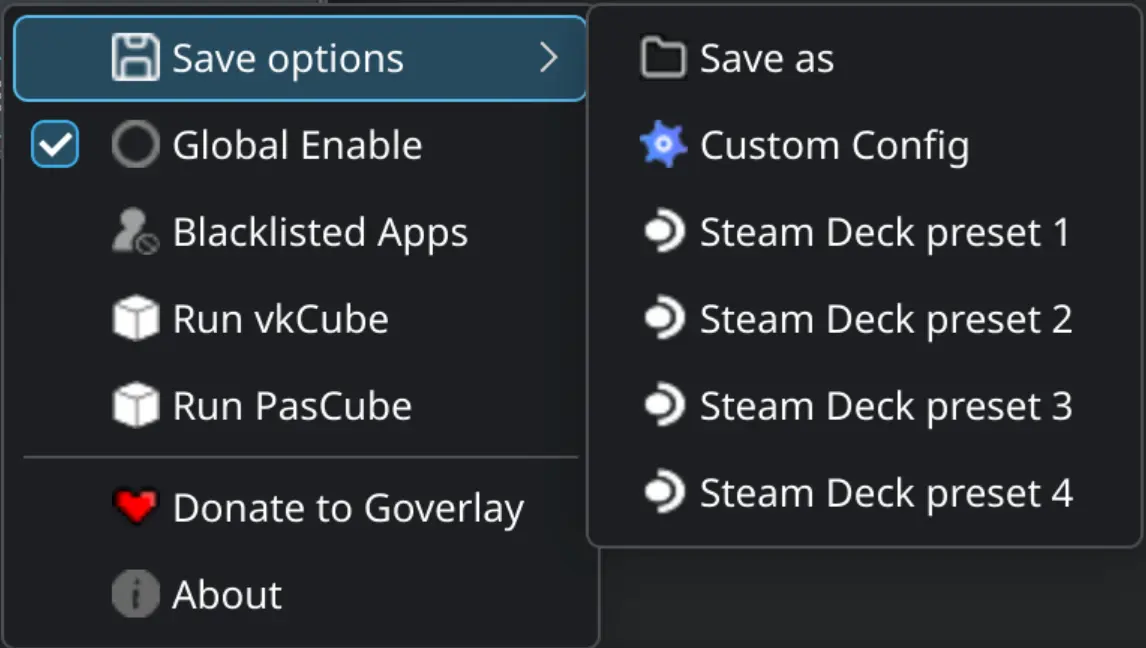
The biggest practical change is the ability to dump a MangoHud or vkBasalt config wherever you like. When you click Save As, Goverlay pops up a plain folder picker, lets you name the file and drops it into the location you chose. The reason this matters is simple: you can now keep a low‑latency HUD for fast shooters while using a heavy‑weight overlay for slower indie games – without constantly editing MangoHud.conf by hand.
OptiScaler installs itself for FGMOD
Setting up OptiScaler used to be a three‑step copy‑paste ritual: download the zip, extract it, add the binary to your PATH. The new auto‑installer does all that when you enable the option in the FGMOD tab. It also checks for missing dependencies on startup and pulls the latest stable build if nothing is found. A tiny desktop notification lets you know whether the install succeeded – no need to open a terminal just to verify.
Full XDG compliance, finally
All configuration files now live under the proper XDG base directories:
- Native configs: $XDG_CONFIG_HOME/MangoHud/ (falls back to ~/.config/... if the variable isn’t set)
- Flatpak configs: $XDG_CONFIG_HOME/goverlay/Flatpak/...
- Log files: $XDG_DATA_HOME/goverlay/
Why care? Because you’ll stop seeing random nohup.out clutter in your game folders, and backup tools that respect XDG will include your HUD settings automatically. If you’ve ever had to hunt down a stray log file after a crash, this alone is worth the upgrade.
Bug fixes that actually matter
- Steam processes hanging – The fix rewires the process tracking inside the FGMOD script, so quitting Steam now truly ends the session.
- FGMOD argument parsing – The “--: command not found” error was spewing out for anyone using custom launch options. The separator handling has been corrected, so you can pass -novid or any other flag without blowing up Goverlay.
- Context‑menu clutter – Only the relevant items appear now; the mango‑specific “Global Enable” shows up where it belongs and stays hidden on vkBasalt tabs.
Migration note – update your launch scripts
The FGMOD folder moved to $XDG_DATA_HOME/goverlay/fgmod (defaults to ~/.local/share/goverlay/fgmod). If you have a custom script that points directly at the old path, change it or you’ll get a “file not found” error on launch.
Bottom line
Goverlay 1.7.2 feels like a long‑overdue polish rather than a feature dump. The “Save As” option alone eliminates a common source of frustration for anyone who tweaks HUDs per title, and the automatic OptiScaler install is a nice quality‑of‑life win. If you’re still on an older version and you care about clean config locations, this upgrade is definitely worth the few minutes it takes to migrate your FGMOD scripts.
Release Goverlay 1.7.2 · benjamimgois/goverlay
Hello, Linux Gamers over the world ! This is a polishing release but also brings some cool new features and some old requests to the game. Main Highlights Implemented "Save as" funcionality for Ma...