GE‑Proton 10.31 hotfixes – what’s fixed and why the update matters
The new GE‑Proton 10.31 build patches a handful of regressions. This guide walks through the most noticeable fixes, explains when you really need to switch, and points out a couple of quirks that still linger.

Quick rundown of the hotfixes
The hotfix disables the winewayland systray icon patch that slipped in with 10‑30. That tweak was responsible for crashes in several titles and even broke gamescope sessions on the Deck – “no bueno,” as the developer put it. Video playback, which went down after 10‑29, is back in shape; Nioh 3 now streams cutscenes without freezing. Warhammer 40k Darktide finally stops crashing at launch, a problem that appeared only last week.
Why the systray revert matters
Wayland users have reported that the systray icon patch caused Steam to lose its connection to the compositor, resulting in invisible windows and input dead‑ends. The regression manifested most often in titles that spawn their own system trays (e.g., certain RPGs). By rolling back the change, GE‑Proton restores normal tray behavior without sacrificing Wayland support.
Video playback gets a rescue
The media foundation patches added to this build were unintentionally rolled back in 10‑29, which left games like Nioh 3 rendering black frames during cinematics. The new hotfix reinstates those patches, so video codecs can decode correctly again. Players who complained about “static” or “frozen movies” after updating will see the issue disappear.
Warhammer fixes you actually notice
- Darktide no longer crashes on opening – the crash was tied to a recent EAC update and only showed up when the launcher tried to initialize anti‑cheat services.
- Vermintide 2’s Easy Anti‑Cheat validation finally stops rejecting files that are perfectly legit; that six‑year bug resurfaced after an upstream change.
- A new protonfix now skips the Darktide launcher entirely, preventing the odd “audio‑only background process” that some users described as a phantom game.
Other per‑game tweaks worth mentioning
The build adds a fix for Arknights Endfield’s anti‑cheat flagging when Wayland isn’t active. Duet Night Abyss gets its launch crash and missing login window sorted out, while Akiba’s Trip sees cutscene video, audio, and voice tracks playing in sync again. These aren’t headline‑grabbers, but they erase the “it works on my machine” excuses for anyone running those titles.
Should you switch right now?
If any of the above games are part of your regular rotation, swapping to GE‑Proton 10.31 is a no‑brainer. The protonfix system also means future patches will drop in automatically, sparing users from manual winetricks gymnastics. However, for pure Steam library veterans who never touch Wayland or the listed titles, staying on Valve’s stable Proton may feel safer – GE‑Proton still carries experimental Wine code that can bite on obscure edge cases.
How to install
- Download the latest tarball from GloriousEggroll’s GitHub releases page.
- Extract it into ~/.steam/root/compatibilitytools.d/GE-Proton-10.31.
- In Steam, right‑click a game => Properties => Compatibility => Force the use of a specific Steam Play compatibility tool and pick “GE‑Proton 10.31”.
The extra step of placing the folder correctly matters because Steam only scans that directory at launch; misplacing it results in the new build never showing up in the dropdown.
GE‑Proton can also be used with tools like Bottles, which run Windows games inside a Flatpak sandbox. To upgrade to the latest GE‑Proton release, go to Settings => Runners => Proton GE.
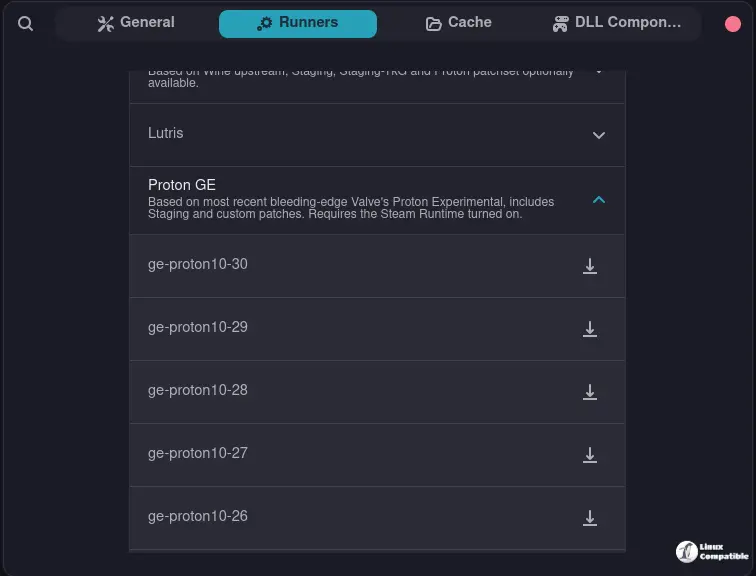
Bottles makes an excellent choice for long‑term support (LTS) distributions, since it bundles the latest Mesa updates through its Flatpak runtime.
Bottom line
GE‑Proton 10.31 patches a handful of nasty regressions that have been tripping up Wayland users and fans of specific titles. The fixes are concrete, the protonfix system keeps things tidy, and the installation process is straightforward. For anyone hitting those roadblocks, the upgrade is worth the few minutes it takes.


