Flowblade 2.24 released
Flowblade 2.24 is out now for Linux users. It’s free and built on open-source principles under the GNU General Public License (GPL) v3.
The core editing experience has some nice upgrades in this release. Six essential tools are designed to help you fine-tune projects, while four distinct approaches exist for adding or modifying clips directly onto the timeline. Features like clip parenting and audio level synchronization add further capability.
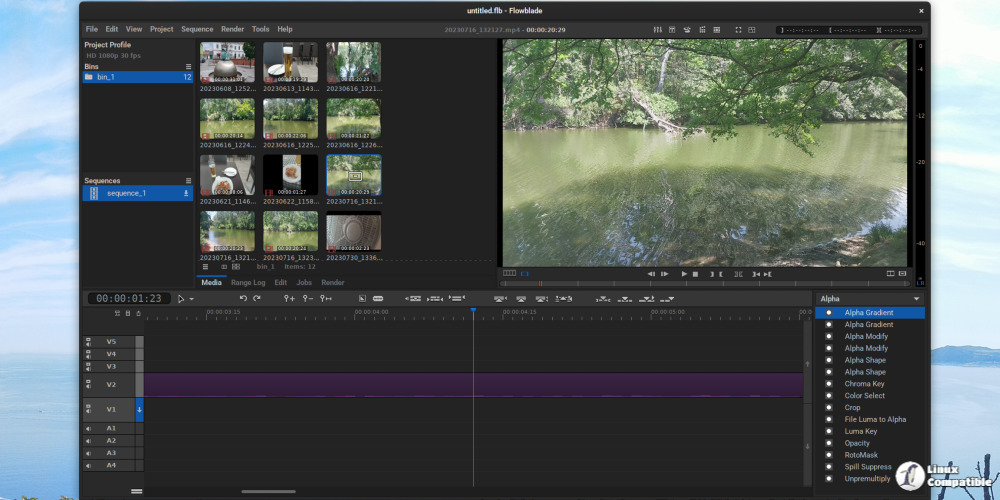
Flowblade's image compositing is also a strong point. You can work with standard track-based methods similar to what you'd expect elsewhere, plus leverage filters for effects like fades, transitions, and alpha channel adjustments. Set blend modes per clip if needed, and the available compositor tools offer ways to build complex animations via keyframing.
There are some advanced capabilities worth noting, too: Generator plugins can produce animated text or custom backgrounds; range logging helps manage video clip segments efficiently by allowing you to define in/out points for different editing tasks. G'Mic Tool integration brings access to unusual, complex effects found nowhere else.
The editor handles a broad spectrum of input media formats from the start; standard video and audio types are covered alongside specific graphic file support like JPEGs, PNGs, TGAs, TIFFs, SVG vector graphics, and numbered frame sequences. Once completed, the editor's flexible output engine allows it to encode into almost any common video or audio format.
Porting to the newer GTK 4 toolkit was a major focus for this version. Development progress has been faster than initially expected, aiming for fall 2025 completion after starting that effort much earlier. However, moving fully away from SDL2-based display systems on X11 while creating new video handling components for Wayland meant extra work had to be tackled alongside the core porting tasks.
The user community played its part again this cycle, with contributions shaping several aspects of the release, including a typo fix in one patch by luzpaz. Various small features, UI tweaks, and bug fixes have been implemented throughout.
Bug fixes highlight some important stability improvements. Fixed issues include freezing audio levels during editing, undo/redo problems in the Rotomask editor, ripple trim undo bugs in Edit modes, and enabling user-settable line colors in the application. Also fixed: non-modal title saving, which improved name input UX significantly.
Other refinements include clearer distinctions between the Clip Monitor and Timeline views by highlighting them visually during use. The Player Buttons Panel got its 'To Marks In'/'To Marks Out' buttons back, restoring functionality users had liked from older versions. Batch rendering operations in Queue now show more information via the Info text field to help understand what's happening.
And for those who enjoy granular control: file render size estimation has been updated to warn if available disk space is a tight 60% or less. A new Box Select Move edit mode joins the Rotomask editor, enabling you to move multiple edit points together as a single group, streamlining clip editing workflows.
Overall, this latest release from Flowblade shows steady progress and responsiveness to user needs, building upon its existing strong foundation. It’s another step forward for a capable Linux video tool developed openly by enthusiasts and professionals alike.
The source code of the new version can be downloaded from GitHub. For detailed installation instructions, visit this page.


