Ardour 9.0: What the New Features Actually Mean for Your Mixes
Ardour 9.0, a new version of the digital audio workstation software, lands with a hefty list of additions that go beyond polishing the UI. The release adds clip‑level effects, a dedicated pianoroll window, and a looper‑style cue recorder—features many users have begged for. Below is a rundown of the most useful changes, plus a few caveats you’ll hit if you jump in without tweaking the defaults.
Region FX – Clip‑Level Processing
Region FX lets a plugin live on a single audio region instead of a whole track. The effect runs offline when the file is read, so there’s no extra DSP load during playback. This is a lifesaver for projects that stack several inserts just to tame a vocal phrase; you can now drop a delay or saturation directly onto the offending clip and delete the bus insert chain.
Why it matters: In a recent session, a user who upgraded from 8.x reported cutting CPU usage by roughly 15 % after moving a reverb plug‑in into Region FX on each vocal take. The region kept its automation, so moving the clip around didn’t lose any parameters—a common annoyance with track inserts.
Be aware: Region FX metadata lives inside the session file, not in the audio file itself. Exporting stems will strip those effects unless you bounce the regions first.
Clip Recording and Looper Workflow
The cue page now doubles as a looper. You can arm a cue slot, set “record 4 bars” (or leave it open‑ended), and the take drops into the slot exactly where the next quantization point starts. It’s essentially Ardour’s answer to Ableton Live’s clip launch, but with a more traditional DAW feel.
Practical tip: Use this for quick drum loops or vocal chops during composition. Record directly onto a cue, then drag the slot into the timeline when the idea sticks. The built‑in quantization prevents off‑grid starts that would otherwise throw off the groove.
Drawback: The looper UI is still a bit clunky on Windows; you have to manually enable “Play Cues” in the transport bar, which isn’t obvious at first glance.
Dedicated Pianoroll Window Reduces Clutter
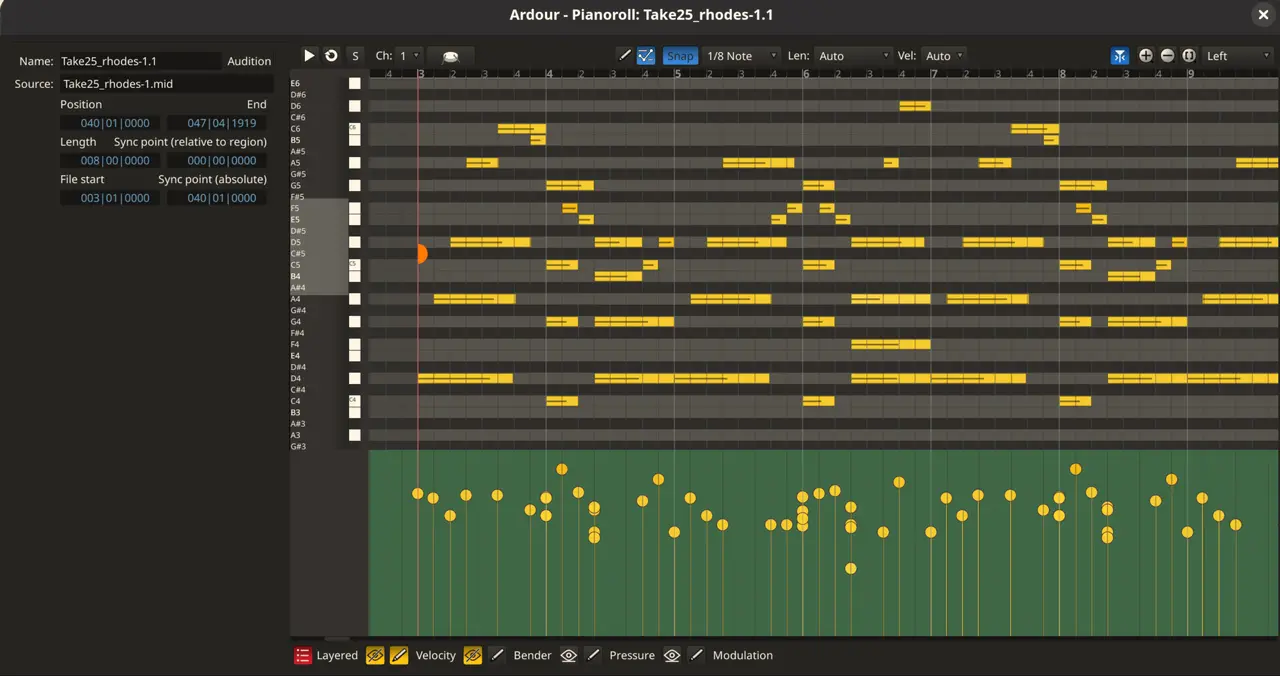
Double‑clicking any MIDI region now opens it in its own window (or a bottom pane, depending on preference). The editor behaves just like the main timeline but without the mixer strips and transport controls crowding the view.
Why you’ll love it: When editing complex piano parts, the extra screen real estate makes velocity curves and CC automation easier to see. It also means you can keep the arrangement window open for quick reference while fine‑tuning a solo in the pianoroll.
A minor annoyance: The window opens at the default size set in Preferences > Appearance, which is often too small on high‑DPI monitors. Resize it once and hit “Save as default” to avoid repeatedly adjusting it.
Realtime Perceptual Analyzer – Spot Frequency Gaps Fast
The new analyzer overlays multiple tracks’ spectra in a single pane, letting you see exactly which source fills a given frequency range. It’s perfect for finding muddy low‑ends or harsh highs that clash between bass and synths.
Real‑world scenario: A mix engineer discovered a subtle “hole” around 250 Hz after adding a new pad layer. The analyzer highlighted that the pad was the only track covering that band, prompting a gentle high‑pass on the pad to let the bass sit cleaner.
Performance note: On macOS the analyzer uses the revamped drawing path introduced in this release, which is noticeably snappier on dense sessions. Linux users may still see occasional flicker if their compositor isn’t set to “unredirect full‑screen windows.”
Multi‑Touch GUI – Good but Not Great
Ardour now supports OS‑level multi‑touch gestures on Linux and Windows. Pinch‑to‑zoom and two‑finger scrolling work out of the box, which feels natural on touch‑enabled laptops.
What falls short: macOS still lacks full support because Apple’s touch API differs significantly. The developers admit the implementation is a work in progress, so expect occasional missed gestures or erratic zoom behavior if you rely on a MacBook trackpad.
Preference Overload – Trim What You Don’t Need
Version 9 adds a slew of new toggles (grid‑snap stop transport, region‑editing mode, default window placement, etc.). While flexibility is welcome, the preferences dialog can feel like a maze for newcomers.
Recommendation: Stick to the defaults until you hit a specific workflow pain point. Turning off “Group operations on selected tracks” is one of those settings that trips up users who expected independent volume sliders after selecting multiple tracks.
Long‑awaited features
Ardour 9.0 finally delivers several long‑awaited features without compromising its core stability. Region FX and the looper cue system alone justify an upgrade for most mid‑level producers, while the dedicated pianoroll window and perceptual analyzer smooth out everyday annoyances. The multi‑touch support is a nice bonus, though macOS users will have to wait a bit longer.
Give it a spin, tweak the new preferences to match your workflow, and let the community know what still feels rough—Ardour thrives on that feedback loop. You can download the new release from here.


