AM 9.9 released
The release of "AM 9.9" is now available, which is an important event for the AppImage package management system. "AppMan", short for "Application Manager", aims to become the go-to package manager for all AppImage packages, providing them with a stable and reliable home.
At its core, AppMan is a set of scripts and modules that enable users to install, update, and manage portable applications in a user-friendly manner. Inspired by the Arch User Repository (AUR) and drawing from a vast database of Shell scripts, AppMan strives to offer an intuitive experience for managing packages across various platforms.
Version 9.9 introduces two new features: configuration cloning and relocation of AppMan apps. Many users have eagerly awaited these options, and their inclusion promises to further enhance the user experience.
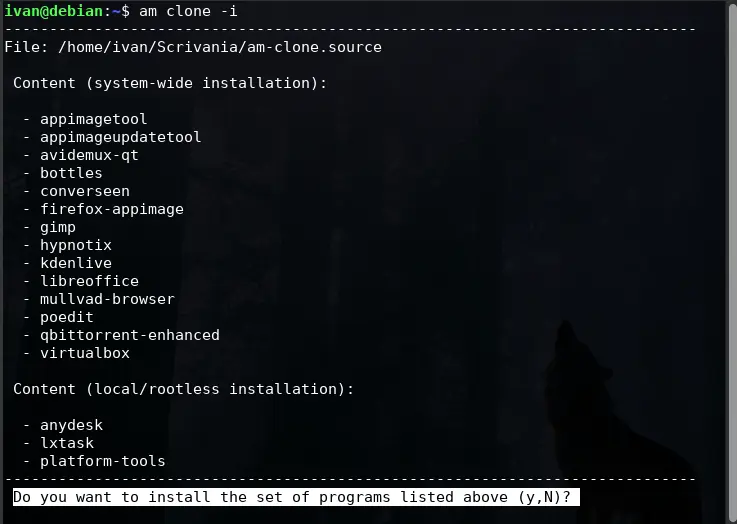
The first feature, "clone" or "--clone", allows users to replicate their configurations from one system to another. This can be achieved in two ways. Firstly, users can create a file called "am-clone.source" that contains the necessary information for installing packages across different systems. Alternatively, they can pre-clone their configuration by using the "--clone" option without any arguments.
The process of creating or detecting this file involves a priority-based search mechanism that checks various directories, including the XDG_DESKTOP_DIR directory (usually Desktop), HOME, and mounted devices. Users can also specify a custom path for this file by setting the "$CLONE_FILE" variable.
Once the configuration file has been detected or created, users can view its contents using the basic "am clone" command without any arguments. This feature supports both AM and third-party databases, providing users with greater flexibility in managing their packages.
Moreover, the "clone or --clone" option allows users to install listed apps in their original layout by running "am clone -i" or "am clone install." To install packages locally like AppMan, users can add the "--user" flag. Conversely, to install packages at the system level, they can use the "--system" flag.
The second feature, "relocate or --relocate", enables users to choose a different location for installing AppMan apps without requiring root privileges or system installations. In contrast to AppMan and AM in AppMan mode, which always install programs in /opt according to LSB specifications, this feature allows users to customize the installation path.
The relocation option is accessed by running "am relocate" or one of its aliases ("am --relocate," "appman relocate," or "appman --relocate"). This feature identifies local apps installed from third-party databases, removes them (while noting the scripts used for installation), and provides users with options to reinstall these apps in a different location.
Among other changes introduced in version 9.9, several notable updates have been made:
- All mentions of "zsync" have been removed from AppImage's stuff
- The file command is now an optional dependency
- Updating third-party database lists has become faster
- The package "gnome-calculator" has been replaced with one from Pkgforge's repo.
- Fixes have been implemented for the gpu-screen-recorder script.
- The option "-f" has reduced startup times.
Overall, the release of AM 9.9 brings a couple of intriguing features to the AppImage package management and promises to provide users with an even more intuitive experience in managing portable applications across various platforms. For more information and the download links, visit the GitHub page below:
"AM" 9.9
Clone and share your configurations and relocate AppMan apps